


In the past, I wrote a blog post about a similar type of error: BizTalk WCF-SQL Error: Microsoft.ServiceModel.Channels.Common.MetadataException: Object [dbo].[StoredProcedureName] of type StoredProcedure does not exist. The difference for this new post is that instead of being the Stored Procedure name that is complaining, it is now complaining about the Column name:
A message sent to adapter “WCF-Custom” on send port ” STAGING_SQL_WCF_SEND” with URI “mssql://SQL-SERVER-NAME//Database?” is suspended.
Error details: Microsoft.ServiceModel.Channels.Common.MetadataException: Object [dbo].[IdRecord] of type StoredProcedure does not existServer stack trace:
at System.Runtime.AsyncResult.End[TAsyncResult](IAsyncResult result)
at System.ServiceModel.Channels.ServiceChannel.SendAsyncResult.End(SendAsyncResult result)
at System.ServiceModel.Channels.ServiceChannel.EndCall(String action, Object[] outs, IAsyncResult result)
at System.ServiceModel.Channels.ServiceChannel.EndRequest(IAsyncResult result)Exception rethrown at [0]:
at System.Runtime.Remoting.Proxies.RealProxy.HandleReturnMessage(IMessage reqMsg, IMessage retMsg)
at System.Runtime.Remoting.Proxies.RealProxy.PrivateInvoke(MessageData& msgData, Int32 type)
at System.ServiceModel.Channels.IRequestChannel.EndRequest(IAsyncResult result)
at Microsoft.BizTalk.Adapter.Wcf.Runtime.WcfClient`2.RequestCallback(IAsyncResult result)
MessageId: {0193EE6F-8DFF-4861-87FB-FC1C82ECF3AB}
InstanceID: {59E3F39A-BF24-4583-BEA9-78CED5B621F7}
![Microsoft.ServiceModel.Channels.Common.MetadataException: Object [dbo].[ColumnName] of type StoredProcedure does not exist.](https://blog.sandro-pereira.com/wp-content/uploads/2019/11/biztalk-server-Object-dbo-ColumnName-of-type-StoredProcedure-does-not-exist.png)
However, despite this error and despite the fact that we were talking about the same server and the same project of the previous issue, one thing I was sure about: they were not related at all.
📝 One-Minute Brief
Explains how to fix the BizTalk WCF‑SQL MetadataException error that occurs when generating schemas for stored procedures due to invalid or incorrectly referenced table and column names.
Cause
At first glimpse, it seems that the stored procedure does not include the column name: IdRecord, or that this field was not passed to the stored procedure at all. So, this was my first point to validate; however, I quickly realized that:
- The stored procedure had that field.
- And I was correctly passing that field to the stored procedure in the message.
Just to be precautionary, I double-checked whether that was related to security permissions, and it was not either. So I went back to my list of some conspiracy theories that I described in my previous post:
- You should regenerate schemas: no, never.
- Or that may be a mismatch in the namespaces: I believe it could be a possibility, but no, since I was using the same scheme, and it was working fine
- The “?” character you normally find in a URI is causing this problem, and it’s also impossible in my case.
- And my favorite is that you should give “sysadmin” rights to the service account that is running the host instance: never.
But the last one made me think: the operation is not properly configured.
Because the last change I made was redesigning the solution that performed composite operations with the SQL Adapter, in my case, I was sending multiple rows to update in the same message.
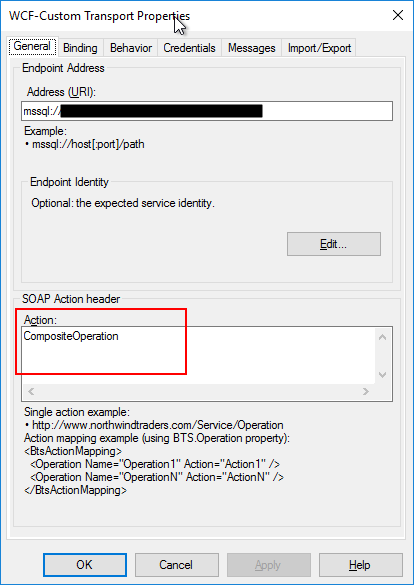
And now I was doing a single operation.
And by doing that, the WCF-SQL Adapter was throwing this strange behavior.
Solution
The solution was quite simple. We just have to change the Action CompositeOperation with the correct operation action mapping, as shown below as an example:
<BtsActionMapping xmlns:xsi="http://www.w3.org/2001/XMLSchema-instance" xmlns:xsd="http://www.w3.org/2001/XMLSchema">
  <Operation Name="SQLStatusUpdateOp" Action="TypedProcedure/dbo/sp_BTS_updateTransaction"/>
</BtsActionMapping>
After making this change, everything started working perfectly again.
Hope you find this helpful! If you liked the content or found it useful and would like to support me in writing more, consider buying (or helping to buy) a Star Wars Lego set for my son.



