


It’s been a while since I made any changes to one of my favorite pet projects: BizTalk Mapper Extensions UtilityPack! Today, I’m happy to announce the release of a new BizTalk Functoid: Convert to a Number Functoid.
Note: And it will not be the only one, soon I will release two new Functoids that I’m working on.
Today I was working on a map that I had the need to transform several numbers delivered in a string with a decimal format:
- 1.000
- 121.000
to an Oracle NUMBER(x) – without decimals.
Initially, I thought of creating a Scripting Functoid and reusing it inside the map for each element. However, I realize that I will have to use the same transformation in different maps… so I end up creating this simple Functoid.
📝 One-Minute Brief
A quick introduction to the Convert to a Number custom functoid in the BizTalk Mapper Extensions UtilityPack, which converts decimal-formatted numeric strings into an integer by defining decimal and group separators—useful for reusable mapping logic and Oracle NUMBER conversions.
Convert to a Number Functoid
This functoid allows you to convert a string to a number (integer)
Parameters
The functoid takes three mandatory input parameters:
- The input value to be converted to a number.
- 1.0000
- 1.000,00
- 123,10
- A character that describes what the decimal separator is (can be empty).
- ,
- .
- A character that describes what the group separator is (can be empty).
- ,
- .
The output of the functoid will be a Number (integer), for example: 1234.
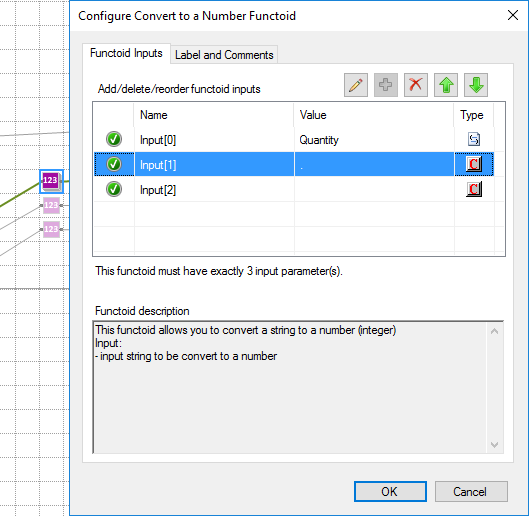
In the sample shown in the picture above, we receive a string with a decimal value “1.000” and want to transform it into “1”. So, in this case, the functoid configuration will be:
- The first input will be our value.
- The second input will be “.” (dot) that describes the decimal separator.
- and the third input will be “” (empty) because there isn’t any group separator (delimitator).
BizTalk Mapper Extensions UtilityPack: Project Description
BizTalk Mapper Extensions UtilityPack is a set of libraries with several useful functoids to include and use in a map, which will provide an extension of BizTalk Mapper capabilities.
Download
You can download this functoid along with all the existing ones on the BizTalk Mapper Extensions UtilityPack GitHub:
Hope you find this helpful! If you liked the content or found it useful and would like to support me in writing more, consider buying (or helping to buy) a Star Wars Lego set for my son.




Sandro, this will also be useful when converting to an EDI X12 N2 data type. N2 is an implied decimal, thus 12.34 becomes 1234.
Awesome!