


I’m back with Errors and Warnings, Causes and Solutions, and this time targeting developers – BizTalk Deploy operation failed – that work until late and they are a bit tired… believe me, it’s never a good recipe!
Today, will I was deploying a BizTalk Server Solution from Visual Studio, I had a rookie problem that, because I was tired, I took 20 minutes to find out the problem:
Severity Code Description Project File Line
Error Assembly “Finance.Orchestrations, Version=1.0.0.0, Culture=neutral, PublicKeyToken=d149e7c1ed8e238f” references the following assemblies that must be deployed before deploying this assembly:
Assembly “Staging.Orchestrations, Version=1.0.0.0, Culture=neutral, PublicKeyToken=d149e7c1ed8e238f”.
Deploy operation failed…
At Microsoft.BizTalk.Deployment.BizTalkAssembly.PrivateDeploy(String server, String database, String assemblyPathname, String applicationName)…
…
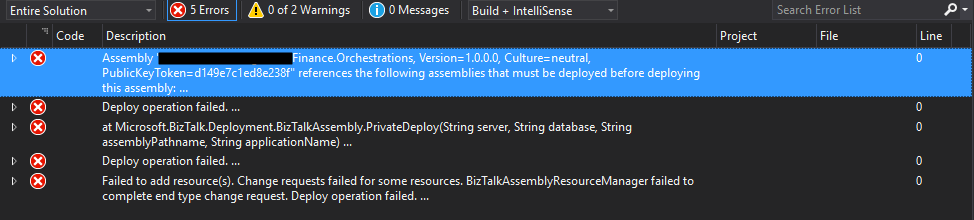
… a rookie problem that, if you read the error message carefully, you will know the problem.
📝 One-Minute Brief
A troubleshooting guide that explains why BizTalk Server deployment fails when an assembly references other assemblies that are not yet deployed, and how to resolve dependency and deployment order issues to successfully deploy BizTalk applications.
Cause
Basically, this is a dependency problem… “Finance.Orchestrations” assembly references certain “Staging.Orchestrations” artifacts, and for this reason, this last assembly (Staging.Orchestrations) must be deployed before deploying the assembly that references these artifacts (Finance.Orchestrations).
When you deploy a BizTalk assembly, ensure that any referenced assemblies are deployed first. BizTalk actually helps you out by enforcing that “deployment rule” by not letting you applying adding resource action without deploying all its references, and that is the reason why this error happens
Although I’m almost sure that I had deployed all the resources – common schemas, maps, and orchestrations – that were being consumed in this BizTalk Solution. When I decided to check if they were actually deployed in the environment, I found out that they weren’t… again, a rookie mistake.
Solution
The solution to this problem is easy: ensure all dependencies are deployed before deploying your solution.
In my case, I deployed the “Staging.Orchestrations” assembly, and then I was able to indeed deploy the “Finance.Orchestrations”.
Hope you find this helpful! If you liked the content or found it useful and would like to support me in writing more, consider buying (or helping to buy) a Star Wars Lego set for my son.




Hello Sandro, I was having the same problem but in my case was that the path where I had my solution was too long. I made the path shorter and that resolved the Issue 🙂