

Why Feature Packs Matter in BizTalk Server 2016
Traditionally, BizTalk Server relied on Service Packs and Cumulative Updates to deliver fixes and improvements. However, those updates mainly addressed bugs and stability issues after a product release.
With BizTalk Server 2016, Microsoft introduced a new delivery model: Feature Packs.
As a result, Microsoft can now ship non‑breaking features faster, without waiting for a major product release. More importantly, this approach allows BizTalk Server to evolve gradually while remaining stable in production environments.
What BizTalk Server 2016 Feature Pack 1 Brings
Feature Pack 1 focuses on extending BizTalk Server capabilities while improving its integration with Azure services.
Specifically, Feature Pack 1 introduces:
- New features and enhancements delivered outside major releases
- Improved deployment, analytics, and runtime capabilities
- Closer and more consistent Azure integration
Therefore, organizations can adopt new functionality sooner while maintaining their existing BizTalk investments.
Supported Editions and Licensing Requirements
Before installing Feature Pack 1, it is important to understand the supported scenarios.
Feature Pack 1 is available only for:
- BizTalk Server 2016 Enterprise Edition
- BizTalk Server 2016 Developer Edition
In addition, Microsoft requires one of the following:
- Software Assurance (SA), or
- BizTalk Server running in Azure under an Enterprise Agreement
However, Feature Packs are not supported on the Standard Edition. Consequently, you should verify your BizTalk edition before proceeding.
Important note: It is required to restart the BizTalk Server machine to finish the FP1 installation process.
📝 One-Minute Brief
A practical walkthrough explaining how to install BizTalk Server 2016 Feature Pack 1, why Microsoft introduced Feature Packs, what editions support them, and the exact steps required to complete the installation safely, including required restarts and service updates
Microsoft BizTalk Server 2016 Feature Pack 1: Step-by-step Installation Instructions
After you download the Microsoft BizTalk Server 2016 Feature Pack 1 You should:
- Run the downloaded .EXE file – BTS2016-KB4014788-ENU.exe – from your hard drive.
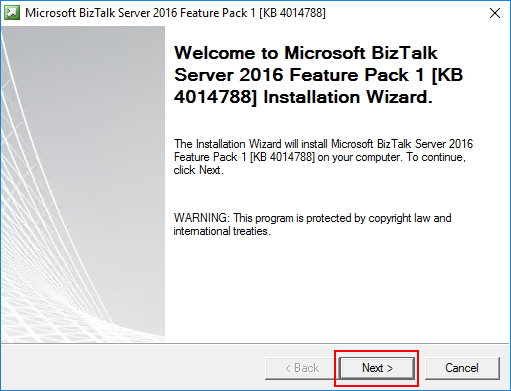
- In the Welcome to Microsoft BizTalk Server Feature Pack 1 Installation Wizard screen, click Next.
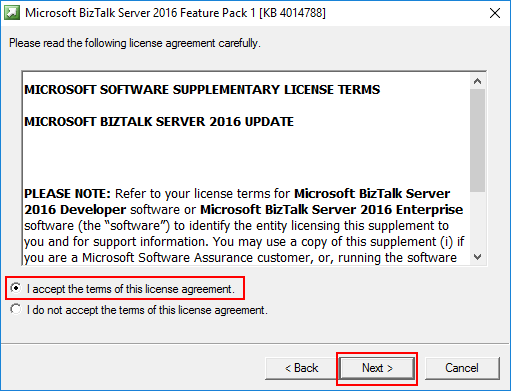
- On the License Agreement screen, select the option I accept the terms of this license agreement, then click Next.
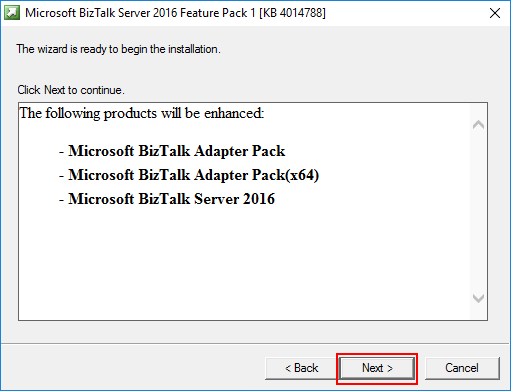
- In the Ready to Install section, a list of products to be enhanced will be provided. Click Next to continue the installation.
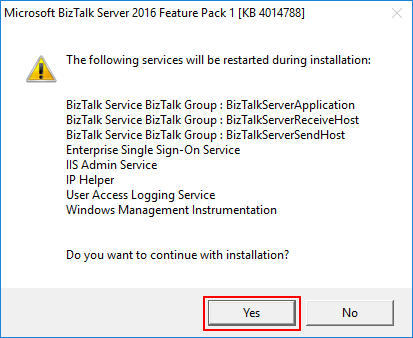
- The FP1 installation will display a window listing the services that will be restarted during the installation process. Click Yes to continue with the installation.
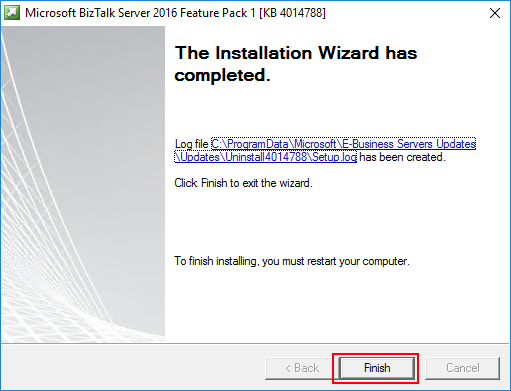
- The installation process may take some minutes to complete, and you will probably see some “background” windows to appear and to be completed. You should wait until the Installation Wizard has completed screen to appear.
- In the Installation Wizard has completed screen, click Finish.
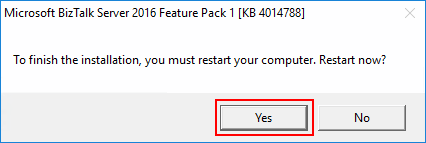
- Note: You must restart the BizTalk Server machine to complete the FP1 installation. Click Yes to restart the server.
Once the restart is complete, you will be able to see and use the following new features:
- Deployment:
- Deploy with VSTS – Enable Continuous Integration to automatically deploy and update applications using Visual Studio Team Services (VSTS).
- New management APIs – Manage your environment remotely using the new REST APIs with full Swagger support.
- Analytics:
- Application Insights – Tap into the power of Azure to track valuable application performance and better understand your workflow.
- Leverage operational data – View operational data from anywhere and with any device using Power BI.
- Runtime:
- Support for Always Encrypted – Use the WCF-SQL adapter to connect to SQL Server secure Always Encrypted columns.
- Advanced Scheduling – Set up advanced schedules using the new capabilities with Feature Pack 1.
Hope you find this helpful! If you liked the content or found it useful and would like to support me in writing more, consider buying (or helping to buy) a Star Wars Lego set for my son.




Hi!
I have tried Google, but cannot find any offline installer for the feature pack 1. Do you know if there is one to download anywhere?
Thanks,
Johan
Hi Johan, once you download the BizTalk Server 2016 FP1 from the official site: https://www.microsoft.com/en-us/download/details.aspx?id=55100 you can install it offline on the servers.
Thanks for the reply Sandro! Don’t know what I was doing when it didn’t work at first
Hi Sandro, Thanks for this good article.
How to remove these feature pack?
BizTalk Server 2016 ISO file required for reinstallation FP1 on same platform.
And time remaining 95 minutes !!!
Is this bug?https://uploads.disquscdn.com/images/bb738de7458cc008904d91dfec7edc2f7f949f448db2eecc130e8d26ae5753a3.jpg https://uploads.disquscdn.com/images/7361c95da64cfc0ba66ee69da7a36edbe2db7a002c2895409246b85e076b86b4.jpg https://uploads.disquscdn.com/images/b964c3953a95035694466a9027ef97527e3542748777e903a63e396285cccbff.jpg
How to remove FP1, good question, I sent an email to product group asking this question.
It would be nice to know what the real prerequisites are. We installed FP1 into our test environment and it broke Admin console. It turned out you must have Visual Studio 2015 installed on the server.
Is it customary or even advisable to have developer tools to be installed in BizTalk servers?
There was no way to rollback the broken installation and we had to build our environment from scratch.
Not an experience I like to see anytime soon.
Has far as I know the only requirement is for you to have BizTalk Server 2016 and there is no need for you to have Visual Studio installed. Nevertheless I send an email to the product group to validate your comment.
That’s what the product group told MS support engineer when I opened a case with Premier Support. Installation stopped on trying to run some Visual Studio extension (vsix). I wonder why nobody else has stumbled to this.
This was fixed. Dowload new package
Hi Eric,
I’m struggling to install the Feature Pack 2 on my new
BizTalk 2016 Dev Server (Windows 2012 with .net 4.6.2). I have done the
following steps:
1. Installed BizTalk Server 2016 Dev Edition
2. Installed WCF LOB adapters, 32-bit and 64-bit adapters packs
3. Configured BizTalk modules (didn’t configure BAM and BAM portal)
4. Tried to install Feature Pack 2
At step 4, I’m getting the following error message: Error 5003 Regsvcs
failed for assembly C:Program Files (x86)Microsoft BizTalk Server
2016Microsoft.BizTalk.Adapter.MQS.dll. Return code -2146234013 and the
installation is being rolled back.
I’ve tried installing CU1 and got the same error. I tried repairing my BizTalk 2016 installation but had no success either. I googled a lot and found that people have
encountered this error in the past while installing any of BizTalk 2016 CUs. Unfortunately no one has yet suggested the real cause or a valid https://uploads.disquscdn.com/images/faaf212ecbaaf17c35d7791ec4e8360e85fc812447d6dcce8ea730e87ab5df3e.jpg solution. Do you have any idea about why I’m may be getting this error ?
Thank you in advance for your reply.
I have the same issue, when I installed FP1 on Integration server, Admin console broke and the error it is throwing is;
Could not load file or assembly ‘Microsoft.BizTalk.Analytics.Common, Version=3.0.1.0, Culture=neutral, PublicKeyToken=31bf3856ad364e35’ or one of its dependencies. The system cannot find the file specified.
(Microsoft.BizTalk.ExplorerOM);
I noticed it’s not installing lot of these assemblies to GAC and not sure why. Anybody has any clue
I uninstalled the FP1 and it’s back to normal again.
This was fixed. Download new msi
Hello,
I installed the FP1 on my Test server and now I am unable to load BizTalk group in the Admin Console.
The error I get is as follows:
This operation failed while accessing at least one of the Message Box databases. Some results might be omitted. (Microsoft.BizTalk.Administration.SnapIn)
Value cannot be null.
Parameter name: dbName (Microsoft.BizTalk.Operations)
I tried uninstalling the update but it did not help.
Can someone tell me what went wrong?
This was fixed . Download new msi
If you install the Feature Pack (with CUx) the BizTalk Health monitor does not recognize the fact that you have CU’s installed and that you have the feature pack installed. Anyone encounterd this as well?
When installing BizTalk 2016 Feature Pack 1 (CU3) on a fully configured dual node BizTalk (Non Development) Environment (two BizTalk nodes sitting above a single SQL Server Node) we ended up with the followinh issues
1. Accessing the machine on the BizTalk Node where FP1 is installed the Admin Console fails to work properly (expanding the Group Hub) with the following error
Could not load file or assembly ‘Microsoft.BizTalk.Analytics.Common, Version=3.0.1.0, Culture=neutral, PublicKeyToken=31bf3856ad364e35’ or one of its dependencies.
The system cannot find the file specified.
(Microsoft.BizTalk.ExplorerOM);
2. It is noted that even though there are no errors witnessed in the install log of FP1 it does not appear in the list of installed programs in the Control Panel. This means I am not able to uninstall FP1.
3. I was able to get the Admin Console to work correctly by manually GAC-ing a number of Microsoft.BizTalk.Analytics* dlls but im unsure as to whether there has been any other negative effects that I have yet to come to light (we are moving to 2016 and this is a Test environment that has yet to go through a thorough testing cycle yet) .
4. The above behaviour was witnessed when performing the FP1 update on the second BizTalk node and was rectified in exactly the same way as for the first node
5. I noted that this issue has been reported previously but with earlier versions of the FP1 and was reportedly fixed in the version I tried to install
Things to note about the BizTalk Nodes I installed FP1 on:
1. Its fully installed and configured, including the installation of all adapters including Swift and the Swift 2016 message pack)
2. It has approx. 20 applications installed at the time of the installation of FP1.
3. We have installed the latest version of the Feature Pack
4. These BizTalk Nodes are not development machines and do not have Visual Studio installed
Do you have ESB installed? I’m running into the same problem, and I think it’s tied to me not configuring ESB before installing the patch (ie, I did the BizTalk install, then the FP1, then tried to configure ESB) or possibly because I installed the patch and then attempted to install and configure ESB. It worked on one of my standalone boxes, and one of my split environment (SQL on one machine, BT on a separate VM), but three other environments failed with this same error.
I of course downloaded the latest version of the installer, which supposedly fixed this.
Finally, could you list (if you kept track) the dlls you manually gac’ed to fix this? Though I generally subscribe to your belief that even though you fixed it by manually gac’ing, you have no idea what other hidden issues are there. I generally choose a full reinstall when something like this goes wrong.
I have installed BTS 2016 Feature pack on VM, DEV, STAGE servers with out errors but the same MSI got installed on TEST. after installing tried to open BizTalk admin console got this error.
Could not load file or assembly ‘Microsoft.BizTalk.Analytics.Common, Version=3.0.1.0, Culture=neutral, PublicKeyToken=31bf3856ad364e35’ or one of its dependencies. The system cannot find the file specified.
(Microsoft.BizTalk.ExplorerOM);
any idea whats causing the issue? same MSI failing only one env ?
In BizTalk 2016,SFTP adapter listing out the files but not deleting in SFTP server. Even now it is working but in random way like when we restart SFTP host.
Hi Sandro, we are getting this error after installing BizTalk 2016 Feature pack 1? any idea? any help would be appreciated. thank you
The Messaging Engine failed to initialize the tracking interceptor.
https://uploads.disquscdn.com/images/faaf212ecbaaf17c35d7791ec4e8360e85fc812447d6dcce8ea730e87ab5df3e.jpg
did you ever figure this out? I’m getting the same erro.
Issue with VSTS Deployment in BT2016 while using release definition
##[error] Exception: ‘Exception calling “SaveChanges” with “0” argument(s): “Could not validate TransportTypeData, Address or Public Address properties for Receive Location ‘RCVLoc’. Could not load file or assembly ‘Microsoft.BizTalk.Scheduler, Version=3.0.1.0, Culture=neutral, PublicKeyToken=31bf3856ad364e35’ or one of its dependencies. The system cannot find the file specified.”‘
Note : Currently we are using schedule adapter version 6.0.0.0
My advanced scheduling is not working. It is not pulling the information as expected