


Recently, while I was testing an integration solution on a client that uses WCF-SQL to insert data into a SQL Server database, I got the following error:
System.NotSupportedException: The SqlDbType “” is not supported. Modify your table, view, stored procedure, or function definition to avoid having parameters or columns of this type.
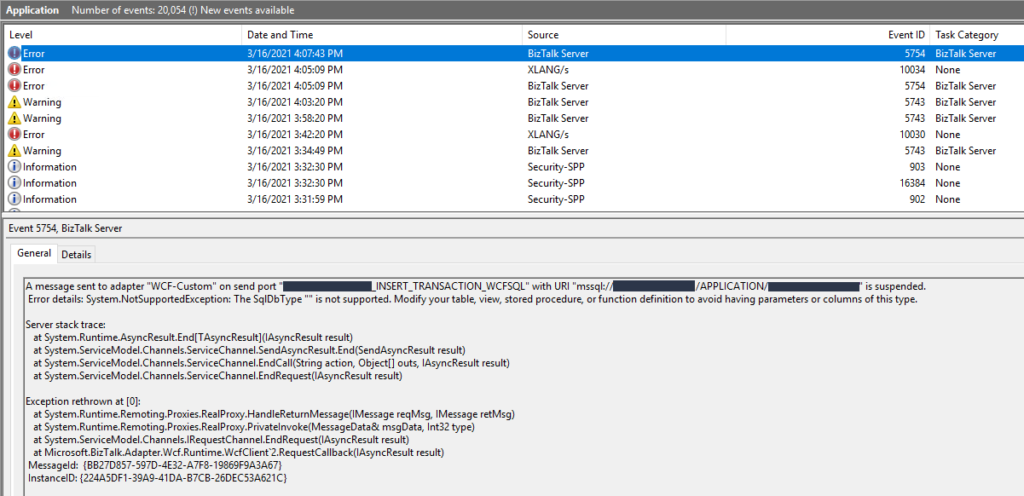
This was a surprise since everything was working properly in the development environment.
📝 One-Minute Brief
A BizTalk WCF‑SQL integration can fail with a System.NotSupportedException when invoking SQL Server stored procedures that use user‑defined table types. This article explains the root cause of the SqlDbType error and shows how to fix it by correcting SQL Server permissions for the BizTalk Host Instance account.
Cause
In this solution, we were doing bulk insert on a SQL Server database by using a User-Defined Type as the input to the stored procedure, in our case, a User-Defined Table Type. There are other ways to do a SQL Server bulk insert or update in BizTalk Server, but definitely, this is the best approach. And this is one of the reasons why we are getting the error message with the keyword: SqlDbType.
This problem occurs because the user account that you used to access the database, in my case the BizTalk Host Instance Account, doesn’t have permissions on the User-Defined Type associated to the stored procedure that we were invoking.
Solution
To solve this issue, you must give access to the user, in my case, the BizTalk Host Instance Account, to properly execute the stored procedure. You must:
- Open SQL Server Management Studio and connect to your server.
- In the Object Explorer, select and expand the desired database, expand the Security folder, and then the Users.
- Right-click on the User, BizTalk Host Instance Account, and choose Properties.
- On the Database User windows, choose the Owned Schemas tab, and then on the Schemas owned by this user panel, select the schema bound to your User-Defined Table Type.
- In our case: Material.
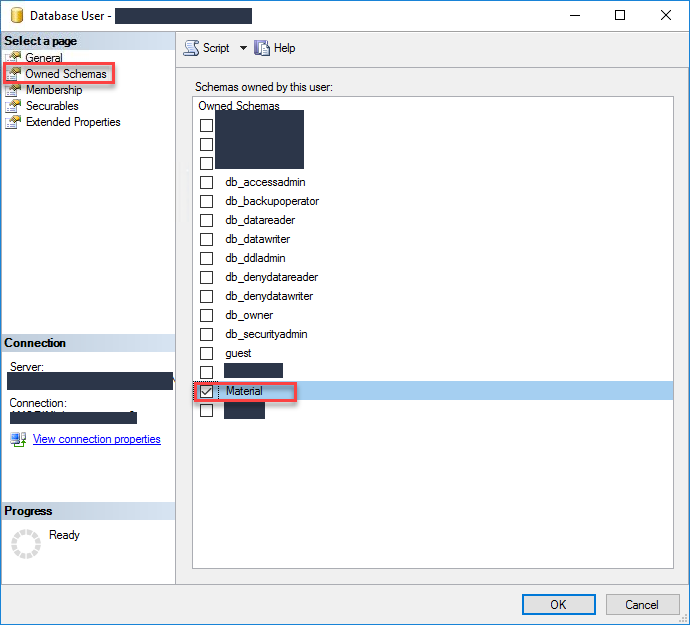
- Click OK and try again to send the data to your SQL Server. It should work.
Hope you find this helpful! If you liked the content or found it useful and would like to support me in writing more, consider buying (or helping to buy) a Star Wars Lego set for my son.



