


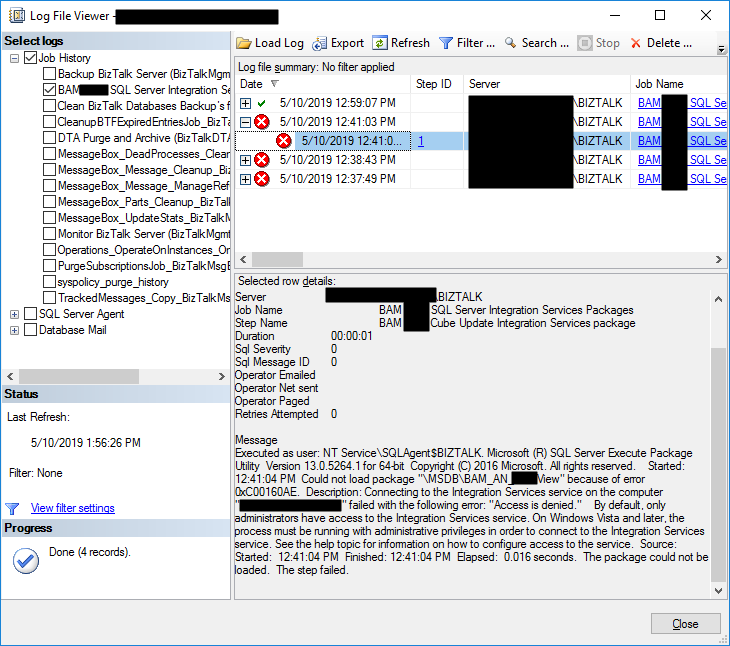
In my last blog post, I wrote about an “Access is denied” error while trying to connect with SQL Server Integration Services (SSIS). Today’s post is about the same problem but in a different situation/context, of course, with a different cause and solution, this time I got this error while trying to execute a SQL Server Job to run the BAM_AN_<name>View and BAM_DM_<name> to import BAM data to Analysis Server and maintain the BAMPrimaryImport BAM tables:
Date 5/10/2019 12:41:03 PM
Log Job History (BAM <name> SQL Server Integration Services Packages)
Step ID 1
Server localhost
Job Name BAM <name> SQL Server Integration Services Packages
Step Name BAM <name> Cube Update Integration Services package
Duration 00:00:01
Sql Severity 0
Sql Message ID 0
Operator Emailed
Operator Net sent
Operator Paged
Retries Attempted 0
Message
Executed as user: NT Service\SQLAgent$BIZTALK. Microsoft (R) SQL Server Execute Package Utility Version 13.0.5264.1 for 64-bit Copyright (C) 2016 Microsoft. All rights reserved. Started: 12:41:04 PM Could not load package “\MSDB\BAM_AN_<name>View” because of error 0xC00160AE. Description: Connecting to the Integration Services service on the computer “localhost” failed with the following error: “Access is denied.” By default, only administrators have access to the Integration Services service. On Windows Vista and later, the process must be running with administrative privileges in order to connect to the Integration Services service. See the help topic for information on how to configure access to the service. Source: Started: 12:41:04 PM Finished: 12:41:04 PM Elapsed: 0.016 seconds. The package could not be loaded. The step failed.
To better contextualize this issue, I got this error after:
- I give permissions to my user to connect to SSIS (see how in my previous blog post).
- I successfully created the SQL JOB to import and maintain BAM data, so I was able to navigate in SSIS to select the correct packages.
📝 One-Minute Brief
Explains how to fix the “Access is denied” SSIS error when executing BAM packages in BizTalk Server 2016, specifically when SQL Server jobs fail to load BAM_AN packages due to permission issues.
Cause
Again, the description says that by default, only administrators have access to the Integration Services service. On Windows Vista and later, the process must be running with administrative privileges to connect to the Integration Services service. That, in other words, means:
- insufficient rights to connect to SSIS.
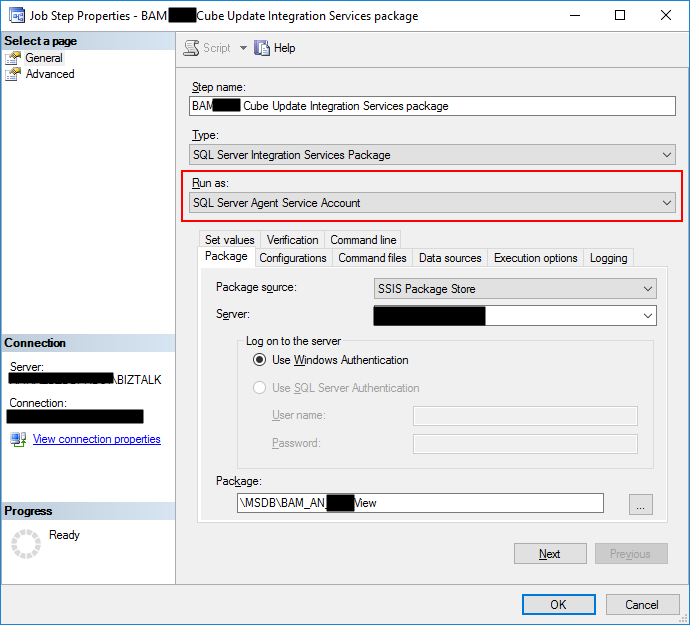
And the reason behind that is that the tasks are by default running under (Run as) SQL Server Agent Service Account, which is typically a different user than the user who is configuring/creating the importation Jobs. Usually, it will run under a service account, or NT Service, like NT SERVICE\MSSQLSERVER or, in my case, NT Service\SQLAgent$BIZTALK, and this may not have access to SSIS.
Solution
The solution to this issue is:
- To give permission to the SQL Server Agent Service Account.
- Or for better control, you should set up a Proxy Account to run SSIS packages.
To set up a Proxy Account to run SSIS packages, you should:
- Note: I will assume that a Login for the user is already created/configured in SQL Server and that the user will also have access to the BAMPrimaryImport database.
- The first step is to create the credentials, which will then be used in the Proxy Account. To do this, we need to:
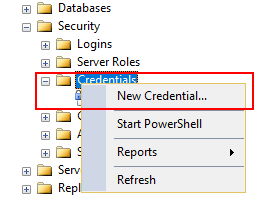
- In SQL Server Management Studio, click on Security and then right-click on Credentials, click on New Credential…
- On the New Credential window:
- Put a Credential name. You can put the same name as the domain name or a meaningful name. In my case, I add the BAM Import Account.
- Click on Identity, which will open the Select User or Group window to ensure you select the correct user or Group.
- And then you will need to put in the password for the Domain account you selected and confirm the password in another text box.
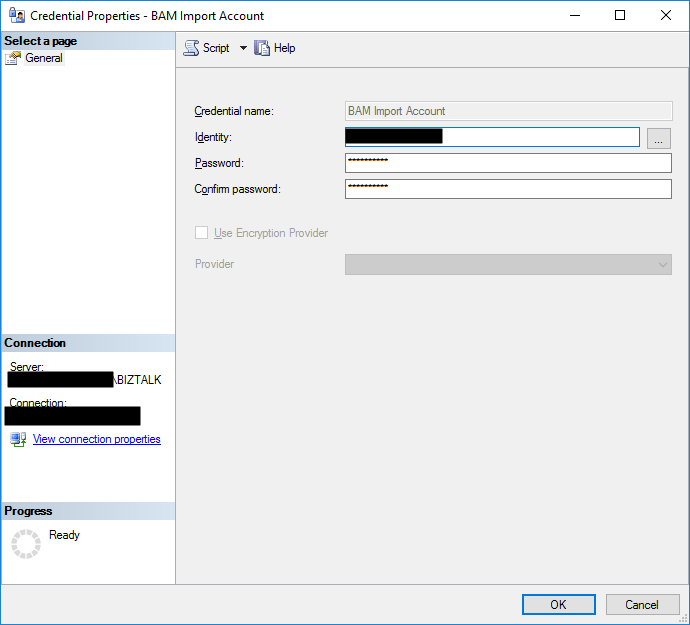
- Then click Ok to create your new Credential
- The second step will be creating a proxy to be used within the SQL Server Agent. To do that, you should:
- In SSMS, click on SQL Server Agent, then Proxies, and then SSIS Package Execution.
- Right-click and select New Proxy…
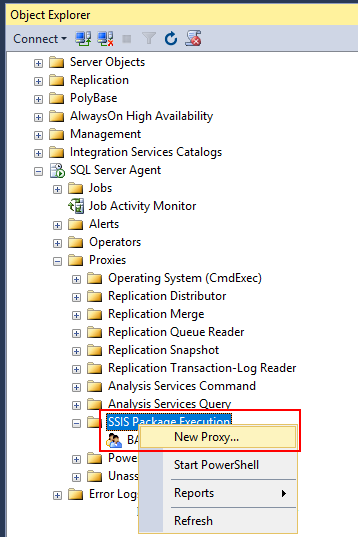
- On the New Proxy account window
- Give your Proxy a meaningful name, in my case, BAM Proxy.
- Under Credential Name, select the credential you should use to execute the packages, in my case, BAM Import Account.
- And activate the following subsystems from the list:
- SQL Server Integration Services Package.
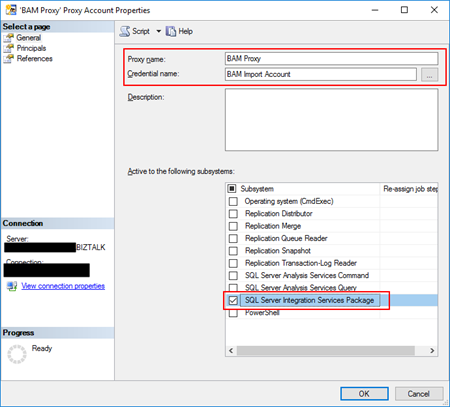
- Then click Ok to create your new Proxy.
- The third and final step is to associate this proxy with your job execution. To do that, you should:
- In SSMS, go to SQL Server Agent, right-click on the BAM importation Jobs and select Properties.
- Select the steps tab and edit all the steps that execute the SSIS packages.
- On the Run as combo box, you will now be able to see the Proxy created earlier. Select that option. And click OK.
- In SSMS, go to SQL Server Agent, right-click on the BAM importation Jobs and select Properties.

Now, assuming that you configured adequately, if you manually run the job or wait for the next scheduled execution, it will run successfully… we hope.
Hope you find this helpful! If you liked the content or found it useful and would like to support me in writing more, consider buying (or helping to buy) a Star Wars Lego set for my son.




1 thought on “BizTalk Server 2016 and SQL Server Integration Services (SSIS) 2016: Connecting to the Integration Services service on the computer “localhost” failed with the following error: “Access is denied.” – PART II: Could not load package BAM_AN_”