


Recently, while preparing my Logic App Data Mapper demos for the Nordic Integration Summit (NIS) 2025, I encountered this error while trying to configure a custom XSLT to run inside the map:
Error message: correlationId=’0ba09cb8-0dfd-4521-8f4a-e19b60b0f86e’, operationName=’ErrorResponseHandling.GetErrorResponseMessage.POST/RUNTIME/WORKFLOW/MANAGEMENT/’, message=’Http request failed with unhandled exception of type ‘XmlException’ and message: ‘System.Xml.XmlException: ‘xsl’ is an undeclared prefix. Line 1, position 2
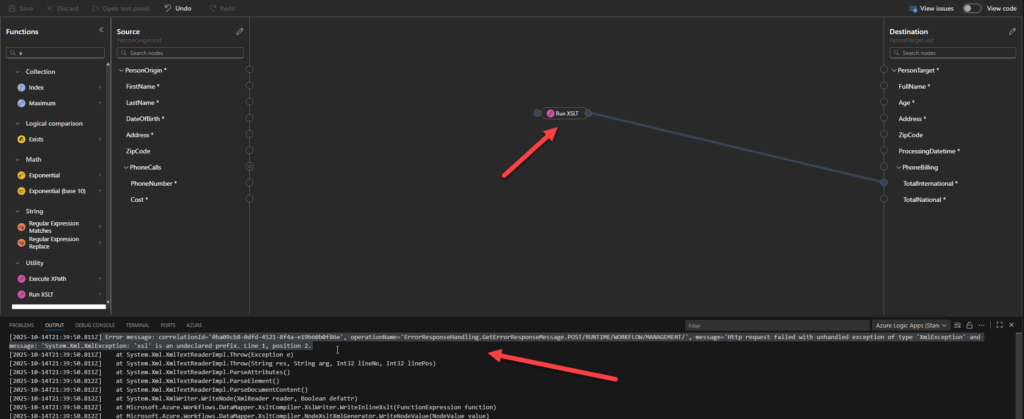
I was basically trying to set up the following simple XSLT code in order to simplify the function chain necessary to solve these mapping rules:
<xsl:variable name="totalNational" select="sum(//PhoneCalls[starts-with(@PhoneNumber, '+351')]/xs:decimal(@Cost))"/>
<xsl:variable name="totalInternational" select="sum(//PhoneCalls[not(starts-with(@PhoneNumber, '+351'))]/xs:decimal(@Cost))"/>

<PhoneBilling>
  <TotalInternational>
  <xsl:value-of select="format-number($totalInternational, '0.00')"/>
  </TotalInternational>
  <TotalNational>
  <xsl:value-of select="format-number($totalNational, '0.00')"/>
  </TotalNational>
</PhoneBilling>
And xsl is the default prefix namespace for XSLT transformation: xmlns:xsl=”http://www.w3.org/1999/XSL/Transform”
📝 One-Minute Brief
Logic App Data Mapper’s Run XSLT throws “‘xsl’ is an undeclared prefix” unless you explicitly add xmlns:xsl="http://www.w3.org/1999/XSL/Transform" to each custom snippet.
Workaround: inject the namespace on a neutral wrapper (e.g., xsl:choose with 1 eq 1) to keep the output clean and unblock your mapping.
Cause
Unfortunately, the Data Mapper is not and does not have the same behavior as the BizTalk Server Mapper, and despite, behind the scenes, the map defines and uses this prefix and namespace
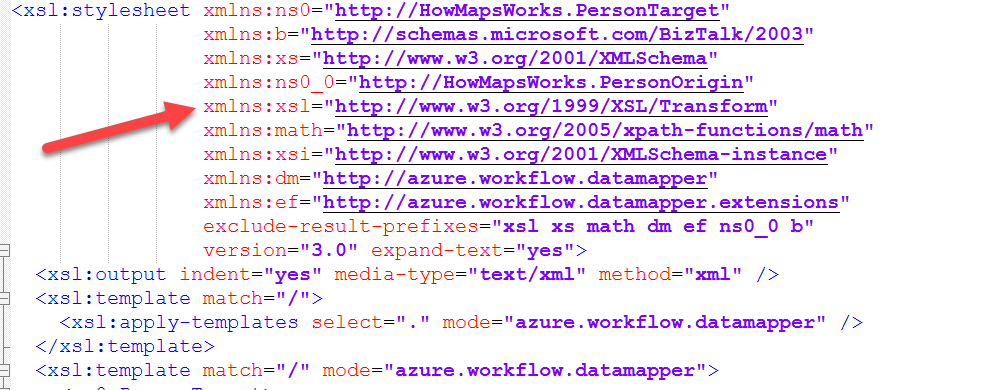
In the design mode of the current version of the Data Mapper, the Run XSLT does not recognize this xsl prefix, throwing the error message above.
Solution
Unfortunately, the current version of the Data Mapper forces us to set this prefix and namespace inside each custom XSLT file.
And for that, we have two options:
- Add to the element you are creating
For example:
<Name xmlns:xsl="http://www.w3.org/1999/XSL/Transform">Sandro Pereira</Name>
I do not like this approach because the Name element in the output message will have this prefix/namespace, which can lead to problems in the end systems.
- Or apply a workaround.
For example, make use of a 1=1 condition to apply the transformation:
<xsl:choose xmlns:xsl="http://www.w3.org/1999/XSL/Transform">
    <xsl:when test="1 eq 1">
        <Name>Sandro Pereira</Name>
    </xsl:when>
    <xsl:otherwise>
        <xsl:text>Nothing</xsl:text>
    </xsl:otherwise>
</xsl:choose>
Not elegant, I know, but it work like a charm!
Hope you find this helpful! If you liked the content or found it useful and would like to support me in writing more, consider buying (or helping to buy) a Star Wars Lego set for my son.



