


Oh yes! I’m back to one of my favorite topics: Errors and warnings, causes and solutions – aka Troubleshooting! This time, I’m combining two things I like: mapping and BizTalk Server. What could go wrong!
While trying to implement a mapping rule using C# inline code, where the goal was to infer the conversion rate between two coins: EUR to any other coin. This was the code I have used (courtesy of ChatGPT)
public static string EurPerCoin(string eurAmount, string coinAmount)
{
        if (!decimal.TryParse(eurAmount, NumberStyles.Number, CultureInfo.InvariantCulture, out var eur))
            return "0.00";

        if (!decimal.TryParse(coinAmount, NumberStyles.Number, CultureInfo.InvariantCulture, out var coin))
            return "0.00";

        if (coin == 0)
            return "0.00";

        var rate = eur / coin;
        return Math.Round(rate, 2, MidpointRounding.AwayFromZero)
                   .ToString("F2", CultureInfo.InvariantCulture);
}
I got these two generic errors:
Error Inline Script Error: Invalid expression term ‘)’
Error Inline Script Error: ; expected
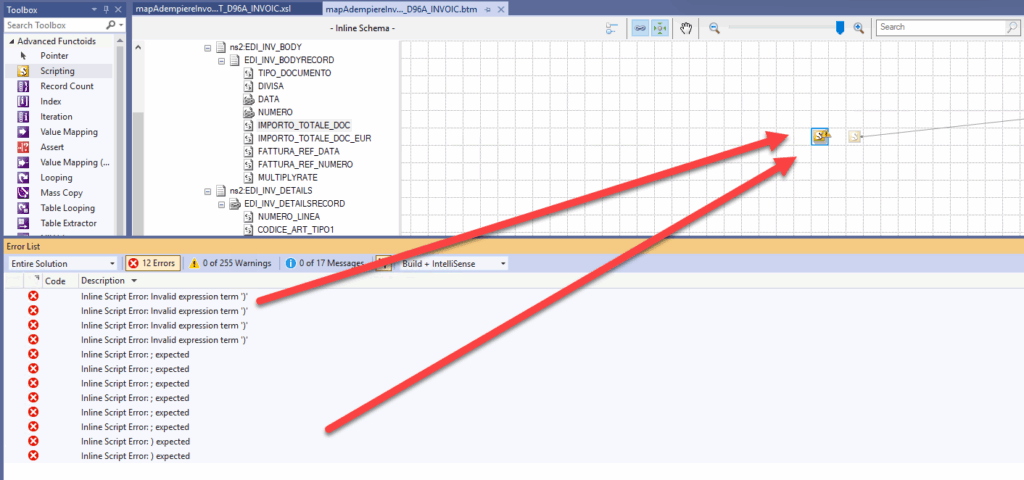
I wasn’t surprised to receive those kinds of errors because the generated code is using namespaces that are not referenced in the BizTalk Server map. So, it is always a good practice to copy your code to a Visual Studio console application and validate it
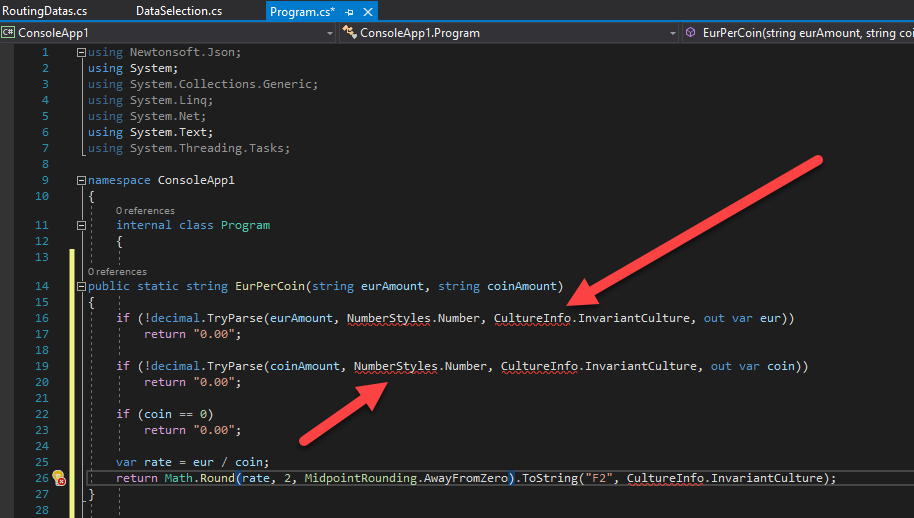
Of course, to fix this is very simple. Since we cannot use Using System.Globalization; we need to provide the full namespace in the code.
public static string EurPerCoin(string eurAmount, string coinAmount)
{
    if (!decimal.TryParse(eurAmount, System.Globalization.NumberStyles.Number, System.Globalization.CultureInfo.InvariantCulture, out var eur))
        return "0.00";

    if (!decimal.TryParse(coinAmount, System.Globalization.NumberStyles.Number, System.Globalization.CultureInfo.InvariantCulture, out var coin))
        return "0.00";

    if (coin == 0)
        return "0.00";

    var rate = eur / coin;
    return Math.Round(rate, 2, MidpointRounding.AwayFromZero).ToString("F2", System.Globalization.CultureInfo.InvariantCulture);
}
However, when I try to compile, I still encounter the exact same problems. Now I was curious.
📝 One-Minute Brief
This post explains how to troubleshoot the BizTalk Server mapping error Inline Script Error: Invalid expression term. Learn what causes this issue in inline scripting functoids, how to identify the failing expression, and how to fix it to restore mapping execution.
Cause
These error messages are generic error messages and basically tell you that there is a code “interpretation” issue. And this can occur for the following reasons:
- There is a code syntax error.
- And again, better to troubleshoot that inside a support C# console application project.
- You are using namespaces that are not included/recognized by default by the BizTalk Mapper.
- Here, you need to provide the full namespace as we did above.
- Or you are using code not supported by the .NET 2.0 Framework, which is used inside the mapper.
In our case, for example: .NET 2.0 Framework does not support var keyword. The var keyword was introduced in C# 3.0, which shipped with .NET Framework 3.5. In .NET 2.0 (C# 2.0), you must explicitly declare the type of every variable.
Solution
The solution to this issue is quite simple: we must explicitly declare the type of every variable we use inside our C# inline code.
In our case, for example, to make the map work, we have to use the following code:
public static string EurPerCoin(string eurAmount, string coinAmount)
{
    decimal eur = 0;
    decimal coin = 0;
    if (!decimal.TryParse(eurAmount, System.Globalization.NumberStyles.Number, System.Globalization.CultureInfo.InvariantCulture, out eur))
        return "0.00";

    if (!decimal.TryParse(coinAmount, System.Globalization.NumberStyles.Number, System.Globalization.CultureInfo.InvariantCulture, out coin))
        return "0.00";

    if (coin == 0)
        return "0.00";

    decimal rate = eur / coin;
    return Math.Round(rate, 2, MidpointRounding.AwayFromZero).ToString("F2", System.Globalization.CultureInfo.InvariantCulture);
}
Hope you find this helpful! If you liked the content or found it useful and would like to support me in writing more, consider buying (or helping to buy) a Star Wars Lego set for my son.



