


As service instances (receive ports, orchestrations, send ports) process messages moving through BizTalk Server, these service instances can be in one of several states.
- In Breakpoint: An active orchestration hits a breakpoint, typically one set by a BizTalk Server solutions developer. This state is valid only for orchestrations.
- Ready to run: A service instance that has been activated but has not yet started running, typically due to temporary unavailability of resources, such as a heavy processing load on the server.
Active Running service instance. - Dehydrated: The instance state persists in the MessageBox database, and no Windows service is running that instance.
- Completed with discarded messages: The service instance was completed, but some messages were not consumed by the instance.
- Suspended (resumable): The instance is suspended; you can resume it.
- Important: Resuming a messaging instance will do the following:
- Resume the messaging instance.
- Send the message to the send port. The send port delivers the message to the destination even if it is not in a Started state.
- Note that when you suspend a scheduled instance and then resume it, the instance goes into a dehydrated state.
- Important: Resuming a messaging instance will do the following:
- Suspended (not-resumable): The instance is suspended, but you cannot resume it. You can save the Messages referenced by the instance, then terminate it.
- Note that when you suspend a scheduled instance and then resume it, the instance goes into a dehydrated state.
- Pending suspend/Pending terminate: A status, not an independent state. You can combine it with other states.
- A control message to suspend or terminate was sent to a service instance, but has not yet been picked up by the instance. Only one pending operation is allowed at a time. When an instance with a pending operation becomes dehydrated, you can terminate the instance.
📝 One-Minute Brief
A quick and effective way to monitor how many BizTalk service instances are actively running in your environment. The post explains the different BizTalk instance states, why relying on the Administration Console is inefficient for monitoring, and how a simple SQL query against the MessageBox database can instantly show the number of active (running) instances. This helps administrators quickly detect processing bottlenecks and keep BizTalk performance healthy.
We can see all of these service instances in all different stages inside the BizTalk Server Administration Console:
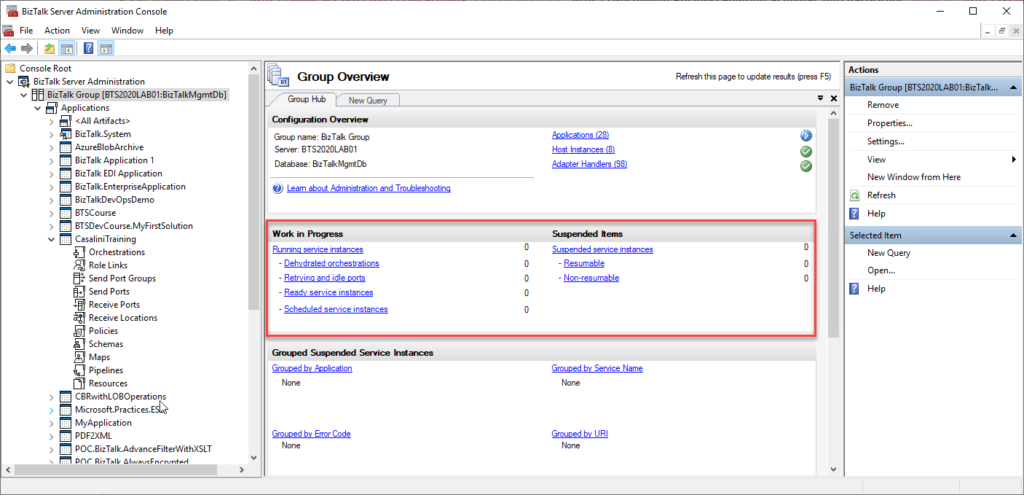
The problem with the admin console is that it requires manual intervention to check all this information, so we have to keep clicking F5 each time we want to check it. That is not an effective monitoring operation and quite a waste of human resources. Of course, there are several other ways to achieve this goal:
- You can use third-party monitoring tools.
- You can use PowerShell to extract this information.
- Or you can use a simple SQL query.
Well, here is how you do a simple SQL query to extract active (running) service instances:
USE BizTalkMsgBoxDb;
SELECT COUNT(nstate) Active
FROM Instances WITH (NOLOCK)
WHERE nstate = 2
You need to run this script against BizTalkMsgBoxDB, and it will return the count of active (running) service instances. Equal to what you see in the BizTalk Server Administration Console.
Where can I download it?
You can download the SQL script here:
THIS SQL SCRIPT IS PROVIDED “AS IS” WITHOUT WARRANTY OF ANY KIND.
Hope you find this helpful! If you liked the content or found it useful and would like to support me in writing more, consider buying (or helping to buy) a Star Wars Lego set for my son.



