


Last week, when preparing for a deployment, I bumped into this error again. As noted in my previous post, it could be easily fixed with a PowerShell module installation.
But this time, the script was already fixed. Nothing had changed, as far as I knew. The last build and publish was in September, no errors there.
📝 One-Minute Brief
Explains how to troubleshoot and fix the “Get‑AzLogicApp command was not found” error in Azure DevOps pipelines, highlighting how task order and Azure CLI updates can impact the availability of Az.LogicApps PowerShell commands.
So what happened that killed my build?
It couldn’t be the Az module updates, because we were forcing the version. There had been several updates, so could this be it?
I tried to force a newer version, like 2.0.0, but still failed to execute the command. I even restricted the script to use only the command I needed, which was the CallbackUrl.
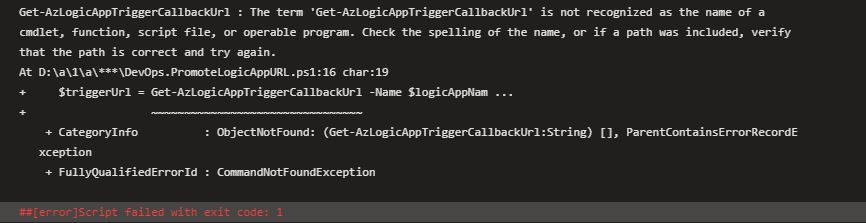
After a few other failures, my thinking was, “This can’t be the problem; the script was executing without issues, so it has to be something else.”
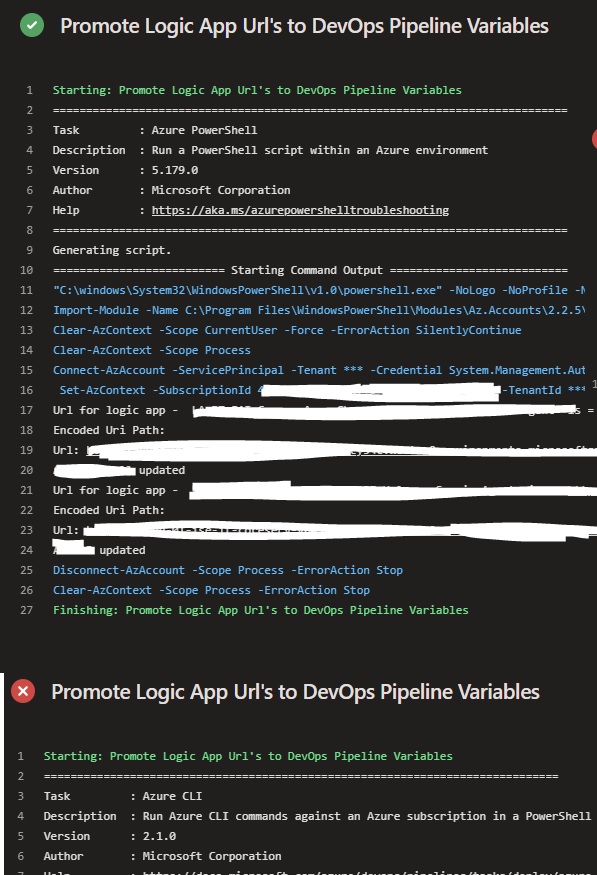
So I took another look at my pipeline. It was the same as before… Azure PowerShell task to remove AzureRM, install the Az module, and Azure CLI task to execute the script… wait!
Could this be the problem?
I switched the tasks and re-queued the pipeline.

And success! No more errors.
Azure CLI has received some updates in the past weeks, and the build I had before was 2.0.16 (Core 2.11.0), compared to 2.1.0 (Core 2.18.0), which was running in these failed pipeline runs.
I reviewed the Azure CLI release notes, but I couldn’t find any reference to Logic App commands or the Az.LogicApps module. None of the documented changes explained why this issue suddenly started to appear.
Suspected root cause
At this point, I still don’t have a definitive explanation for the error. However, I strongly suspect that a recent Azure CLI update introduced a breaking change. More specifically, that update may have affected how Az module commands execute when used alongside Azure CLI, or it may have impacted Az.LogicApps commands directly.
Unfortunately, without an explicit mention in the release notes, this remains an educated assumption rather than a confirmed cause.
Hope you find this helpful! If you liked the content or found it useful and would like to support me in writing more, consider buying (or helping to buy) a Star Wars Lego set for my son.




2 thoughts on “Revisiting “The Get-AzLogicApp command was not found””