


As the learning process’s path, all my interns or new team members, regardless of what technologies they will be using more, one of the first things they will do is create a BizTalk Server development environment from scratch. Yes, all my team members will have skills in all Integration technologies, BizTalk Server, Logic Apps, Service Bus, APIM, and the list goes on and on.
I don´t mind or care if you get it right the first time or not. Sometimes it is with failures that we learn best and most. And I find it curious that with these exercises, they will find problems that I would never imagine happening, so sometimes it is a learning process and continuous improvement for both the team.
This is one of these cases. My recent team member, while he was trying to configure BizTalk Server using the BizTalk Server Configuration wizard, was getting a failure in all the components immediately:
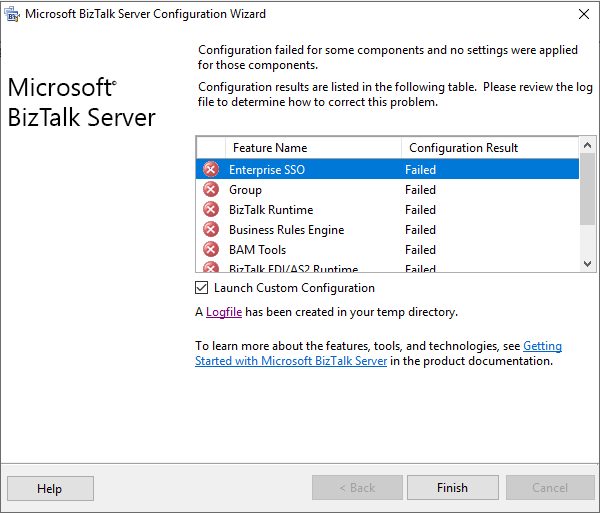
As he did not understand why this problem was happening, he asked me for help. Once we analyze the log file generated by the configuration wizard, we saw this error:
[2020-11-10 22:08:14:0631 Error Configuration Framework]Feature: [Enterprise SSO] Failed to configure with error message [<Exception Message=”Failed to create the SQL database ‘SSODB’ on SQL Server ‘BTS2020LABAVMRG’ (with SSO Administrator account ‘SSO Administrators’).” Source=”SSO” HelpID=””><Exception Message=”(0xC0002A21) An error occurred while attempting to access the SSO database.
” Source=”SSO” HelpID=””><Exception Message=”An error occurred while attempting to access the SSO database. See the event log (on computer ‘BTS2020LABAVMRG’) for more details.
” Source=”SSO” HelpID=””/></Exception></Exception>]
Basically, this error message does not show any clue or cause as to why this problem is happening. Nevertheless, it will point to you a source to see more details about this issue: the event viewer.
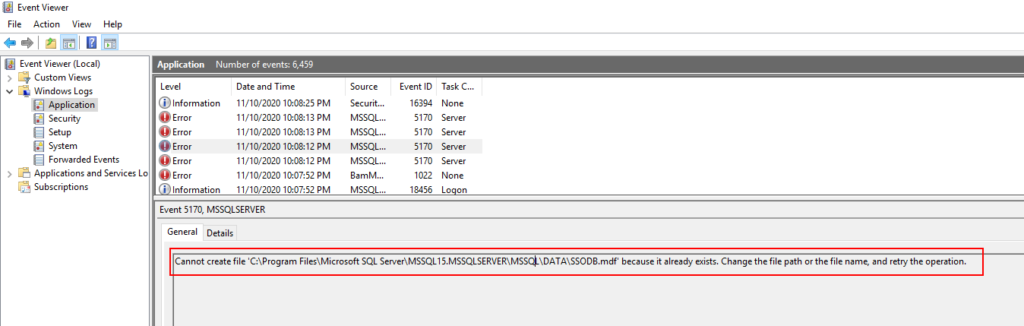
Once we checked the event viewer, we got a very clear error message:
Cannot create file ‘C:\Program Files\Microsoft SQL Server\MSSQL15.MSSQLSERVER\MSSQL\DATA\SSODB.mdf’ because it already exists. Change the file path or the file name, and retry the operation.
📝 One-Minute Brief
A BizTalk Server configuration can fail when the Configuration Wizard tries to create SQL database files that already exist. This article explains why the “Cannot create file .mdf because it already exists” error occurs and how to fix it by correcting SQL Server instance setup and database file locations.
Cause
The reason this error happens is clear. The BizTalk Server configuration wizard is trying to create the database files in the default SQL Server folders, but they already exist.
This error happened because my team member initially didn’t install all the required SQL Server components correctly. Once, he was trying to add new features to an existing instance, and he accidentally created another SQL Server instance.
After that, he uninstalled all the SQL Server instances and appropriately installed all the components, at least for now, let’s assume so. Nevertheless, while he was trying to do a Basic Configuration, he got that “strange” error.
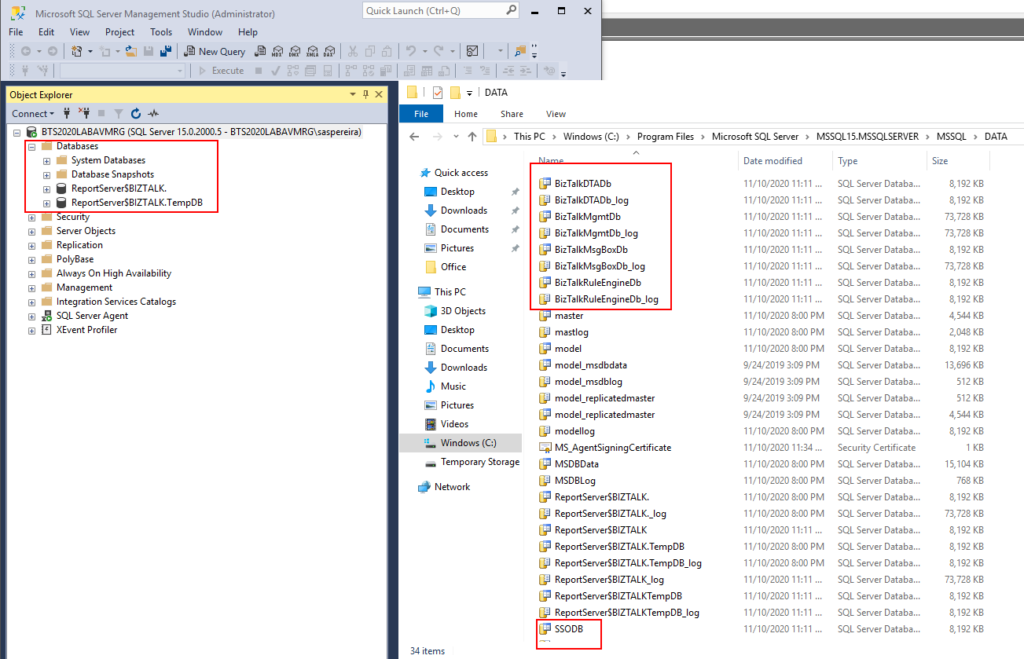
Thru the SQL Server Management Console, we couldn’t see these databases, not only SSO as the error description, but also with all other BizTalk Server databases. But once we saw that folder, we realized that the uninstall did not delete the BD files created before from the hard drive.
Solution
The solution is very simple: delete all the Unnecessary files from that folder, like:
- SSO
- SSO_log
- BizTalkDTADb
- BizTalkDTADb_log
- BizTalkMgmtDb
- BizTalkMgmtDb_log
- BizTalkMsgBoxDb
- BizTalkMsgBoxDb_log
- BizTalkRuleEngineDb
- BizTalkRuleEngineDb_log
And run the BizTalk Server Configuration again. At the end, you will be able to configure BizTalk Server.
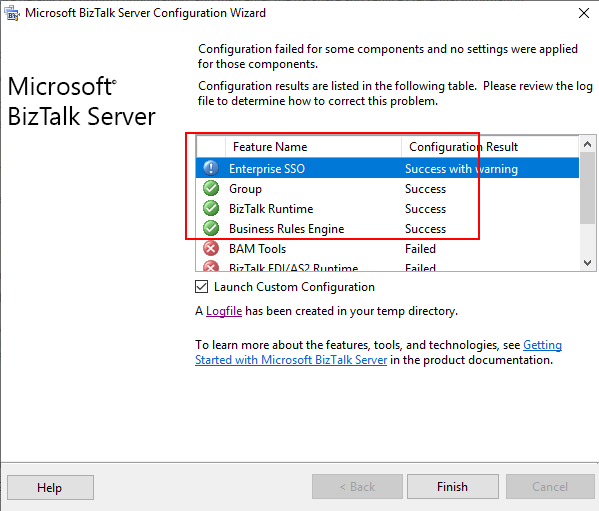
Hey… but there are still errors over there. Indeed, there are, but I will leave that to another post that will be published very soon. However, this blog post’s original error was solved, and we were able to configure the required and critical BizTalk Server components: SSO, Group, and BizTalk Runtime.
Hope you find this helpful! If you liked the content or found it useful and would like to support me in writing more, consider buying (or helping to buy) a Star Wars Lego set for my son.



