


Recently, a client called me to report strange behavior in the BizTalk Server Administration Console. Based on what was reported to me, some updates were applied to the server at the operating system level, and after installation, they would have performed a controlled restart to the environment. However, after the environment is back once again online, when trying to access the administrative console, they got the following error:
The snap-in performed a non-valid operation and has been unloaded. To continue working with this snap-in, restart MMC or reload the snap-in.
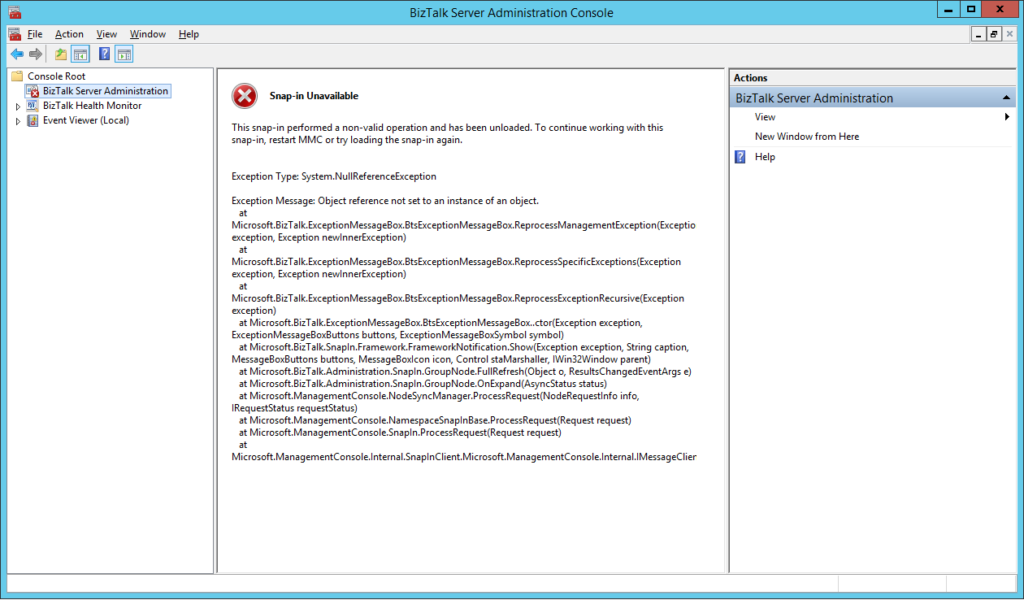
Just for curiosity, BizTalk Health Monitor, worked perfectly fine. And the BizTalk Server engine was working properly, also. It was just a matter of UI.
📝 One-Minute Brief
Describes how to resolve a BizTalk Administration Console error where the MMC snap‑in fails with a non‑valid operation message, typically caused by a corrupted or improperly loaded BizTalk MMC snap‑in.
Cause
I don’t really know the specific reasons for this problem, and to be honest, in a production environment, the important thing was to get everything working again. But in a simple way, this error message normally means that the MMC or one of the snap-ins, in this case, the BizTalk Server Administration snap-in, did not load correctly.
Restarting the machine or even the BizTalk Server Administration console doesn’t resolve the issue.
Solution
You can troubleshoot this problem further and use a tool like System File Checker to scan for the root of the issue and likely the fix.
However, the simple way to solve this is to:
- Repair BizTalk Server installation.
Once you repair the installation, everything should be working fine again.
Notice: don’t forget to reinstall the last Cumulative updates.
Hope you find this helpful! If you liked the content or found it useful and would like to support me in writing more, consider buying (or helping to buy) a Star Wars Lego set for my son.




DO they use BizTalk 360 ? If yes, does that function without issues ?