


In the past, I’ve often said that you should never configure BizTalk Server when you’re tired. My advice is simple: take a break, get some sleep, and come back later. Unfortunately, that advice doesn’t always work when a client urgently needs things done. In those situations, mistakes tend to happen.
This was one of those cases. As I usually say, the problem was between the chair and the keyboard.
That week, I had just returned to work after a short honeymoon leave. I spent part of it working and part of it taking care of my little kid, who was not feeling well. As you can imagine, I came back a bit exhausted. To make things worse, my first day was packed with several clients asking for help with small but urgent tasks.
One of those tasks involved reconfiguring IIS application pools. These pools hosted websites exposing BizTalk orchestrations as web services. Initially, they were running under the BizTalk Server Administration account, which is not recommended from a security perspective. Therefore, I updated the configuration to follow best practices and security guidelines.
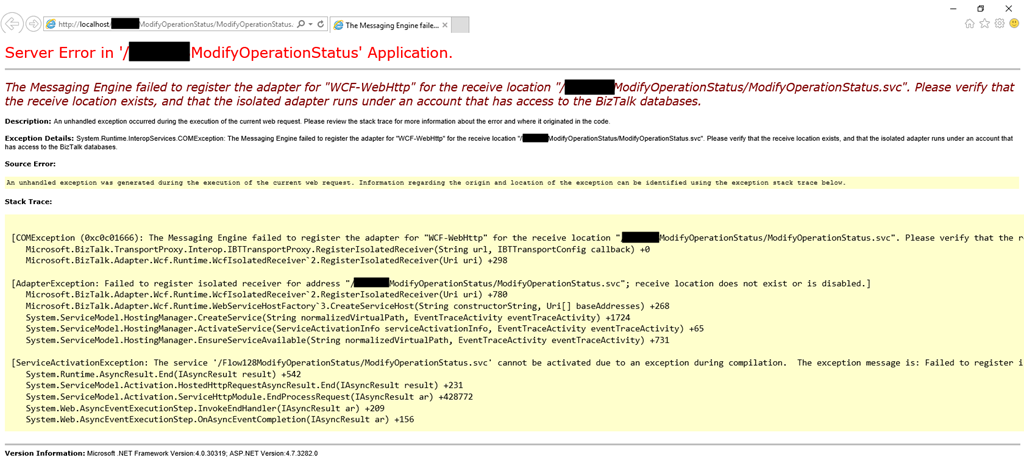
However, as soon as I finished configuring the application pools, I started receiving the following error:
The Messaging Engine failed to register the adapter for “WCF-WebHttp” for the receive location “/ModifyOperationStatus/ModifyOperationStatus.svc”. Please verify that the receive location exists, and that the isolated adapter runs under an account that has access to the BizTalk databases~
📝 One-Minute Brief
Explains how to fix the BizTalk Server WCF adapter error stating that the receive location does not exist or the isolated adapter lacks access to BizTalk databases, typically caused by incorrect IIS application pool permissions.
Cause
Usually, this can happen for two reasons:
- There isn’t a receive location created and enabled to listen to this web service.
- Or this is a permission issue! And is typically related by the fact that the account or service account specified on the application pool that the web service is running is not… a member of the BizTalk Isolated Host Users group.
In my case, because the names of the service accounts were very similar, I improperly configured the application pool to run with the service account that was a member of the BizTalk Host Users group (btsapphostsrv) instead of the service account member of the BizTalk Isolated Host Users group (btsiapphostsrv).
Solution
To solve this issue, you first should check and double-check if the IIS Application Pool Identities are correctly configured.
If yes, guarantee that the user or service account is part of the BizTalk Isolated Host Users group. If not:
- Make sure you add that user or service account to the BizTalk Isolated Host Users group.
- Or change the IIS Application Pool Identity for an account that is already a member of the BizTalk Isolated Host Users Group.
And then make sure that there is a receive location configured to listen to this web service, and if it is enabled.
In my case, changing to the BizTalk Isolated Host Instance Account, which is, of course, a member of the BizTalk Isolated Host Users group, solved my issue.
Hope you find this helpful! If you liked the content or found it useful and would like to support me in writing more, consider buying (or helping to buy) a Star Wars Lego set for my son.




2 thoughts on “BizTalk Server WCF-* Adapter: Please verify that the receive location exists, and that the isolated adapter runs under an account that has access to the BizTalk databases.”