


Back to Errors and Warnings, Causes and solutions, this time with a surprising error that I got while I was testing a custom Functoid that I had developed: Extension function parameters or return values which have Clr type ‘Char’ are not supported.
The full error description was:
Invoking component…
C:\Development\BizTalk Server Project1\BizTalk Server Project1\Map1.btm: warning btm1028: The required field “VarValue” has no incoming link, constant value, or default value.
TestMap used the following file: <file:///C:\Development\BizTalk Server Project1\Schema1_output.xml> as input to the map.
C:\Development\BizTalk Server Project1\BizTalk Server Project1\Map1.btm: error btm1050: XSL transform error: Unable to write output instance to the following <file:///C:\Users\Administrator\AppData\Local\Temp\2\_MapData\BizTalkServerProject1\Map1_output.xml>. Extension function parameters or return values which have Clr type ‘Char’ are not supported.
Test Map failure for map file <file:///C:\Development\BizTalk Server Project1\BizTalk Server Project1\Map1.btm>. The output is stored in the following file: <file:///C:\Users\Administrator\AppData\Local\Temp\2\_MapData\BizTalkServerProject1\Map1_output.xml>
Component invocation succeeded.
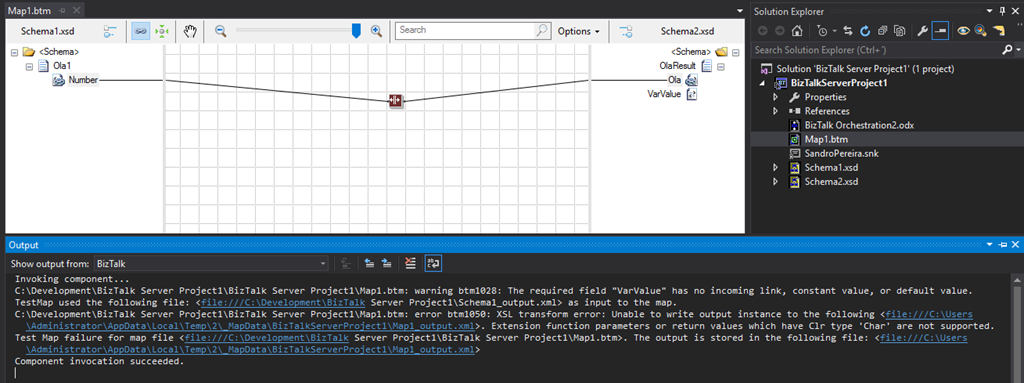
Again, I caught this error while I was trying to test my custom functoid inside Visual Studio.
The Custom Functoid was invoking the following code:
private string GetCSharpBuffer()
{
    StringBuilder builder = new StringBuilder();
    builder.Append("public string SplitText(string element, int pos, char splitter)\n");
    builder.Append("{\n");
    builder.Append("\tstring[] listValues = element.Split(splitter);\n");
    builder.Append("\tif (listValues != null)\n");
    builder.Append("\t\tif (listValues.Length > pos)\n");
    builder.Append("\t\t\treturn listValues[pos];\n");
    builder.Append("\treturn \"\";\n");
    builder.Append("}\n");
    return builder.ToString();
}
Or, to be easier to read in a clean C# code, that would be like this:
public string SplitText(string element, int pos, char splitter)
{
   string[] listValues = element.Split(splitter);

   if (listValues != null)
      if (listValues.Length > pos)
         return listValues[pos];
   return "";
}
📝 One-Minute Brief
Explains why BizTalk custom functoids fail with the “char[] are not supported” error and shows how to properly handle string and character data types when developing custom functoids.
Cause
Unfortunately, this is a limitation of the BizTalk mapper engine. The type Char is not supported at least on built-in code inside the XSLT, in other words, by using the Functoid SetScriptBuffer functionality:
SetScriptBuffer(ScriptType.CSharp, this.GetCSharpBuffer());
I didn’t test, but it may work if you replace this functionality with the SetExternalFunctionName functionality:
SetExternalFunctionName(GetType().Assembly.FullName, GetType().FullName, "SplitText");
Note: This means that the code will not be inside the XSLT but instead you will be calling an external assembly that needs to be on GAC.
Solution
The simple solution, or let’s call it a workaround, is to use strings instead, either on inputs as output parameters of the Functoid. For that, we just need to replace the above code to this:
private string GetCSharpBuffer()
{
    StringBuilder builder = new StringBuilder();
    builder.Append("public string SplitText(string element, int pos, string splitter)\n");
    builder.Append("{\n");
    builder.Append("\tstring[] listValues = element.Split(Convert.ToChar(splitter));\n");
    builder.Append("\tif (listValues != null)\n");
    builder.Append("\t\tif (listValues.Length > pos)\n");
    builder.Append("\t\t\treturn listValues[pos];\n");
    builder.Append("\treturn \"\";\n");
    builder.Append("}\n");
    return builder.ToString();
}
Or again, in a simple C# form:
public string SplitText(string element, int pos, string splitter)
{
    string[] listValues = element.Split(Convert.ToChar(splitter));

    if (listValues != null)
       if (listValues.Length > pos)
          return listValues[pos];
    return "";
}
By doing that, you will be able to successfully test the Functoid.
Hope you find this helpful! If you liked the content or found it useful and would like to support me in writing more, consider buying (or helping to buy) a Star Wars Lego set for my son.



