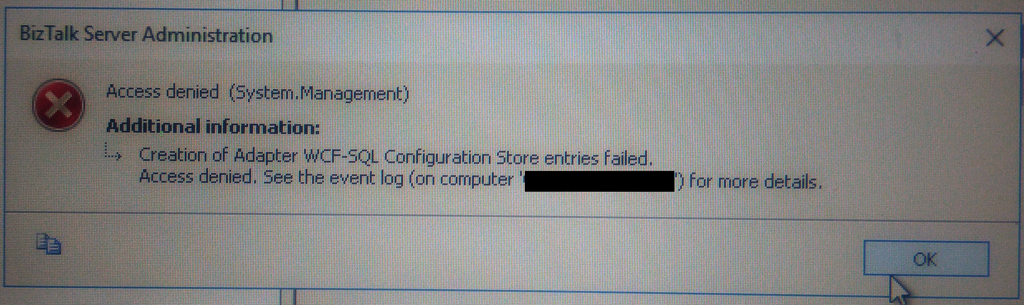
This week, while configuring and optimizing a brand-new BizTalk Server 2016 environment, we got the following error message while trying to configure and register the WCF-SQL Adapter in the BizTalk Server Administration console:
Creation of Adapter WCF-SQL Configuration Store entries failed. Access denied. See the event log (on computer ‘SQL-SERVER’) for more details.
(sorry the picture quality, it was taken with my cell phone)
Although I was a member of the BizTalk Administration group, I didn’t have remote access to the SQL Server machine that was managed by another team, so I couldn’t go there to check it out. Nevertheless, I reached that team (SQL and sysadmins) already with a possible solution that turned out to be correct.
📝 One-Minute Brief
A troubleshooting guide that explains why BizTalk Server fails with “Creation of Adapter WCF‑SQL Configuration Store entries failed” and how to resolve permission or configuration issues that prevent the WCF‑SQL adapter from being registered correctly.
Cause
Many times, these types of issues indicate or lead us to believe that there are problems associated with MSDTC. If it is not properly configured, Windows Firewall may be blocking DTC communications, or in an HA environment, SSO is not clustered and may be offline.
All these possibilities should be investigated. However, if any of the points mentioned above were, in this case, a probable cause of the problem, it should have already manifested when the team pre-installed the environment, and they did so without encountering any problems.
The only difference between the installation and my current configuration was that these tasks were performed by different users!
It is important to mention that the user who is trying to register an Adapter using the BizTalk Server Administration Console needs to have permissions to the SSO Database in order to register its properties so that they can store and retrieve the properties at design time and runtime.
And that is one of the reasons why the BizTalk Server Administrators group should be a member of the SSO Administrators group.
BizTalk administrations are responsible for configuring all the components of BizTalk, and many of them need to interact with the SSO Database.
The people/team that was responsible to install BizTalk Server, they were members of BizTalk Server Administration, SSO Administration and some of them System Administrations and that was the reason why they didn’t get this problem or similar problems. The reason for the problem I faced was:
My user was a member of the BizTalk Server Administrators group and the local admin group only. But the BizTalk Server Administrators group wasn’t a member of the SSO Administration group.
Solution
To solve this problem, you may have two options:
Add my user to the SSO Administrators group.
Not recommended because, in my opinion, it is more difficult to manage user access rights if you add them to each individual group.
Or add the BizTalk Server Administrators group as a member of the SSO Administrators group.
After my user or the BizTalk Server Administrators group was added to the SSO Administrators group, I was able to register the adapter.
Note: this problem can happen with any adapter you are trying to register.
Hope you find this helpful! If you liked the content or found it useful and would like to support me in writing more, consider buying (or helping to buy) a Star Wars Lego set for my son.
Author: Sandro Pereira
Sandro Pereira lives in Portugal and works as a consultant at DevScope. In the past years, he has been working on implementing Integration scenarios both on-premises and cloud for various clients, each with different scenarios from a technical point of view, size, and criticality, using Microsoft Azure, Microsoft BizTalk Server and different technologies like AS2, EDI, RosettaNet, SAP, TIBCO etc.
He is a regular blogger, international speaker, and technical reviewer of several BizTalk books all focused on Integration. He is also the author of the book “BizTalk Mapping Patterns & Best Practices”. He has been awarded MVP since 2011 for his contributions to the integration community.
View all posts by Sandro Pereira