


Introduction
Maps or transformations are one of the most common components in the integration processes. They act as essential translators in the decoupling between the different systems to connect. This article aims to explain how maps are processed internally by the engine of the product as we explore the map editor BizTalk Server.
This series of posts is based on the series BizTalk Server – Basic principles of Maps published earlier, where the basic functionalities of maps are explained in detail and how they can be implemented. This article intends to be an introductory note for those taking the first steps in this technology.
As explained in the previous article, when we perform a transformation in the message, there are 5 basic functionalities that typically arise:
- A simple mapping of a given value (direct copy)
- Concatenation of values
- Conditional selection
- Custom scripts
- Add new values (data)
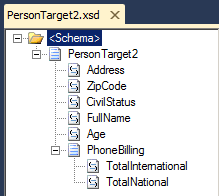
Based on these functionalities, we will explain how the BizTalk Mapper Designer processes and translates these links internally. To better understand its functioning, we perform some changes to the structure of the destination schema: we add an optional element (“CivilStatus”) and intentionally disorganize its structure.
📝 One-Minute Brief
This introductory post demystifies the internal engine of the BizTalk Mapper. Sandro explains that while we see links and functoids, BizTalk translates them into XSLT. Crucially, he details the “Target-to-Source” processing model: instead of reading the source file from start to finish, the engine traverses the destination schema and “pulls” the necessary data from the source to build the final message.
Processing model of BizTalk Maps
Although traditionally the information is extracted from the source as it is being processed, in reality, in the models based on XSLT, what happens is exactly the opposite: each element in the target (destination schema) causes the search for the corresponding element in the source. Here’s a traditional example:
- The source is traveled (parsed) from the beginning to the end of the file.
- The information is extracted from the source in the exact order that it is found.
- The mapping rules are constructed as the source is traveled (parsed).
BizTalk also uses this technique in the conversions of Flat Files to XML format (Syntax Transformations, also explained in BizTalk Server – Basics principles of Maps), however, the transformations inside maps use a different approach, as we will see later in this article.
One of the important factors when using integration tools is also having in mind the existing standards format or technologies, and that’s what the creators of the product have in mind. BizTalk works internally, almost exclusively, with XML documents, so it made sense to use a standard format to carry out these types of transformations. For that, W3C defined the XSLT (Extensible Stylesheet Language Transformation) as the standard format to represent the transformations between XML documents.
This way, all links and functoids that are graphically visible in the Mapper Grid are no longer than a graphical representation of an XSLT document that transforms the source document into a particular format specified by the destination schema, i.e., BizTalk maps are graphical representations of XSLT documents that allow us to perform, in a simple and visual manner, transformations between XML messages.
We can say that BizTalk maps always have their focus on the final document, thereby making sense that the mapping rules are processed in the sequence required to create the final document. When the map is compiled, these rules are translated into XPath queries and XSLT functions in order to transform the required information, i.e., the mapping rules are built from the destination (target) and not by the source, as some traditional tools (or traditional models).
BizTalk maps follow the model below:
- The BizTalk mapping engine traverses the destination schema from beginning to end.
- The mapping rules are constructed and executed as links are encountered in the destination schema.
- The information is extracted from the source when a link is encountered in the destination schema.
Note: We can use an XSLT created by an external application and include it on the map inside a Scripting functoid (XSLT custom script) or by importing a XSLT file that carrying out the complete transformation of the map (of course the editor – BizTalk Mapper Designer – does not represent the graphical representations – links and functoid – in this scenario).
Related links
- How BizTalk Maps Work – Deconstructing a map (Part 2)
- How BizTalk Maps Work – The sequence of links (Part 3)
For those looking to move beyond the basics of message transformation, I highly recommend checking out my eBook, BizTalk Mapping Patterns & Best Practices, published in partnership with BizTalk360.
This resource is a deep dive into the real-world challenges of data transformation. It covers:
- Mapping Patterns: From simple field-to-field links to complex structural shifts.
- Performance Optimization: How to build maps that don’t slow down your environment.
- XSLT vs. Functoids: Knowing exactly when to use built-in tools and when to write custom code.
Whether you are maintaining a legacy BizTalk 2010 environment or planning a migration, these patterns are the foundation of clean, maintainable integration.
Download the full eBook here: BizTalk Mapping Patterns & Best Practices
Hope you find this helpful! If you liked the content or found it useful and would like to support me in writing more, consider buying (or helping to buy) a Star Wars Lego set for my son.




How to implement BizTalk CAT instrumentaion in XSLT.