

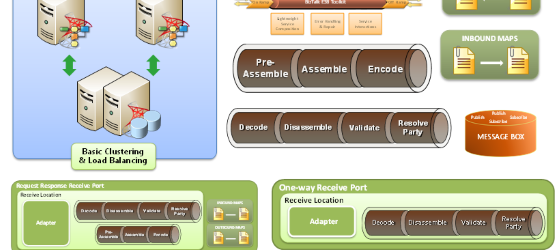
After the unexpected success of my previous post and some requests, I decided to spend half of my weekend improving the stencil by adding more artifacts.
📝 One-Minute Brief
Following the popularity of the initial release, I have expanded the BizTalk Server Visio Stencil pack. This update brings the total to 37 high-quality, resizable shapes. New additions include detailed representations of BizTalk topologies (Clustering/Standalone), ESB Toolkit components, and specific messaging artifacts like Receive/Send Pipelines, Inbound/Outbound Maps, and various Port types (One-way, Request-Response, Solicit-Response). These stencils are now hosted on GitHub as part of the broader Microsoft Integration and Azure Stencils Pack.
The result is 26 new shapes of a total of 37, representing:
- BizTalk topologies (Standalone and Clustering)
- BizTalk Runtime Architecture and ESB Toolkit
- Receive and Send Pipelines, Inbound and Outbound Maps, Adapters, and Filters
- Receive Ports and Receive Locations (One-way and Request-Response)
- Send Ports (One-way and Solicit-Response)

Download
You can download the Microsoft Integration, Azure, BAPI, Office 365, and much more Stencils Pack for Visio from GitHub here:
I’m not a design expert, but inspired by several presentations available on the Web, I created new shapes, and I shared others (find them in the presentations).
Hope you find this helpful! If you liked the content or found it useful and would like to support me in writing more, consider buying (or helping to buy) a Star Wars Lego set for my son.




Thank you! Greatly appreciated!
//Piotr
Thanks Sandro, your blog is in my RSS Reader ! Great Blog Content! 😉
I downloaded the file but it does not open. I get an error saying the file is corrupt. Are you sure the file is totally kosher?
Hi Mikael,
Apparently there is a problem at source, it took me an eternity to download the file, which is not normal.
Please try the following links:
– http://dl.dropbox.com/u/16742382/VisioBiztalkServer2010.zip
or
– http://dl.dropbox.com/u/16742382/BiztalkServer2010.vss
I’ve tried it, works for me – I’m using Visio Premium 2010.
Let me know if you have more problems
Top work there Sandro.. The graphics are slick .. 🙂
These shapes are fantastic! Great work Sandro! I can see these becoming a standard for physical architecture diagrams.
Thanks Sandro. It worked like a charm for me in Visio 2003.
Thanks Sandro…. Excellent post… Good work…!!!
Great really helpful 😀
Thanks Sandro, brilliant work….