


I have installed and enabled the BAM Excel Add-in in Excel 2007. Now, when I start Excel, I get the following error message:
“Repairs to BAM.xla’
Excel was able to open the file by repairing or removing the unreadable content.
This workbook has lost its VBA project, ActiveX controls and any other programmability-related features”
📝 One-Minute Brief
When opening the BAM Add-in in Excel 2007, you may see the error: “This workbook has lost its VBA project, ActiveX controls and any other programmability-related features.” This occurs because the VBA for Applications component was not installed with Microsoft Office. To fix it, you must modify your Office installation through the Control Panel to include “Visual Basic for Applications” under Shared Features.
Cause
- You get this error because during the installation of MS Office 2007, Visual Basic for Application was not installed.
Solution
- To solve this, you need to change your installation of MS Office.
- Close Excel if it is open.
- In the Control Panel, choose Add or Remove Programs.
- Select Microsoft Office from the list, then click the Change button.
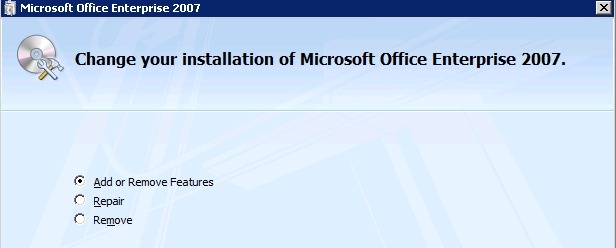
- Choose Add or remove features and press Continue.
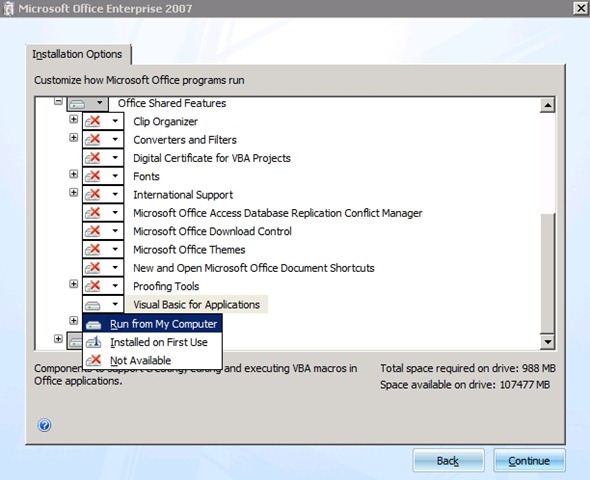
- Select Visual Basic for Applications in the Office Shared Features list and set it to Run from My Computer. Then click on the Continue button.
After the installation is finished, you will be able to use the BAM Excel Add-In.
This error is a simple matter of a missing prerequisite. By ensuring the VBA shared feature is installed, you provide the environment the BAM Add-in needs to execute its logic.



