


A funny error I found out on December 4, 2017, that I’m now recovering from my backlog to be published. While trying to repair a BizTalk Server 2016 installation on a virtual machine, I encountered this annoying, funny, and strange error: Please insert the disk: 1.
Microsoft BizTalk Server 2016 Installation Wizard
Please insert the disk: 1
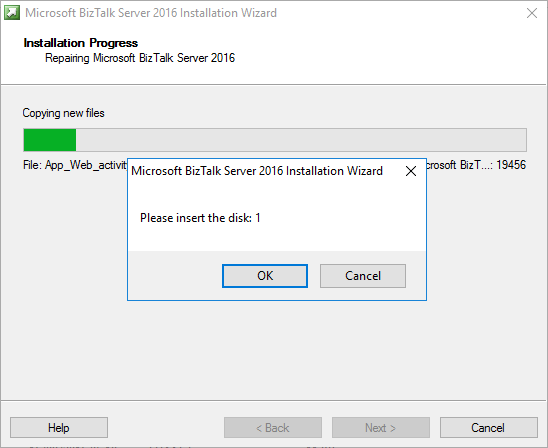
Regardless of what I did back then, like running the execution file as an administrator, I was getting this error every time I tried to repair the BizTalk Server installation.
And what I did back then was:
- Attach the BizTalk Server ISO file to the DVD drive of the Virtual Machine that was running in Hyper-V.
- And execute the installation file from the VM’s DVD drive.
📝 One-Minute Brief
A troubleshooting guide explaining why BizTalk Server repair installation fails with the “Please insert the disk 1” error and how to fix it by restoring the correct installation media or source path.
Cause
Unfortunately, this message may appear if you are trying to repair the product from the CD/DVD drive, and the reason is not clear to me.
I don’t know if this error occurred due to the fact that in the original installation, the ISO was locally on the machine, or it is just a coincidence.
Solution
The solution, however, is very simple:
- Copy the contents of the BizTalk Server 2016 ISO to the local hard drive of the Virtual Machine, but I believe this is the same to other BizTalk Server versions.
- And execute the BizTalk Server setup file from the local Hard Drive as an Administrator.
By doing so, you will definitely resolve the Please insert the disk: 1 issue and be able to repair the existing installation.
Hope you find this helpful! If you liked the content or found it useful and would like to support me in writing more, consider buying (or helping to buy) a Star Wars Lego set for my son.




Interestingly this also applies to BizTalk Standard to Enterprise upgrades if you run setup of a mounted ISO