


Time to update and improve a very old project of mine: Item Template for Visual Studio 2010: Custom BizTalk Functoid. I really like this one because I normally create many custom functoids, and it will help me streamline my work. Be fast, more productive, and avoid repeating and annoying tasks… that is my goal.
📝 One-Minute Brief
One-Minute Brief (TL;DR):
This template will allow you to easily create new Functoids for BizTalk Server 2016 – but I think it will also work for other versions of BizTalk/Visual Studio – without having to code the entire class, and therefore allowing you to focus on what really matters, the functoid behavior. Just start a new Visual Studio C# library project, or open an existing one, and add a functoid class to start building your BizTalk Server custom Functoid.
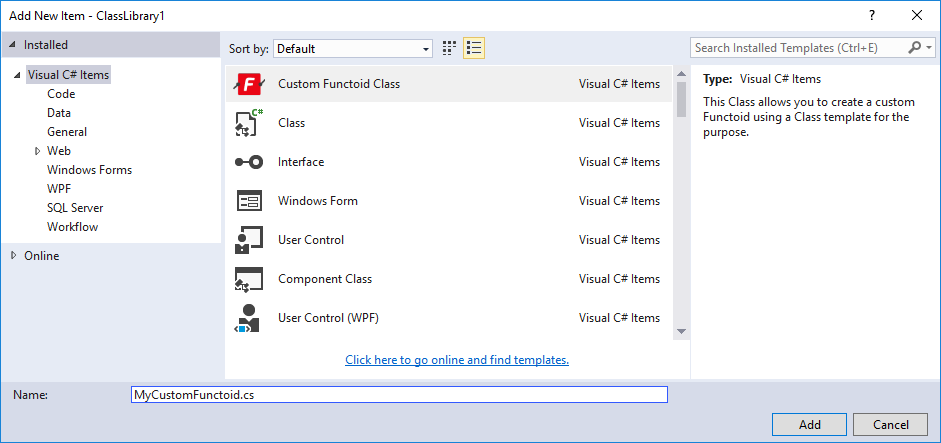
This will create a class with the basic skeleton necessary for you to start building your custom functoid, including adding the necessary references (DLLs) to your project. Again, the aim here is to you to focus on the logic of your custom functoid, not on the need to remember all the structure you need to implement, or on the properties you need to override from the extended BaseFunctoid.
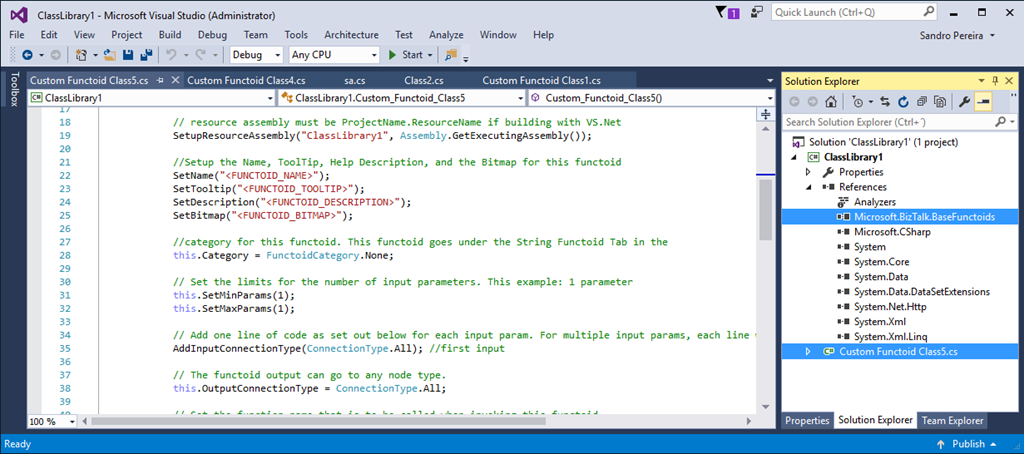
How can I install the Item Template?
To use this item template in your C# library projects, just download the project (Don´t unzip) and copy the compressed file to:
- C:\Users\UserName\Documents\Visual Studio 2015\Templates\ItemTemplates\VisualC#.
Download
THIS SAMPLE IS PROVIDED “AS IS”, WITHOUT WARRANTY OF ANY KIND.
You can download BizTalk Server 2016: Custom BizTalk Functoid item template for Visual Studio 2015ayed Start) with PowerShell from GitHub here:
Hope you find this helpful! If you liked the content or found it useful and would like to support me in writing more, consider buying (or helping to buy) a Star Wars Lego set for my son.




1 thought on “Custom BizTalk Functoid item template for Visual Studio 2015 is now available”