

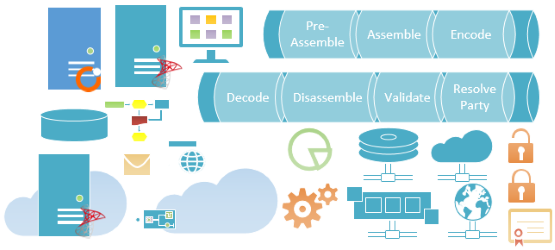
Finally, I’m happy with the final result and ready to release the first version of this new version of Visio 2013 Stencils for BizTalk Server… This is a collection of 73 modern flat Visio 2013 shapes that will help you represent BizTalk Server physical architectures, Integration architectures (Cloud or Hybrid scenarios), or solutions diagrams in Visio 2013:
- BizTalk Servers shapes
- BizTalk, SQL, BAM, IIS, and so on…
- Common BizTalk artifacts:
- Orchestrations, Receive and Send Pipelines, Transformations, and Filters
- BizTalk Out-of-the-box Adapters shapes
- SMTP, SQL, File, FTP, SFTP, MSMQ, …
- Business Activity Monitoring, Business Rules Engine, BizTalk Console Administration, and BizTalk360
- Windows Azure BizTalk Services and Cloud shapes
- Common Integration Servers shapes
- SMTP, Active Directory, Web, Mainframe, …
- Certificates, RFID, Gateway, Secure Message, and much more…

📝 One-Minute Brief
Create professional BizTalk architecture diagrams with this updated collection of 73 modern, flat Visio 2013 shapes. This pack includes everything from core BizTalk artifacts (Orchestrations, Pipelines) and adapters (SFTP, SQL) to Azure BizTalk Services and BizTalk360 icons. Optimized for performance, the file size has been slashed to just 822KB while maintaining high-quality resizability and design template compatibility.
As I said in my previous post, this is a major upgrade, apart from improving some of the existing shapes, several shapes were removed (like logotypes and “static” receive port representations)… but many new ones were created, for example, Cloud and Bridges, and others to provide a better representation of receive and send ports. For you to have a good perspective, we went from 37 to 73 available shapes that you can use and resize without losing quality!
Another big complaint that existed in the previous version was:
- The size of the stencil file is 26.5 MB.
- And the lack of parameterization or flexibility on some of the shapes, especially the receive and send ports shapes available.
Well, these two issues were solved in this version. The size of the file is now 822KB! And all the shapes can be modified or reconfigured, and you can apply different design templates.
There are still some points that could be improved, as well as adding new stencils, and I expect to release a new version next month with some of these improvements.
Instructions:
- Download the file and copy it to the folder C:\Users\you_user\Documents\My Shapes (that is the default folder for the Visio custom shapes)
- To access the shapes in Visio, from the Shapes Windows select: More Shapes > My Shapes > BizTalkServerStencilsForVisio2013.vssx.

Download
You can download the Microsoft Integration, Azure, BAPI, Office 365, and much more Stencils Pack for Visio from GitHub here:
This stencil pack is an ongoing project. If you have created custom shapes or want to see new artifacts added, feel free to contribute to the GitHub repository!
Hope you find this helpful! If you liked the content or found it useful and would like to support me in writing more, consider buying (or helping to buy) a Star Wars Lego set for my son.




Thanks for shairing this. 🙂