


APIs play a critical role today because they enable different software systems to communicate with one another. Therefore, effective API Management becomes essential to keep these interactions seamless, secure, and efficient. Nevertheless, like any complex platform, API Management can still present challenges that require investigation and troubleshooting.
One common issue developers encounter appears when they try to remove future unused Name Values from Azure API Management. At first glance, this task seems straightforward. However, these Name Values often hide dependencies that are not immediately obvious. To better understand this behavior, let’s first clarify what Name Values are and why this situation occurs.
📝 One-Minute Brief
Removing unused Name Values in Azure API Management may look like a harmless cleanup task. However, hidden dependencies can easily cause conflicts and deployment errors. This Friday Fact explains why Name Values sometimes cannot be deleted, how backend configurations can still reference them, and the correct step‑by‑step approach to safely remove both the backend and the Name Value without breaking existing API configurations.
Understanding the requirement
When managing APIs, name values (often referred to as key-value pairs) are used for various configurations, such as setting API keys, configuring endpoints, or defining parameters. Sometimes, these name values become obsolete and need to be removed to maintain a clean and efficient system. However, you might encounter an error preventing the removal of these unused name values, especially when they are linked to existing backend configurations.
This error typically happens because a backend configuration still references those name values. The API management system prevents its deletion to avoid breaking any dependencies that might rely on this configuration.
Solution
The solution to this issue normally involves a two-step process:
- First, remove the backend configuration that uses the name-value.
- And then delete the name value itself.
Step 1: Remove the Backend Configuration
Before you can remove the name value, you need to ensure that no backend configurations are using it. Here’s how you can do this:
- Identify the backend: Determine which backend configuration is using the name value you want to delete.
- Access the backend settings: Navigate to the backend settings in your API management.
- Remove the backend: Carefully review the backend settings to confirm that it can be safely removed without disrupting your API services. Once confirmed, remove the backend configuration.

Note: Ensure that the backend removal does not impact other parts of your API infrastructure. Verifying that this backend is truly obsolete or that its functionalities have been migrated elsewhere is important.
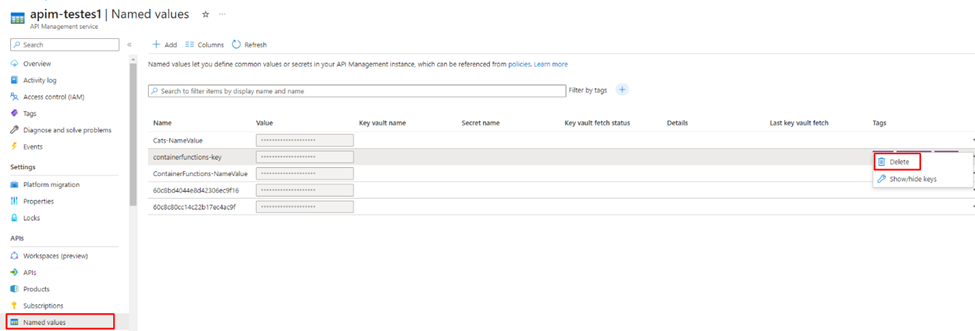
Step 2: Remove the Named Values
With the backend configuration removed, you can now proceed to delete the unused name value:
- Navigate to named values: Go to the section in your API management that manages named values.
- Delete the name value: Find the specific name value that you identified as unused and delete it.
Conclusion
Removing future unused name values in API management might seem straightforward, but dependencies can complicate the process. You can successfully delete these name values without errors by methodically removing the associated backend configurations first. This approach helps maintain a clean and efficient API management system, ensuring that your API services run smoothly and efficiently.
To lazy to read? We’ve got you covered! Check out our video version of this content!
Hope you find this helpful! If you enjoyed the content or found it useful and wish to support our efforts to create more, you can contribute towards purchasing a Star Wars Lego for Sandro’s son!



