
Migrating integrations from BizTalk Server to Azure Logic Apps Standard isn’t simply a matter of replacing orchestrations, maps, pipelines, and adapters.
There are many smaller pieces of logic hidden inside existing BizTalk solutions that also need to be migrated.
And XPath expressions are a perfect example.
If you have worked with BizTalk Server for any length of time, you have probably used XPath expressions inside orchestrations, custom pipeline components, helper classes, or other parts of your integration solutions.
When we migrate those solutions to Azure Logic Apps Standard, we frequently need to reproduce the same logic using expressions or actions inside our workflows.
And that is where we hit a surprisingly annoying problem:
What is the correct XPath for this XML document?
Logic Apps allows us to execute XPath expressions, but it doesn’t provide a visual XPath editor or tester to help us navigate the XML structure, understand the namespaces, build the expression, and immediately see the result.
So how do we test it?
For many developers, the answer is Google: XPath Tester Online
And that normally works.
But should we really be copying real enterprise XML messages into random online tools? Probably not.
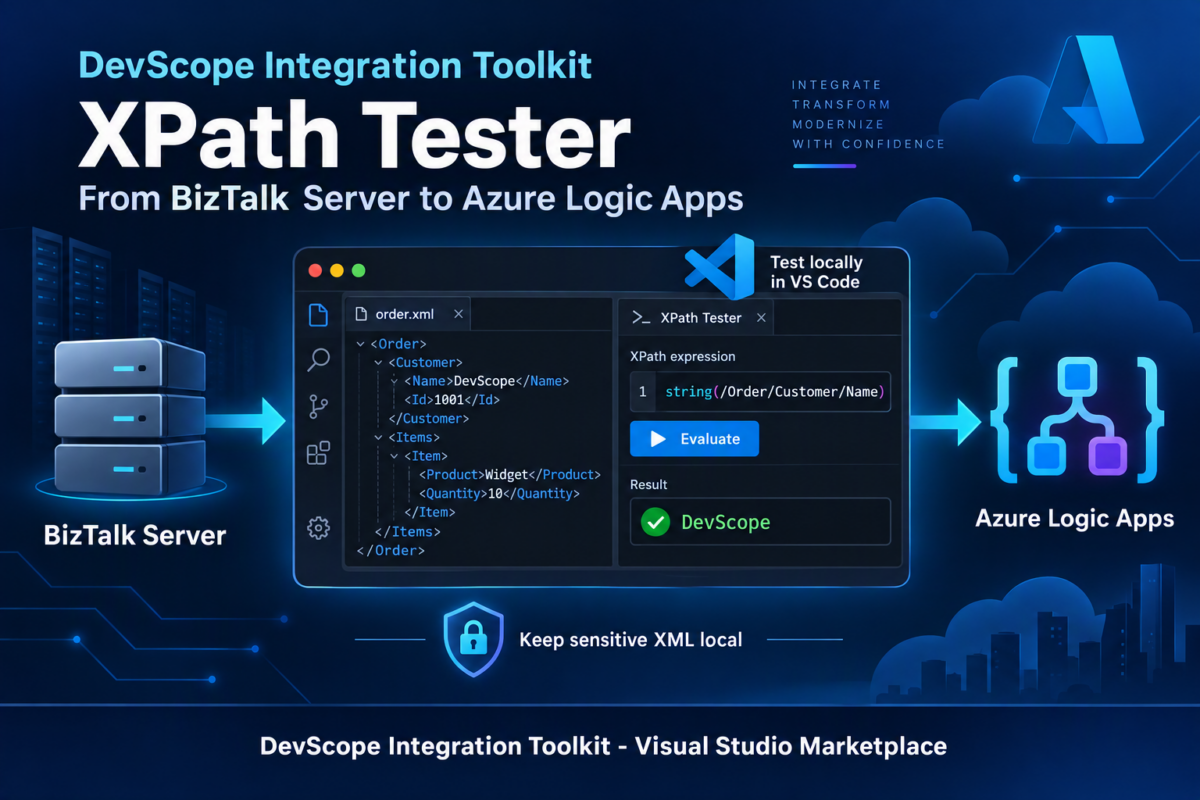
That is why we added an XPath Tester to the DevScope Integration Toolkit for Visual Studio Code.
📝 One-Minute Brief
Migrating BizTalk Server solutions to Azure Logic Apps Standard often requires recreating existing XPath logic inside Logic Apps actions and expressions. However, Logic Apps doesn’t provide a visual way to build and test XPath expressions. The DevScope Integration Toolkit brings an XPath Tester directly into VS Code, helping developers identify and validate the correct XPath locally, without copying potentially sensitive XML data into online tools.
XPath is still important when migrating from BizTalk Server
When organizations start their journey from BizTalk Server to Azure Logic Apps Standard, the big architectural components usually receive most of the attention.
We need to migrate:
- Orchestrations;
- Maps and transformations;
- Receive Locations and Send Ports;
- Pipelines;
- Business Rules;
- Adapters and connectivity;
- Error handling and monitoring.
But inside those components, we also have many smaller pieces of implementation logic.
XPath is one of them.
A BizTalk orchestration, for example, may contain expressions that retrieve or manipulate a specific element inside an XML message.
Conceptually, we may have something like:
/*[local-name()='Order' and namespace-uri()='http://schemas.company.com/orders']
  /*[local-name()='Customer']
  /*[local-name()='Name']
During a migration, that business requirement doesn’t disappear. We still need to retrieve the same information from the message. The implementation simply moves somewhere else.
And in Azure Logic Apps, XPath may once again be an excellent way to do it.
Also, XML is not going away. New integrations still rely on XML documents, and sometimes we need to extract a value from the message to perform a Business decision, for example. Why convert to JSON just to have tokens in the Logic App Design when we can simply apply an XPath query?
Using XPath inside Azure Logic Apps
Azure Logic Apps provides the xpath() workflow expression function, allowing us to evaluate an XPath expression against XML.
For example, conceptually, we may need something similar to:
xpath(
    xml(body('Get_XML_Message')),
    'string(/Order/Customer/Name)'
)
The problem isn’t necessarily writing xpath(). The difficult part is often identifying the correct XPath expression.
This becomes particularly challenging when working with:
- Large XML documents;
- Deeply nested structures;
- Multiple namespaces;
- Default namespaces;
- Repeating elements;
- Attributes;
- XML generated from enterprise schemas;
- Industry-standard messages;
- Existing BizTalk schemas.
If I have a 500-line XML message and need to retrieve one specific element, I don’t want to deploy and execute my Logic App repeatedly just to discover whether my XPath expression is correct.
I want to test it first.
Logic Apps doesn’t provide a visual XPath testing experience
And this is where I believe there is a tooling gap. When building Logic Apps workflows, we can write XPath expressions inside actions and workflow expressions.
But there is no visual experience that allows us to provide an XML document, navigate its structure, write an XPath, execute it, and immediately see what nodes or values it returns.
So, in many cases, developers end up leaving Visual Studio Code and searching for an external XPath testing tool. There are plenty of good online tools that can do this. Technically, that solves the problem.
From an enterprise integration perspective, however, it creates two new ones:
- Productivity (especially working offline).
- But most importantly: Privacy.
Do you really want to paste your XML into an online XPath tester?
This is probably the biggest reason why I wanted an XPath Tester inside the DevScope Integration Toolkit.
Consider the XML messages we normally process in enterprise integrations.
They may contain:
- Customer information;
- Names and addresses;
- Order information;
- Invoice details;
- Employee information;
- Banking information;
- Healthcare information;
- Internal identifiers;
- Commercially sensitive information;
- Credentials or security-related values accidentally present in payloads.
During development, troubleshooting, or migration, it is very easy to take a real XML message and paste it into an online XPath testing website. I’ve done it with test data. Most developers probably have.
But with real integration messages, we need to be much more careful.
Even if a particular online service claims that the processing happens locally in the browser, we still need to understand and trust how that service works before providing it with potentially sensitive business information.
And there is an easier answer:
Don’t send the XML anywhere. Test it locally.
DevScope Integration Toolkit: XPath Tester
That is precisely the objective of the XPath Tester available in the DevScope Integration Toolkit.
Instead of leaving Visual Studio Code, searching for an online tool, and copying your XML somewhere else, you can test the XPath directly from your development environment.

The workflow becomes straightforward:
- Take the XML message you are using during the migration.
- Open the XPath Tester inside Visual Studio Code.
- Provide the XML sample.
- Define the necessary namespaces when required.
- Enter your XPath expression.
- Execute it.
- Immediately inspect the result.
- Adjust the XPath until you obtain exactly the information you need.
- Use that validated XPath inside your Logic App.
This is particularly handy during a BizTalk Server to Logic Apps migration. You already know what the old implementation is trying to achieve. What you need is a quick way to determine how to reproduce that behavior inside your new Logic Apps workflow.
But if you are not very familiar with XPath, the tool has a Navigator panel that allows you to interact with the message, and it will generate the XPath for you.

A small tool that becomes extremely useful during migrations
The XPath Tester isn’t intended to be some revolutionary new integration technology.
XPath exists for decades. XPath testing tools also exist everywhere. But that isn’t the point.
The objective of the DevScope Integration Toolkit is to make the day-to-day experience of integration developers better, particularly when developing and migrating solutions to Azure Logic Apps Standard.
And when migrating hundreds of integrations from BizTalk Server, these small productivity improvements matter.
Instead of:
- Logic Apps → inspect workflow run → copy XML → open browser → find XPath website → paste XML → test XPath → return to VS Code → apply changes to the workflow
we can reduce the flow to:
- Logic Apps → inspect workflow run → copy XML → Open VS Code XPath Tester → validate XPath → apply changes to the workflow
More importantly, the XML message stays inside your development environment. No unnecessary external websites. No unnecessary copying of potentially sensitive enterprise information.
Just a faster and safer development workflow.
Bringing the missing integration tooling into Visual Studio Code
This is ultimately one of the main goals behind the DevScope Integration Toolkit.
As we modernize BizTalk Server solutions into Azure Logic Apps Standard, we shouldn’t need to give up all the development experiences that made integration development easier.
Visual Studio Code is becoming an increasingly important development environment for Logic Apps Standard.
But there are still many areas where integration-specific tooling can make our lives considerably easier.
That is what we are trying to address with capabilities such as:
- Visual Data Mapper
- Visual XSD Editor
- Visual JSON Schema Editor
- Flat File Wizard
- Schema Validator
- Workflow Diff
- XPath Tester
- Logic Apps JSON Path Tester
- Schema to C#
The objective isn’t to recreate BizTalk Server inside Visual Studio Code.
The objective is to provide the tools we actually need to successfully move away from BizTalk Server and build modern integration solutions with Azure Logic Apps.
And the XPath Tester is another small but extremely handy piece of that puzzle.
Hope you find this helpful! If you liked the content or found it useful and would like to support me in writing more, consider buying (or helping to buy) a Star Wars LEGO set for my son.