For more than two decades, BizTalk developers have relied on the BizTalk Flat File Schema Wizard to help create flat file schemas.
Flat files may not be exciting. CSV files are certainly not new, and fixed-width formats are even less glamorous. However, in enterprise integration, one thing is clear: flat files are everywhere.
ERP systems, banking platforms, manufacturing systems, logistics applications, mainframes, B2B exchanges, legacy applications, and even modern SaaS solutions still exchange data using CSV, positional, delimited, and other proprietary flat file formats.
As organizations move their integrations from BizTalk Server to Azure Logic Apps Standard, those formats don’t magically disappear.
What often disappears, however, is something developers have relied on for years:
- The familiar development experience for creating flat file schemas.
For that reason, we wanted to bring that experience into Visual Studio Code with the DevScope Integration Toolkit.
Included in the toolkit is a Flat File Schema Editor/Wizard directly in Visual Studio Code. It allows integration developers to start with a flat file sample and visually build the schema required to process it in BizTalk Server or Azure Logic Apps.
More importantly, the toolkit currently generates BizTalk/Logic Apps flat file schemas (.xsd) from CSV, delimited, or fixed-width samples. In addition, it can convert a sample to JSON and generate the corresponding JSON Schema.
📝 One-Minute Brief
Discover how the DevScope Integration Toolkit Flat File Schema Editor/Wizard brings the familiar BizTalk Flat File Schema Wizard experience to Visual Studio Code, helping Azure Logic Apps Standard developers create schemas from CSV, delimited, and fixed-width flat file samples without going back to Visual Studio and the BizTalk development tools.
We Still Need Flat File Schemas in Modern Integration
There is sometimes an assumption that moving integrations to the cloud means moving everything to:
- JSON
- REST APIs
- Events
- Modern SaaS platforms
I wish that were true.
I wish that were true.
However, enterprise integration tells a very different story. Even in modern cloud architectures, we continue to deal with traditional and legacy data formats.
For example, we still receive files like:
10001|Sandro Pereira|Portugal|Active
10002|John Smith|United States|Active
10003|Mary Johnson|United Kingdom|Inactive
or:
10001,Sandro Pereira,Portugal,Active
10002,John Smith,United States,Active
10003,Mary Johnson,United Kingdom,Inactive
And sometimes we get something considerably more interesting:
HDR20261117DEVSCOPESYSTEM01
CUS000001Sandro Pereira         PTActive
CUS000002John Smith             USActive
CUS000003Mary Johnson           UKInactive
TRL000003
Anyone who has worked with BizTalk Server is already smiling.
Because we know what comes next.
We need to understand:
- Where does a record start and end?
- What is the record delimiter?
- What is the field delimiter?
- Is the document positional or delimited?
- Are records identified by tags?
- Are there repeating records?
- Is there a header?
- Is there a trailer?
- Are fields optional?
- What encoding is being used?
- What happens when a field is empty?
And ultimately: How do we describe this flat file structure using an XSD schema that our integration runtime understands?
That problem existed in BizTalk Server and it still exists in Azure Logic Apps. Now even more because several clients are migrating theres BizTalk Server solutions to Azure Integration Services.
The BizTalk Flat File Schema Wizard solved a real problem
One of the good things about BizTalk Server was that Microsoft didn’t expect developers to manually create every flat file schema annotation.
The BizTalk Flat File Schema Wizard allowed us to use an actual flat file instance as input and visually describe its structure to define both delimited and positional flat file schemas. The wizard supported identifiers and character and hexadecimal delimiters. It also provided preview capabilities and allowed us to select portions of an interchange when defining the schema.
That was extremely useful.
Imagine receiving this:
ORDER|10001|2026-11-17
CUSTOMER|C001|Sandro Pereira|Portugal
LINE|1|AZURE-SUB|1|150.00
LINE|2|SUPPORT|5|75.00
Looking at the file, we immediately understand the logical structure:
Order
  Header
    OrderNumber
    OrderDate

  Customer
    CustomerId
    Name
    Country

  Lines
    Line
      LineNumber
      Product
      Quantity
      Price
The problem isn’t necessarily understanding the file.
The problem is translating that understanding into the correct schema representation, with all the flat file annotations required by the parser.
Of course, we can write that manually. Just as I mentioned in my previous article about the XSD Schema Editor for Visual Studio Code and Logic Apps, technically nothing prevents us from working directly with the XSD.
But why should we? Anyone who has built non-trivial BizTalk flat file schemas knows that this is not just a normal XML Schema. Along with the regular schema structure, we need to define the specific flat file characteristics that tell the parser how the text document should be interpreted. And the more complex the input file becomes, the more difficult that is to maintain manually.
Bringing the Flat File Wizard experience to Visual Studio Code… and improve it
This is where the DevScope Integration Toolkit comes into the picture.
One of the capabilities included in the toolkit is a Flat File Editor/Wizard designed specifically for integration developers working inside Visual Studio Code.
And the idea is simple and get the existing essence inside BizTalk Flat File Wizard: Start with the message you actually have. For example:
10001;Sandro Pereira;Portugal
10002;John Smith;United States
10003;Mary Johnson;United Kingdom
Instead of starting by manually writing an XSD and trying to remember all the flat file-specific annotations required by the runtime, we can start with the actual document instance and describe its structure visually.
That is very similar to the workflow BizTalk developers have used for years. Microsoft’s original wizard was also designed around creating the flat file schema from an existing document instance.
But now: The development experience lives directly inside Visual Studio Code.

The DevScope Integration Toolkit Flat File Wizard currently supports all types of flat file scenarios that BizTalk Server Flat File Schema Wizard supports:
- Delimited flat files (like CSVs)
- and Positional flat files
And that distinction is important.
The improvements we try to bring
However, the main goal was not only brought that capabilities to Logic Apps but also to improve it if that was possible. And I think we did accomplish this by:
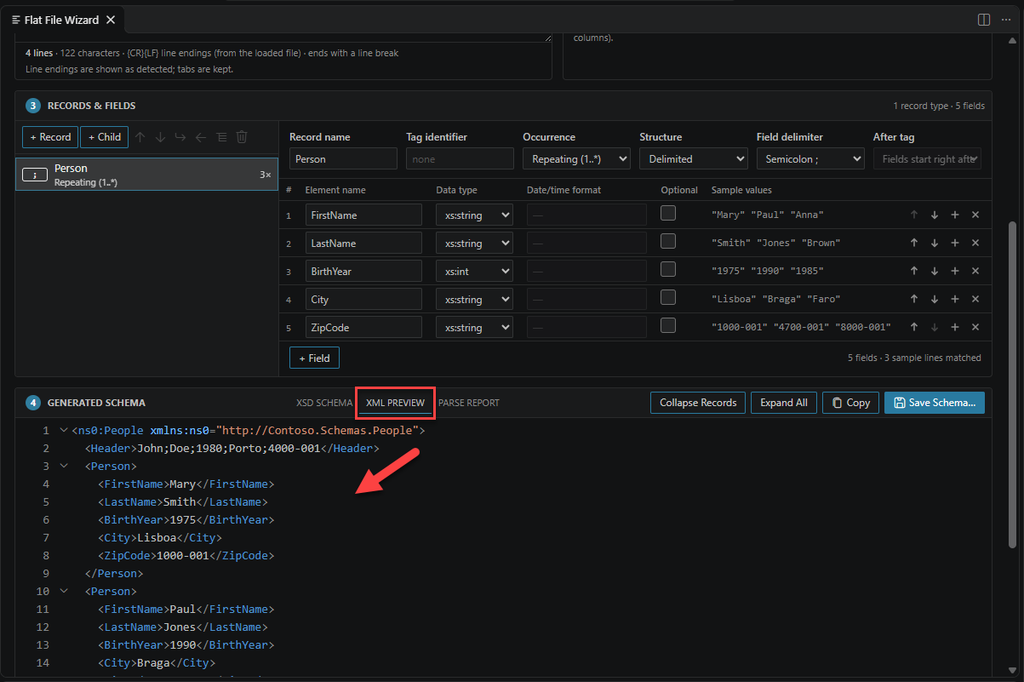
- Avoiding multiple screens, so now we have a single screen that we can work on all the steps.
- Most Flat Files are easy to be interpretates, like CSVs, so we add a Analyze Sample button than will try to infer all the parsing rules for you.
- We add a First line is a column header (kept as a single field, not parsed into columns) option to easily handle Flat Files where the first line is not data but the columns names.
- And this is not just a simple Wizard creator anymore, this is also a editor. That means that after you parse the Flat File into XSD you will be able to visually edit and apply changes.
- You didn’t have that option in BizTalk Flat File Schema Wizard. If you did a mistake, you add to delete it and start all over again.
- We will be improving this experience even more in upcoming new releases.
- It will support Flat File directly to JSON Schemas! (but we will address that in a dedicated blog post).
And in the same window you can see live the parsing result, even when you are making the chances:
And we also provide you a simple Parse Report for analyze and information:

We shouldn’t need BizTalk Developer Tools just to create a Flat File Schema
This is perhaps the main point. If I’m building new Azure Integration Services solutions using:
- Azure Logic Apps Standard
- Visual Studio Code
- Azure DevOps
- GitHub
- GitHub Copilot
I shouldn’t need to install:
- Visual Studio
- BizTalk Server Developer Tools
just because somebody sends me a Flat File and asks: Can you process this file?
Today we need the same kind of capability where we’re developing our Azure integrations.
And increasingly that means: Visual Studio Code.
I said this in my previous post about the XSD Schema Editor, and I think it is equally important here: It’s not about bringing BizTalk back. The objective isn’t to rebuild BizTalk Server inside Visual Studio Code.
BizTalk Server gave us many excellent integration development experiences. Some of them remain extremely useful and The Flat File Schema Wizard is definitely one of them.
Modernization should mean:
- Keep what worked.
- Improve what didn’t.
- And make those capabilities available in the tools we use today.
That is precisely what we’re trying to achieve with the DevScope Integration Toolkit. And the Flat File Wizard is only one piece of the toolkit
The DevScope Integration Toolkit isn’t only about flat files.
The current Visual Studio Marketplace extension includes:
- Visual Data Mapper
- Visual XSD Editor
- Visual JSON Schema Editor
- Flat File Wizard
- Schema Validator
- Workflow Diff
- XPath Tester
- Logic Apps JSON Path Tester
- Schema to C#
All directly available inside Visual Studio Code.
The philosophy behind all of them is similar:
Give enterprise integration developers the tooling they need where they are actually building integrations today.
Download
You can install the DevScope Integration Toolkit directly from the Visual Studio Marketplace:
If you’re coming from BizTalk Server, the Flat File Wizard should feel familiar.
If you’re developing Azure Logic Apps Standard, it means you don’t need to return to the old BizTalk development environment simply because your integration needs to understand a CSV, delimited, or fixed-width file.
And personally, I think that’s exactly how modernization should work.
Hope you find this helpful! If you liked the content or found it useful and would like to support me in writing more, consider buying (or helping to buy) a Star Wars LEGO set for my son.