

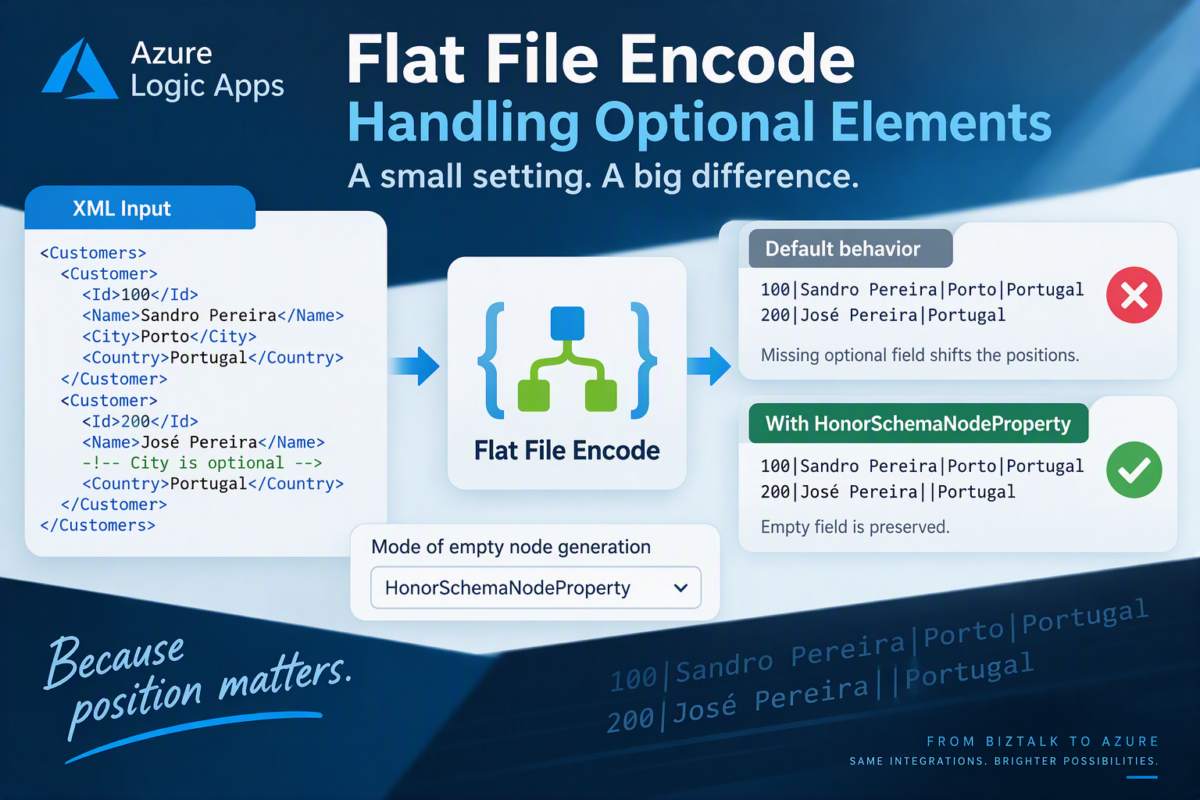
When working with Flat File schemas in Azure Logic Apps, creating the schema correctly is only part of the story.
Sometimes, your XML is perfectly valid, your Flat File schema is correctly configured, and the Flat File Encode action executes successfully, but the generated flat file is not exactly what you expected.
This is particularly noticeable when your schema contains optional elements.
If you come from a BizTalk Server background, or you’re migrating BizTalk Server solutions to Azure Logic Apps, the result may surprise you.
The reason may be a small but very important option:
- Honor schema node properties

📝 One-Minute Brief
When encoding XML into flat files in Azure Logic Apps, optional elements can produce unexpected results. By default, missing elements may also omit their corresponding delimiter, shifting subsequent fields to the wrong position. The Honor schema node properties option allows the encoder to consider the properties defined at the schema-node level, helping produce the expected flat-file structure, especially when migrating existing BizTalk Server integrations.
The problem
Let’s take a very simple example.
Imagine that we have a Flat File schema representing a list of customers with the following structure:
- Id
- Name
- City
- Country
The delimiter between the fields is a pipe character (|).
However, the City element is optional.
Now let’s assume we receive the following XML message:
<Customers>
    <Customer>
        <Id>100</Id>
        <Name>Sandro Pereira</Name>
        <City>Porto</City>
        <Country>Portugal</Country>
    </Customer>
    <Customer>
        <Id>200</Id>
        <Name>José Pereira</Name>
        <Country>Portugal</Country>
    </Customer>
</Customers>
Notice the difference between the two customer records.
The first customer contains all four elements:
- Id
- Name
- City
- Country
But the second customer doesn’t contain the City element because that element is optional:
- Id
- Name
- Country
If we pass this message through the Flat File Encode action using the default behavior, we will get the following output:
100|Sandro Pereira|Porto|Portugal
200|José Pereira|Portugal
At first glance, this may look perfectly valid.
But it isn’t necessarily the flat-file representation we want.
The problem with optional fields
The problem becomes obvious when we look at each field’s position.
Our expected structure is:
Id|Name|City|Country
For the first record, everything is correct:
100|Sandro Pereira|Porto|Portugal
We have:
- 100 > Id
- Sandro Pereira > Name
- Porto > City
- Portugal > Country
However, look at the second record:
200|José Pereira|Portugal
Because the XML document doesn’t include City, its position disappears from the resulting flat file.
If a receiving system interprets fields by position, it may interpret that line as:
- 200 > Id
- José Pereira > Name
- Portugal > City
- (empty) > Country
Or, the other option is. it will fail parsing. Nevertheless, now we have a problem:
- Portugal is not the City. It is the Country.
What we expect coming from BizTalk Server
If you come from a BizTalk Server background, especially if you have worked extensively with Flat File schemas, you probably expect the position of the optional field to be preserved. This is the default behavior in BizTalk Server.
The expected output would therefore be:
100|Sandro Pereira|Porto|Portugal
200|José Pereira||Portugal
Notice the second line:
200|José Pereira||Portugal
We now have two consecutive pipe characters (||).
And that is exactly what we want.
The empty value between those delimiters represents the optional City field:
- 200 > Id
- José Pereira > Name
- (empty) > City
- Portugal > Country
The City value is empty, but more importantly, its position in the flat-file structure is preserved.
That small difference can matter when integrating with systems that rely on positional or delimited records.
How to honor the schema node properties
This is where the Mode of empty node generation option in the Flat File Encode action becomes important.
| Parameter | Value | Description |
|---|---|---|
| Mode of empty node generation | ForcedDisabled – Do not generate any nodes for missing/empty schema fields. HonorSchemaNodeProperty – Respect the schema’s defined property for empty nodes (e.g., whether to emit a delimiter or not). ForcedEnabled – Always generate nodes for empty schema fields, regardless of schema definition. | The mode to use for empty node generation with flat file encoding. For BizTalk, the flat file schema has a property that controls empty node generation. You can follow the empty node generation property behavior for your flat file schema. Alternatively, you can use this setting to have Azure Logic Apps generate or omit empty nodes. |
The default behavior of Flat File Encode is to omit empty nodes, which means not respecting/honor the schema node properties.
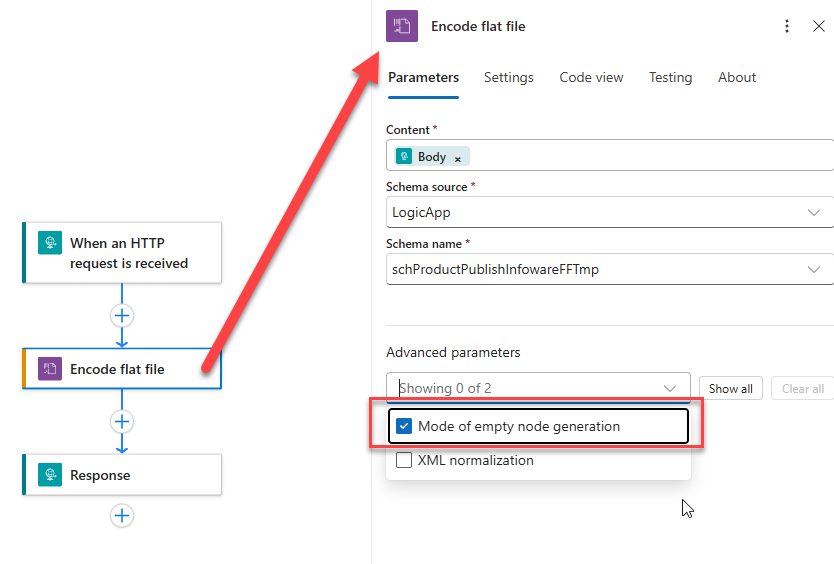
When configuring the Flat File Encode operation, you can configure the Mode of empty node generation property by:
- Click on the Advanced parameters
- and select the Mode of empty node generation option
- In the Mode of empty node generation property combobox, select the option HonorSchemaNodeProperty.
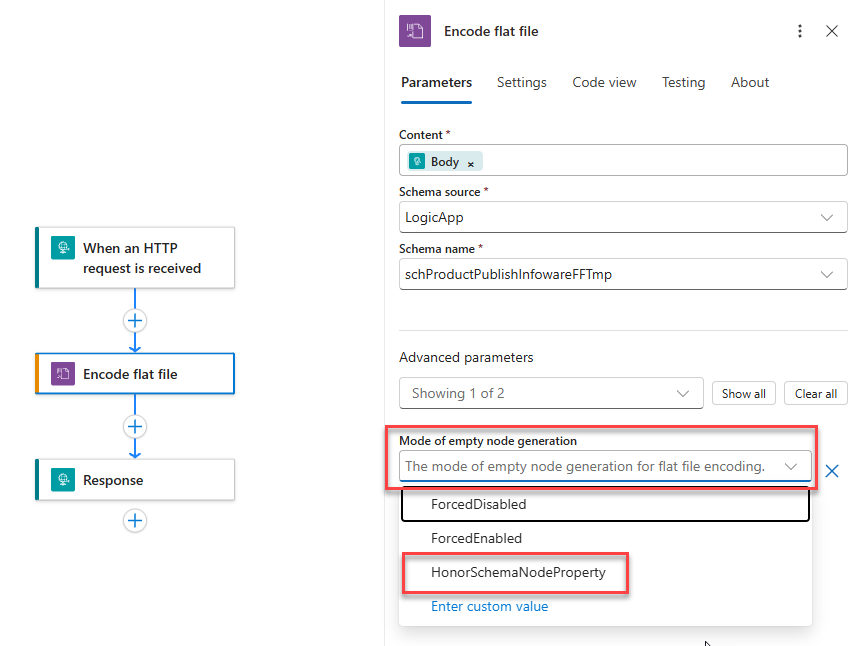
If your Flat File schema defines node-level properties that control how optional elements should be serialized, this setting instructs the encoder to take those properties into consideration.
That can make the difference between generating:
200|José Pereira|Portugal
and generating the expected structure:
200|José Pereira||Portugal
The difference is only one pipe character, but from an integration perspective, that single character can completely change the message’s meaning.
Why is this important?
This type of problem can be difficult to identify because nothing necessarily fails.
- The Logic App runs successfully.
- The XML is valid.
- The schema is valid.
- The Flat File Encode action succeeds.
- And a flat file is generated.
From a technical execution perspective, everything looks fine.
However, functionally, the generated message can be wrong.
Instead of:
Id|Name|City|Country
you effectively generate in some cases:
Id|Name|Country
for records where City isn’t present.
That can cause the receiving application to interpret subsequent values using the wrong field positions.
And those are often the worst integration problems because the message isn’t necessarily rejected. It may simply be interpreted incorrectly.
Especially important for BizTalk Server migrations
This is also something you need to pay special attention to when migrating existing BizTalk Server integrations to Azure Logic Apps.
One advantage of migrating these integrations is that we can often reuse or adapt concepts from existing Flat File schemas.
However, we shouldn’t assume that a similar or actually the same schema means the runtime behavior will automatically be identical.
This is a perfect example.
A BizTalk developer looking at:
Id|Name|City|Country
will naturally expect an empty City to result in:
200|José Pereira||Portugal
But if the Logic Apps Flat File Encode configuration, by default, isn’t honoring the relevant schema node properties, you may instead obtain:
200|José Pereira|Portugal
And that subtle difference can easily go unnoticed during a migration.
Pro Tip
When testing Flat File schemas, don’t only test the happy path where every field contains a value. That may hide the real problem because the resulting record looks perfectly correct.
Always include test messages where optional elements are missing. Then verify that the resulting record maintains the expected structure.
Remember the previous exercise: those two consecutive pipes (||) aren’t a mistake.
They are telling us something important: that field is empty, but its position in the flat-file record is still there.
And in flat-file integrations, position matters.
Sometimes the difference between a correct integration and corrupted data is just one small | character.
I hope you find this helpful! If you liked the content or found it useful and want to help me write more, you can consider buying (or helping to buy) my son a Star Wars LEGO set.



