

Delimited files such as CSV, comma-separated (,), pipe-separated (|), semicolon-separated (;), or tab-delimited files remain one of the most common integration formats in enterprise systems. Despite the rise of modern APIs, JSON, and XML, integration professionals still encounter flat files daily when exchanging information between ERPs, CRMs, warehouse systems, logistics platforms, financial applications, and trading partners.
At first glance, delimited files appear simple. Each field is separated by a specific character, and the receiving system splits the record whenever it finds that delimiter.
Consider the following example:
FirstName,LastName,Address,Country
Sandro,Pereira,Pedroso street,Portugal
Parsing this file is straightforward because the commas clearly separate each field.
However, real-world integrations are rarely this simple.
📝 One-Minute Brief
Delimited files are simple until business data contains the delimiter itself. In this article, we explore why CSV and flat file parsers misinterpret valid data, why custom preprocessing is not always ideal, and how BizTalk Server and Azure Logic Apps can address this challenge while preserving data integrity.
When Business Data Contains the Delimiter
Now consider the following record:
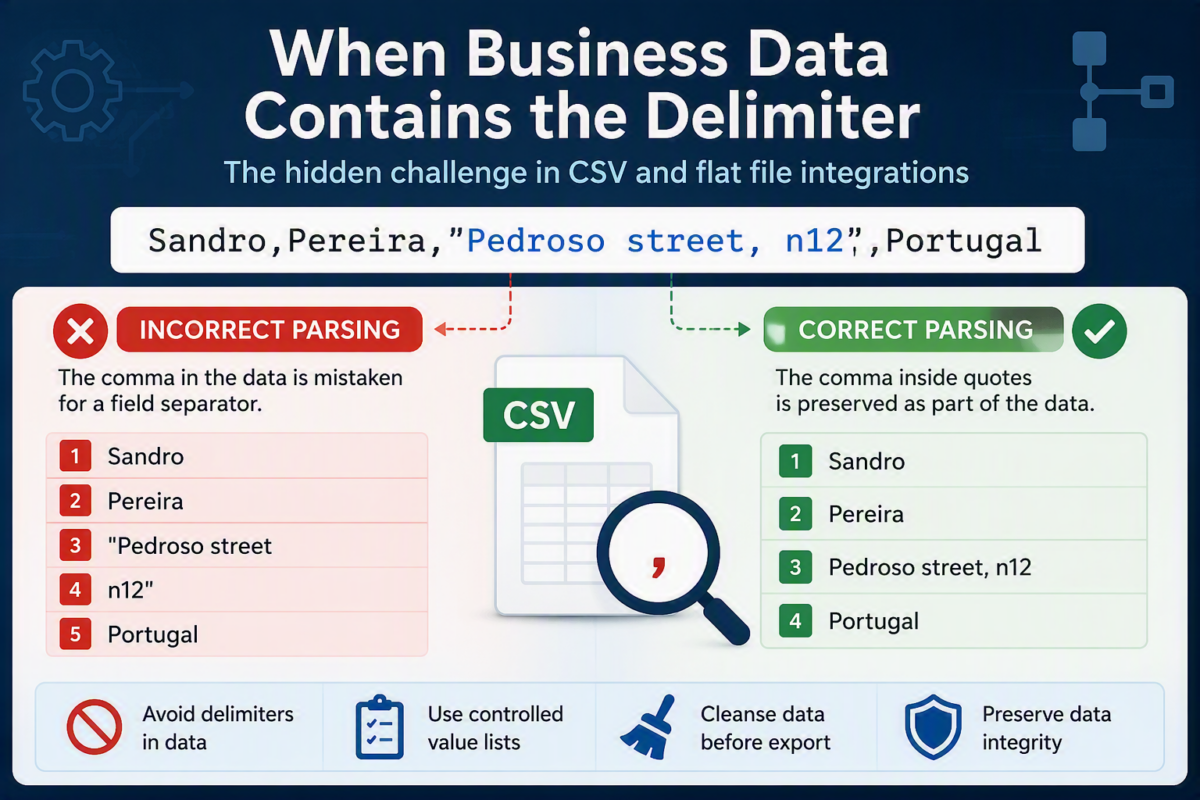
Sandro,Pereira,"Pedroso street, n12",Portugal
At first glance, it may seem valid, and it is! But there is an important problem.
How many fields does this record contain?
A “traditional” parser that uses commas as delimiters will interpret the data as:
Sandro
Pereira
"Pedroso street
n12"
Portugal
Instead of four fields, it now sees five.
The comma that belongs to the business data is being interpreted as a structural separator.
This issue is not exclusive to BizTalk Server. The exact same behavior occurs in Azure Logic Apps, and maybe in other services like Azure Data Factory, and virtually any parser that relies on delimiters to identify field boundaries.
The integration platform is not wrong. It is simply doing what it was instructed to do.
Why We Try to Prevent This Situation
As integration architects and developers, one of the first recommendations we typically make is to avoid special characters within fields whenever possible.
When designing a new interface, we often ask source system teams to:
- Avoid commas in descriptions.
- Avoid line breaks inside fields.
- Avoid delimiter characters in free-text attributes.
- Use controlled value lists whenever possible.
- Apply data cleansing rules before exporting files.
These recommendations simplify parsing and reduce the likelihood of processing failures.
For example, many organizations establish interface contracts stating that fields must not contain:
,
|
;
TAB
CR/LF
depending on the selected delimiter.
This approach works very well when you control both sides of the integration and can influence the data model.
Unfortunately, reality is often different.
The Real World Is Not Always Under Our Control
In many enterprise integration scenarios, another department, another company, or even an external trading partner owns the source system.
You may receive data from:
- Third-party suppliers
- Customers
- Logistics providers
- Marketplace platforms
- Legacy systems
- Commercial off-the-shelf applications
In these situations, you can’t always enforce data restrictions.
A product description may legitimately contain commas: Shampoo, Conditioner and Bath Set.
An address may contain delimiters: Building A, Floor 2
A customer comment may contain almost any character imaginable.
The business value of the data often exceeds the convenience of the integration layer.
So, while eliminating delimiter characters from data may be the preferred approach, it is not always realistic.
Integration solutions must handle these scenarios correctly.
The Common Approach: Custom Code
When confronted with this problem, many teams immediately resort to custom code.
In BizTalk Server, it is common to create a custom pipeline component that preprocesses the incoming file before the Flat File Disassembler parses it.
In Azure Logic Apps, many developers implement the same logic through an Azure Function, Local Function, Inline Code action, or another preprocessing step.
A typical implementation looks like this:
public static string ReplaceCsvDelimiter(string csv)
{
    StringBuilder result = new StringBuilder();
    bool insideQuotes = false;

    for (int i = 0; i < csv.Length; i++)
    {
        char c = csv[i];

        if (c == '"')
        {
            insideQuotes = !insideQuotes;
            result.Append(c);
        }
        else if (c == ',' && !insideQuotes)
        {
            result.Append(';');
        }
        else
        {
            result.Append(c);
        }
    }

    return result.ToString();
}
The purpose of this code is to replace delimiter characters that are outside quoted values while preserving those that belong to the data itself.
From a technical perspective, this works.
The file can then be safely processed by the integration layer without causing incorrect field splits.
Why This Is Not Always the Best Solution
While custom preprocessing is a valid technique, it introduces a significant drawback: You are modifying the original business data.
At first glance, replacing a delimiter may appear harmless.
However, once the integration layer starts transforming the incoming payload before processing it, several concerns arise:
- Data Consistency: The file received from the source system is no longer identical to the file the integration platform processes, and the data sent to the end systems is no longer the same.
- This can complicate troubleshooting, auditing, regulatory compliance, and Data reconciliation
- Maintenance Complexity: Custom code introduces another component that must be developed, tested, deployed, monitored, and supported.
Hidden Technical Debt
Custom preprocessing often gets copied from project to project.
Years later, organizations discover multiple implementations solving the same problem in slightly different ways, making future upgrades and migrations more difficult.
In the next parts of this blog post series, we will explore the different approaches available to address this challenge in both BizTalk Server and Azure Logic Apps. We will review common custom-code solutions, discuss their advantages and drawbacks, and then examine how the platforms can often solve the problem natively through proper configuration. The goal is not only to make the file parsing work correctly, but also to preserve data integrity, maintain consistency across systems, and avoid unnecessary technical debt.
I hope you find this helpful! If you liked the content or found it useful and want to help me write more, you can consider buying (or helping to buy) my son a Star Wars Lego set.



