


If you have ever worked with EDI in BizTalk Server or Azure Integration Services, you already know the feeling. Typically, the frustration begins the moment you open an EDI file—an invoice, a purchase order, or a shipment notice—only to find everything packed into a single line.
As a result, there is no formatting, no indentation, and no visible structure. Instead, you face a massive wall of text that stretches endlessly across the screen. Consequently, something that should be simple quickly becomes a painful, time-consuming troubleshooting exercise.
📝 One-Minute Brief
EDI files are essential, but reading them is painful—one long line with no structure. This post explores the frustration developers face in BizTalk and Azure Integration Services and shows how a simple one-click formatting approach can make EDI readable and troubleshooting faster.
The reality of working with EDI files
EDI has been around for decades, and it continues to power critical business exchanges across industries such as retail, logistics, manufacturing, and finance.
However, despite its importance, the developer experience has not evolved at the same pace. As a result, working with EDI can still feel outdated and unnecessarily complex.
For example, a typical EDI file looks something like this:
UNA:+.? 'UNB+UNOC:3+SENDER+RECEIVER+230101:1200+123456'UNH+1+INVOIC:D:96A:UN'BGM+380+INV12345'DTM+137:20230101:102'...
Everything sits on a single line, which makes the content hard to read. As a result, each segment flows into the next without any visual separation. Consequently, you must parse separators, qualifiers, and segment tags mentally.
When something fails in BizTalk or Azure Logic Apps, you often need to inspect this raw message. Unfortunately, this is exactly where the real pain begins.
The “scrolling to infinity” problem
Your first instinct? Open the file in your favorite editor. Then you immediately hit one of these problems:
- The line is too long to visualize properly.
- You need to scroll horizontally… forever.
- You lose track of segment boundaries.
- Finding a specific value becomes tedious.
So what do we all do?
The Typical Workarounds
Most developers fall back on one of these tricks:
- Enable Word Wrap
- You enable word wrap in Notepad++ (or another editor).
- That helps a bit—you can at least see the entire message without horizontal scrolling.
- But it is still messy. Segments break arbitrarily. Structure remains invisible.
- Manually Break Lines
- Sometimes, you try to insert line breaks manually:
- Replace
'with'\n - Replace
~(for X12) with~\n
It works… kind of. But:
- You modify the original file.
- You risk introducing errors.
- You need to repeat the process every time.
Both are time-consuming tasks you need to do repeatedly.
The real problem: Lack of readability
At its core, the issue is simple: EDI files are not designed for humans. They are designed for systems.
But when something breaks, developers need to step in. And that requires fast, clear, and safe visualization. Without it, troubleshooting becomes:
- Slower
- More error-prone
- Frustrating
Imagine this instead
Now imagine a different experience:
- You open an EDI file in Notepad++.
- You click a button. And suddenly…
UNH+1+INVOIC:D:96A:UN'
BGM+380+INV12345'
DTM+137:20230101:102'
NAD+BY+123456789::16'
LIN+1++ABC123:IN'
QTY+47:100'
PRI+AAA:10.5'
UNT+7+1'
- Each segment on its own line. Clean. Readable. Structured.
- Within seconds, you can:
- Identify missing segments
- Check values
- Trace mapping issues
- Validate business logic
No hacks. No manual edits. No frustration.
Wouldn’t it be great?
Wouldn’t it be great if we could:
- Open an EDI file in Notepad++
- Click once
- Automatically split and format segments
- Keep the original file intact
This is not a complex problem.
It just needs the right macro or script.
The “one-click magic” EDI Macro we all want
Let’s stop dreaming for a second—and build the thing we actually need. What if you could open an EDI file in Notepad++, press a button, and instantly transform that unreadable single-line message into a structured, human-friendly format?
Good news: you can.
With a simple Notepad++ macro, you can unpack EDIFACT messages in seconds—no external tools, no manual edits, and no risk of breaking the file.
What This Macro Does
This macro performs a simple but powerful transformation:
- Preserves escaped segment terminators (
?') - Inserts line breaks after each segment (
') - Restores the original escaped characters correctly
The result?
A clean, readable EDI message where each segment sits on its own line—exactly what you need for troubleshooting.
Step 1: Locate your Notepad++ folder
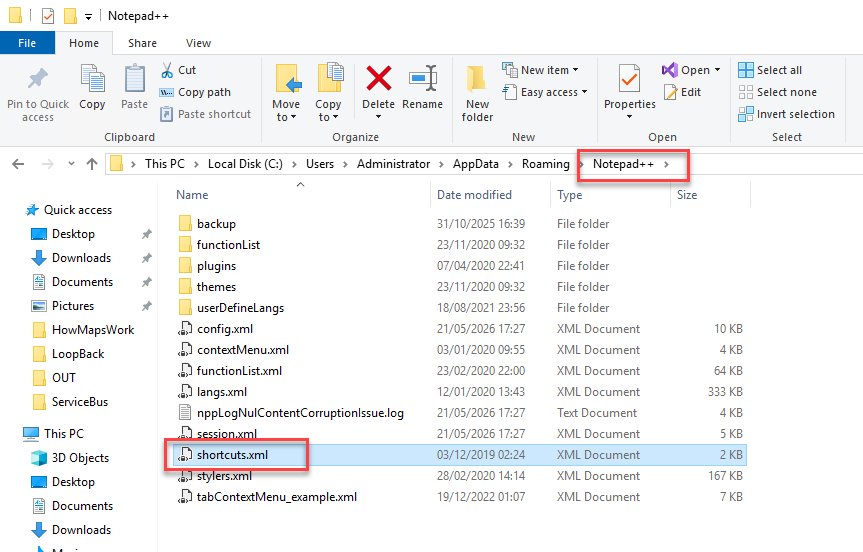
Notepad++ stores macros in a configuration file called shortcuts.xml.
To find it:
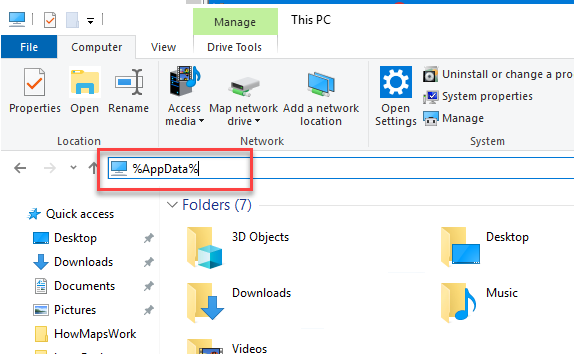
- Open Windows Explorer.
- Type
%AppData%in the address bar and press Enter.
- Open the Notepad++ folder.
- Locate the file: shortcuts.xml.
Step 2: Add the Macro to shortcuts.xml
Open shortcuts.xml in Notepad++.
Now:
- If a
<Macros>node already exists → add the macro inside it - If it doesn’t exist → create it under
<NotepadPlus>
<Macros>
<Macro name="EDIUnpacking" Ctrl="no" Alt="no" Shift="no" Key="0">
<Action type="3" message="1700" wParam="0" lParam="0" sParam="" />
<Action type="3" message="1601" wParam="0" lParam="0" sParam="?'" />
<Action type="3" message="1625" wParam="0" lParam="1" sParam="" />
<Action type="3" message="1602" wParam="0" lParam="0" sParam="**" />
<Action type="3" message="1702" wParam="0" lParam="0" sParam="" />
<Action type="3" message="1701" wParam="0" lParam="1635" sParam="" />
<Action type="3" message="1700" wParam="0" lParam="0" sParam="" />
<Action type="3" message="1601" wParam="0" lParam="0" sParam="\x27" />
<Action type="3" message="1625" wParam="0" lParam="1" sParam="" />
<Action type="3" message="1602" wParam="0" lParam="0" sParam="\x27\x0d\x0a" />
<Action type="3" message="1702" wParam="0" lParam="0" sParam="" />
<Action type="3" message="1701" wParam="0" lParam="1635" sParam="" />
<Action type="3" message="1700" wParam="0" lParam="0" sParam="" />
<Action type="3" message="1601" wParam="0" lParam="0" sParam="**" />
<Action type="3" message="1625" wParam="0" lParam="1" sParam="" />
<Action type="3" message="1602" wParam="0" lParam="0" sParam="?'" />
<Action type="3" message="1702" wParam="0" lParam="0" sParam="" />
<Action type="3" message="1701" wParam="0" lParam="1635" sParam="" />
</Macro>
</Macros>
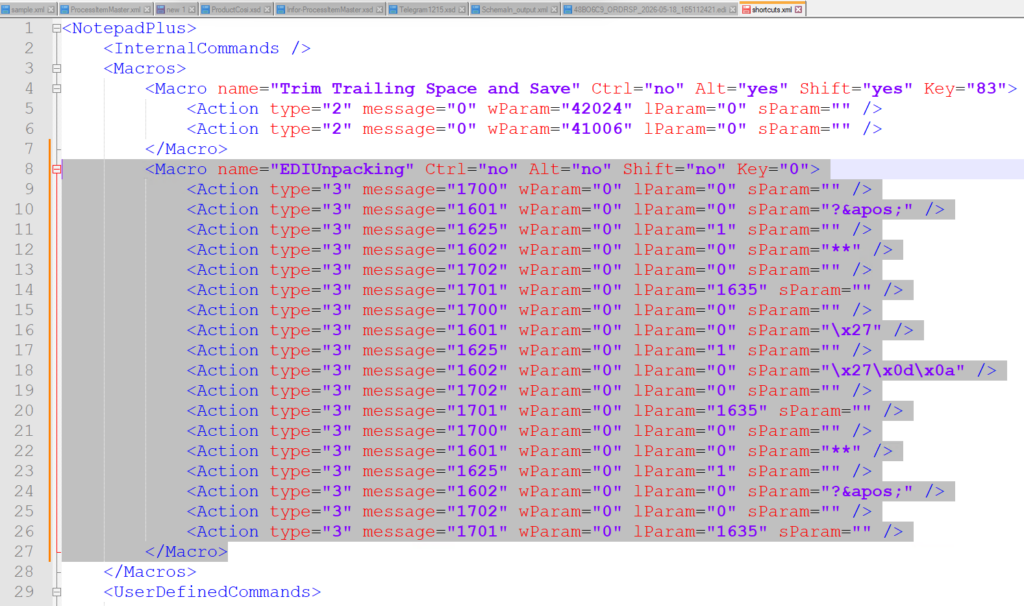
Save the file to ensure your changes are applied. Then, once that is done, restart Notepad++ so the macro becomes available.
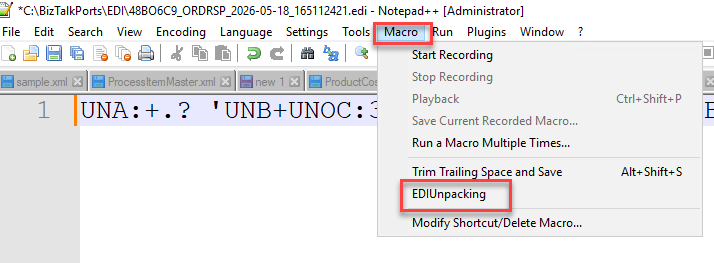
Step 3: Run the Macro
- Open your EDI file
- Go to Macro → EDIUnpacking
- Click… and enjoy
That’s it—your single-line file becomes instantly readable. As a result, you can finally inspect segments without struggling through endless text. In just a second, what used to be painful now feels simple and efficient.
Before and after
Before (typical EDI pain):
UNH+1+INVOIC:D:96A:UN'BGM+380+INV12345'DTM+137:20230101:102'NAD+BY+123456789::16'...
After (clean and readable):
UNH+1+INVOIC:D:96A:UN'
BGM+380+INV12345'
DTM+137:20230101:102'
NAD+BY+123456789::16'
...
Now you can actually:
- Read the message.
- Validate segments.
- Fix issues faster.
Download
You can download the EDI macro from GitHub:
Final thoughts
EDI is not going away anytime soon. In fact, BizTalk Server still processes it, and Azure Integration Services continues to rely on it. Moreover, enterprises depend on EDI every single day to support critical business operations.
However, the developer experience around EDI can—and should—improve. After all, some of the biggest productivity gains come from solving small but recurring frustrations. Ultimately, being able to read an EDI file properly is one of those improvements that makes a real difference.
Finally, a big thanks to Leonardo Lorenzi for helping shape this approach.
I hope you find this helpful! If you liked the content or found it useful and want to help me write more, you can consider buying (or helping me buy) my son a Star Wars Lego set.



