


Testing APIs is crucial for ensuring applications behave as expected. In particular, when working with Azure API Management (APIM), validating APIs early helps prevent issues later in the delivery process. Fortunately, there is a great open-source alternative to Postman that makes this even easier — Bruno.
Unlike Postman, Bruno stores collections as plain .bru files directly on disk. As a result, your test collections live inside your Git repository alongside your code, making them natively version-controlled and fully auditable through pull requests.
📝 One-Minute Brief
Automating API testing is critical for delivering reliable applications. This article explains how to use Bruno, an open-source alternative to Postman, to test Azure API Management (APIM) APIs. By exporting APIs as OpenAPI specifications and importing them into Bruno, teams can create version-controlled test collections using .bru files stored in Git. Combined with Bruno CLI and Azure Pipelines, this approach enables automated API validation during CI/CD, improves collaboration, and ensures faster feedback cycles while keeping secrets secure.
Setting Up Bruno with APIM
Since APIM does not have a native “Export to Bruno” option, the process begins by exporting the API as OpenAPI and manually building the collection. This only needs to be done once.
To get started, you need to:
- Access the Azure Portal and go to your Azure API Management instance.
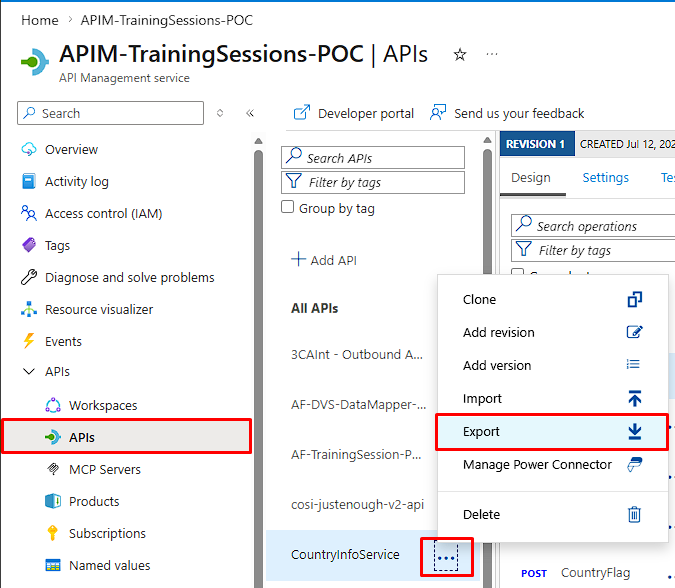
- On the API Management instance, choose the API you want to test from the APIs section.
- Click the … (3 dots) next to the API, then click Export.
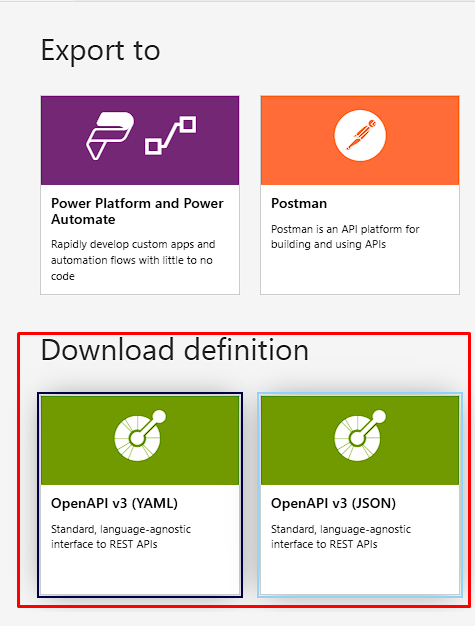
- On the Export panel, select OpenAPI v3 (JSON or YAML) and save the file.
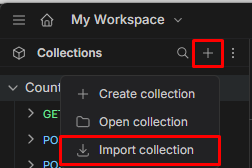
- Open Bruno, create a new collection, and import the OpenAPI file. Bruno will generate one
.brufile per endpoint automatically.
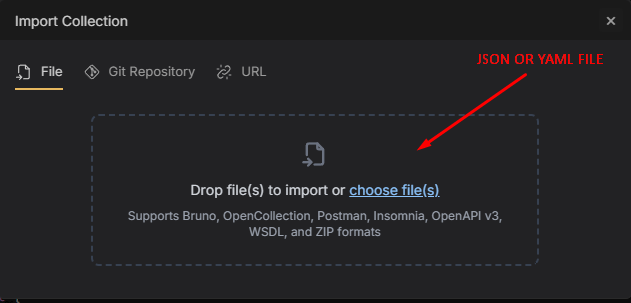
Once imported, you can start sending requests to the API endpoints directly from Bruno. This approach makes it easier to test operations such as GET, POST, PUT, and DELETE. As a result, you can validate API behavior quickly and consistently during development.
Adding Tests to Your Collection
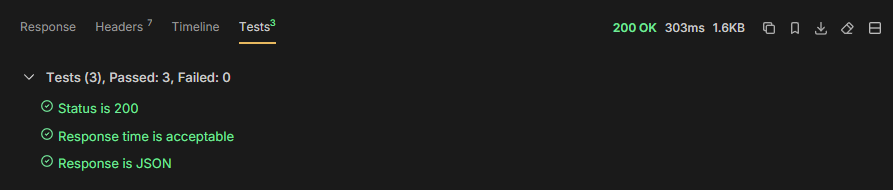
Each .bru file supports a tests block written in JavaScript, where you can assert status codes, response times, headers, and body content. For example, a simple GET test looks like this:
test("Status is 200", function() {
  expect(res.status).to.equal(200);
});

test("Response time is acceptable", function() {
  expect(res.responseTime).to.be.below(3000);
});

test("Response is JSON", function() {
  expect(res.headers["content-type"]).to.include("application/json");
});
By writing tests this way, developers can verify API functionality without manually inspecting responses. Consequently, testing and troubleshooting become faster and more efficient. In addition, teams can detect issues early and reduce the feedback loop.
Handling the APIM Subscription Key
APIM requires a subscription key to authenticate requests. Bruno handles this cleanly through environment files. The key is defined as a blank placeholder in a committed dev.bru environment file and injected at runtime — never stored in the repository.
vars {
  baseUrl: https://your-apim-name.azure-api.net
  subscriptionKey:
}
The actual key value is stored as a secret variable in Azure Pipelines and passed to the Bruno CLI at runtime using the --env-var flag.
Running Bruno Inside Azure Pipelines
You can run the same Bruno collection inside Azure Pipelines. In this scenario, the pipeline automatically tests APIs as part of the CI/CD process. Therefore, each deployment validates API functionality before new code reaches production.
- script: npm install -g @usebruno/cli
  displayName: "Install Bruno CLI"

- script: |
    cd ./bruno-tests
    bru run \
      --env dev \
      --env-var subscriptionKey=$APIM_KEY \
      --output ../test-results.xml \
      --format junit
  displayName: "Run Bruno Tests"
  env:
    APIM_KEY: $(apimSubscriptionKey)

- task: PublishTestResults@2
  inputs:
    testResultsFormat: "JUnit"
    testResultsFiles: "test-results.xml"
  displayName: "Publish Test Results"
  condition: always()
The test results are published directly into Azure DevOps, giving the team a clear pass/fail summary for every pipeline run. If you followed every step/rule, the end result of a very simple DevOps repository with Bruno testing should look like this:
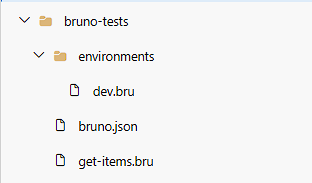
We have mentioned “dev.bru,” which contains the variables, and “get-items.bru,” which contains the tests. We are now just missing “bruno.json”. This file tells Bruno that a folder is a collection. Without it, Bruno won’t recognize the folder at all. Here is our example:
{
  "version": "1",
  "name": "APIM Tests",
  "type": "collection",
  "ignore": []
}
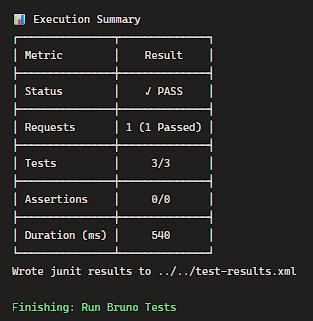
Now, if you run the Azure Pipeline with the script given by us, you should get the results of your tests!
To lazy to read? We’ve got you covered! Check out our video version of this content!
Hope you find this helpful! If you enjoyed the content or found it useful and wish to support our efforts to create more, you can contribute towards purchasing a Sauron’s Action Figure for Sandro’s son, yep, not for me!



