

Sometimes the best way to unblock your team is not to wait for a fully functional backend. Whether you’re validating a contract with a partner, letting frontend developers start early, or running a proof of concept, prototyping your API responses can save significant time. This post covers how to mock responses in Azure API Management (APIM) — from simple static returns to spec-driven and IaC-managed mocks.
API Management provides flexible, powerful ways to return static or dynamic sample responses, even when no backend service is available. Mocking is useful in many scenarios:
- Contract-first / API-first design: Define the API façade first; backend implementation comes later or runs in parallel.
- Proof of concept or demos: Quickly demonstrate API behavior to stakeholders or partners.
- Parallel development: Frontend and backend teams can move forward simultaneously.
- Degraded backend: When a specific backend service is temporarily unavailable.
- Testing specific response shapes: Validate how consumers handle various HTTP status codes and payloads.
📝 One-Minute Brief
This article explains how to mock API responses in Azure API Management to unblock development when no backend exists. It covers static and dynamic mocks using policies, OpenAPI‑driven mocking, and managing mocks as code with Bicep or Terraform.
Option 1: The return-response Policy (Flexible & Dynamic)
The return-response policy halts the normal pipeline execution and immediately returns a specified response to the caller — no backend call is made. This is the most flexible option because you can combine it with APIM policy expressions to produce dynamic, logic-driven responses.
Basic Static Mock
Place this policy in the inbound section to intercept the request before it ever reaches the backend:
<return-response>
    <set-status code="200" reason="OK" />
    <set-header name="Content-Type" exists-action="override">
        <value>application/json</value>
    </set-header>
    <set-body>{
        "success": true,
        "data": {
            "cards": [
                { "id": 28, "name": "Sandro Pereira" },
                { "id": 56, "name": "Carolina Pereira" },
                { "id": 89, "name": "José Pereira" }
            ]
        }
    }</set-body>
</return-response>
Tip: Always place mocking policies in the inbound section. This prevents unnecessary calls to any configured backend and keeps latency low.
Dynamic Mock with Policy Expressions
One of the most powerful uses of return-response is combining it with APIM’s C#-based policy expressions to produce contextually relevant responses. For example, mocking an “add two integers” operation:
<return-response>
    <set-status code="200" reason="OK" />
    <set-header name="Content-Type" exists-action="override">
        <value>application/json</value>
    </set-header>
    <set-body>@{
        var a = Convert.ToInt32(context.Request.Url.Query.GetValueOrDefault("a", "0"));
        var b = Convert.ToInt32(context.Request.Url.Query.GetValueOrDefault("b", "0"));
        return $"{{ \"result\": {a + b} }}";
    }</set-body>
</return-response>
You can also branch based on request headers, subscription keys, JWT claims, or anything else available in the context object. This makes return-response the right choice when you need mocks that simulate realistic business logic during early development.
Configuring via the Azure Portal
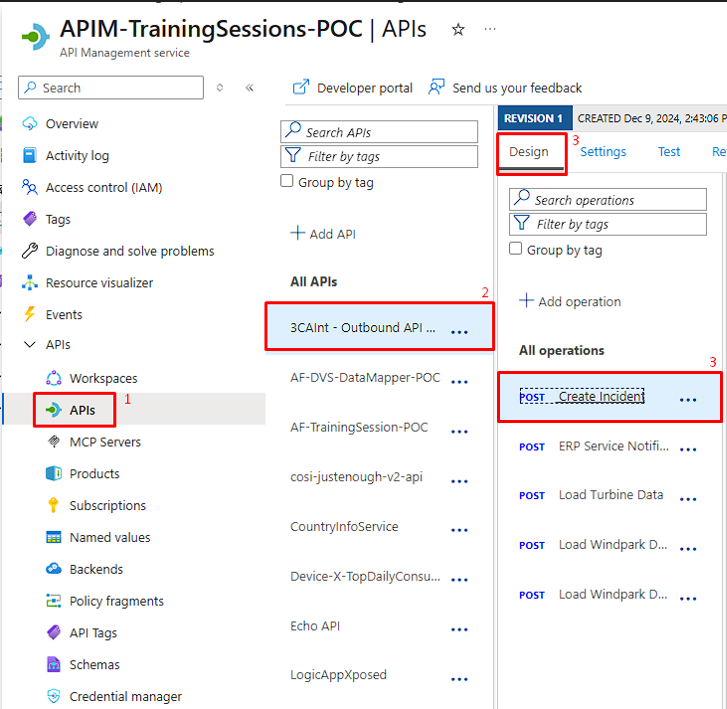
- Navigate to your APIM instance in the Azure Portal and select the APIs section,
- Select the API.
- Select the specific operation in the Design tab.
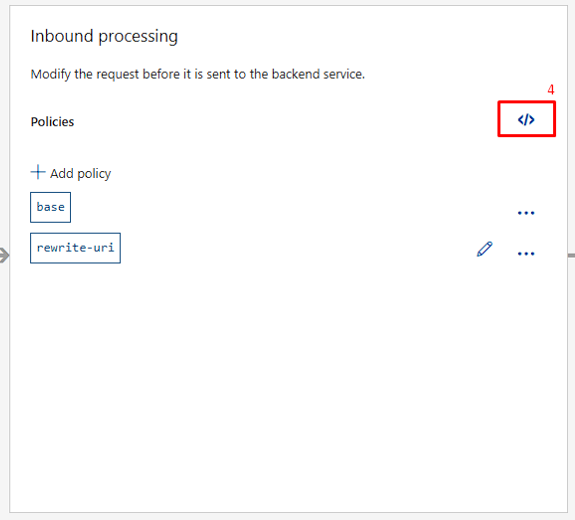
- Switch to Code editor (the
</>icon) on Inbound processing and paste your policy. - Click Save.


Option 2: The mock-response Policy (Spec-Driven & Simple)
The mock-response policy is purpose-built for mocking and integrates directly with your OpenAPI specification. Rather than hardcoding a body in XML, it reads the response examples or schemas you’ve already defined on the operation and uses those to generate the mock response automatically.
This is the recommended approach for API-first teams who are already defining their contracts in OpenAPI.
How It Works
When APIM evaluates a mock-response policy, it looks for response data in this priority order:
- Explicit examples defined on the operation’s response for the given status code and content type.
- Schema-generated samples, if a JSON Schema is defined but no explicit example exists.
- Empty 200 OK, if neither examples nor schemas are found.
The policy signature is:
<mock-response status-code="200" content-type="application/json"/>
Or in its abbreviated form (uses the first available response definition):
<mock-response/>
Defining Response Examples on Your Operation
For mock-response to return meaningful data, you first need to define response examples for the operation. In the Azure Portal:
- Follow the same steps from Configuring via the Azure Portal above up to step 3.
- In Frontend, click the edit icon.
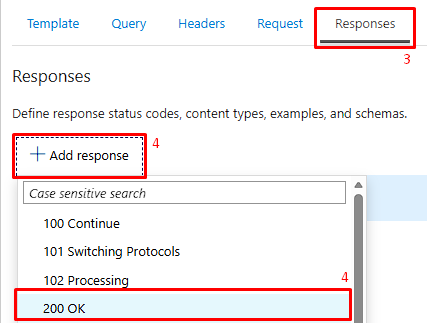
- Select the Responses tab.
- Click the +Add response and in the dropdown choose 200 OK.
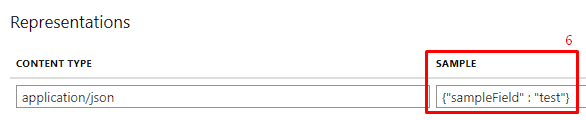
- In the Representations section, click +Add representation, and in the dropdown menu, search for “application/json”.
- Add a sample payload. This is what mock-response will return to callers.

Enabling the Mock in the Policy Gallery
- Follow the same steps from Configuring via the Azure Portal above up to step 3.
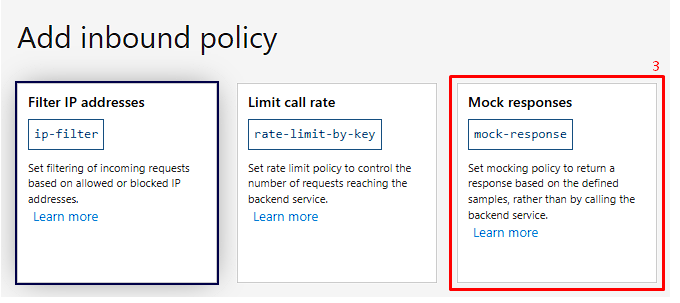
- On Inbound processing, click + Add policy.
- Select the Mock responses tile from the policy gallery.
- In the API Management response dropdown, choose the status code and content type (e.g.,
200 OK, application/json). - Save.


Key benefit: This approach forces good API documentation hygiene. Your mock and your contract stay in sync by design.
Option 3: Managing Mocks with Infrastructure as Code
In modern teams, APIM policies — including mocks — are managed as code and deployed via CI/CD pipelines. Both Bicep and Terraform are fully supported.
Bicep Example
resource mockPolicy 'Microsoft.ApiManagement/service/apis/operations/policies@2023-09-01-preview' = {
  name: 'policy'
  parent: myOperation
  properties: {
    value: '''
      <policies>
        <inbound>
          <mock-response status-code="200" content-type="application/json" />
          <base />
        </inbound>
        <backend>
          <base />
        </backend>
        <outbound>
          <base />
        </outbound>
      </policies>
    '''
    format: 'xml'
  }
}
Terraform Example
resource "azurerm_api_management_api_operation_policy" "mock_policy" {
  api_name            = azurerm_api_management_api.example.name
  api_management_name = azurerm_api_management.example.name
  resource_group_name = azurerm_resource_group.example.name
  operation_id        = azurerm_api_management_api_operation.example.operation_id

  xml_content = <<XML
    <policies>
      <inbound>
        <return-response>
          <set-status code="200" reason="OK" />
          <set-header name="Content-Type" exists-action="override">
            <value>application/json</value>
          </set-header>
          <set-body>{"status": "mocked"}</set-body>
        </return-response>
      </inbound>
    </policies>
  XML
}
Managing mocks via IaC means they live in version control alongside your API definitions, can be reviewed in pull requests, and are promoted through environments consistently.
Choosing the Right Approach
| Scenario | Recommended Policy |
|---|---|
| Quick static stub, no OpenAPI spec | return-response |
| Dynamic response logic (query params, headers, expressions) | return-response with policy expressions |
| API-first team with OpenAPI spec and defined examples/schemas | mock-response |
| Managed via CI/CD and IaC | Either policy, defined in Bicep or Terraform |
Conclusion
Mocking in Azure API Management remains one of the fastest ways to unblock parallel development and validate API contracts early. The core policies — return-response and mock-response — are stable and available across all APIM tiers.
The recommended path today is to define your API contract in OpenAPI, let mock-response use your defined examples, and manage the whole thing in version-controlled Bicep or Terraform. For cases where you need more intelligence in your mock — routing by request shape, simulating error conditions, or computing values from inputs — return-response with policy expressions, it remains the most powerful option in the toolbox.
Hope you find this helpful! If you liked the content or found it useful and would like to support me in writing more, consider buying (or helping to buy) a Star Wars Lego set for my son.



