


If your Azure Logic App feels like it’s stuck in an endless loop… it probably isn’t.

You notice your workflow keeps retrying — sometimes dozens of times — before finally giving up or timing out.
Again, it feels like it’s stuck in an endless loop.

📝 One-Minute Brief
Azure Logic Apps may seem stuck when they call unstable APIs, but hidden retry behavior usually causes the issue. Built‑in retry policies, exponential backoff, and loops without delays can stack retries and slow workflows dramatically. By defining explicit retry limits and handling failures intentionally, you can stop endless retries and build more resilient integrations.
What’s happening?
Logic Apps actions have built‑in retry policies. When an external API fails (500s, throttling, timeouts), Logic Apps will retry automatically — sometimes dozens of times across actions and loops — making workflows look slow or “hung”.
Defaults you may not notice:
- Interval: 20 seconds
- Count: up to 4 (connector-dependent)
- Exponential backoff: enabled on many actions/connectors
The most common culprits
- HTTP actions calling unstable or throttled APIs (endpoints)
- Actions that fail due to throttling from external APIs
- Retry policies left unconfigured
The workaround, or how to fix it:
The most traditional “workaround”, if we can call it this way, since some are best practices that you should apply, are:
- Set explicit retry limits on actions/connectors:
"retryPolicy": {
 "type": "fixed",
 "interval": "PT10S",
 "count": 3
}
- Handle Failures Gracefully using
Configure run after→hasFailed/hasTimedOut - Consider circuit breaker patterns for flaky backends.
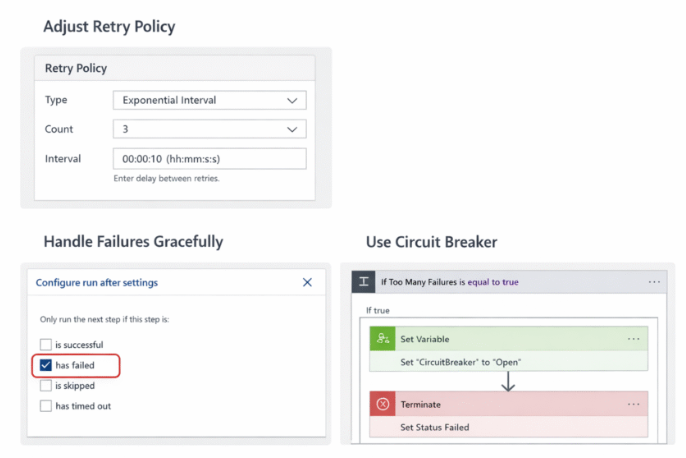
Sometimes, your Logic App isn’t broken — it’s just retrying too hard.
Hope you find this helpful! If you liked the content or found it useful and would like to support me in writing more, consider buying (or helping to buy) a Star Wars Lego set for my son.



