


Ever needed to change a Logic App execution time from 11:30 to 14:00 and thought: Wait… do I really need to open Visual Studio, change the JSON, and/or run a full CI/CD pipeline just to adjust a clock?
Good news, now you don’t.
By moving your Recurrence Trigger settings (Frequency, Interval, Hour, Minute, TimeZone) into Environment Variables (App Settings), you gain total operational control without touching a single line of code.
That means more flexibility, cleaner architecture, and zero unnecessary deployments, just smart configuration.
📝 One-Minute Brief
Learn how to make your Logic App recurrence schedule fully dynamic by moving frequency, interval, hour, minute, and timezone settings into environment variables. This approach lets you change execution times without modifying code or redeploying—improving flexibility, maintainability, and operational control.
Step-by-Step
The goal is straightforward: to allow us to change the frequency, hour, or day of a workflow execution directly through Environment Variables, without needing to edit the Logic App code or redeploy just to change a time slot.
Here is the step-by-step breakdown of the procedure:
Configuring Environment Variables
The first step was to remove the fixed values from the Logic App and move them into the Environment Variables. For example:
RECURRENCE_MINUTE(e.g., 30)RECURRENCE_FREQUENCY(e.g., “Week”)RECURRENCE_INTERVAL(e.g., 1)RECURRENCE_HOUR(e.g., 11)
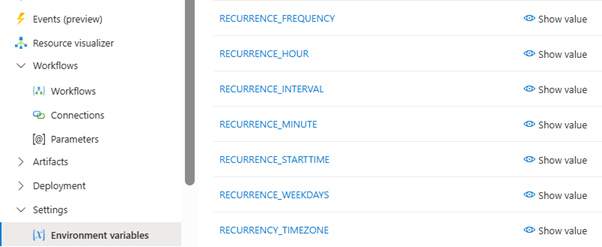
As shown above, we created specific variables for each component of the schedule: Frequency, Interval, Hour, Minute, TimeZone, etc. This centralizes the configuration outside of the code flow.
Implementation in Code View
To make the Logic App consume these variables, we had to modify the trigger’s Code View. This is where the most important technical detail of this procedure lies.

Sample JSON Recurrence configuration:
"triggers": {
    "Recurrence": {
        "type": "Recurrence",
        "recurrence": {
            "frequency": "@appsetting('RECURRENCE_FREQ')",
            "interval": "@int(appsetting('RECURRENCE_INT'))",
            "schedule": {
                "hours": [
                    "@int(appsetting('RECURRENCE_HOURS'))"
                ],
                "minutes": [
                    "@int(appsetting('RECURRENCE_MINS'))"
                ]
            },
            "timeZone": "GMT Standard Time"
        }
    }
}
The Recurrence Trigger requires fields like “interval”, “hours”, and “minutes” to be integers. However, App Settings are read as strings by default.
Therefore, as seen in the image, we used the expression @int(appsetting(‘…’)). This function converts the environment variable value into a valid integer, ensuring the trigger doesn’t fail. For text fields (like “frequency”), we can call appsettings directly.
Validation in the Designer
After configuring the JSON code, the Logic App Designer visually reflects these changes.
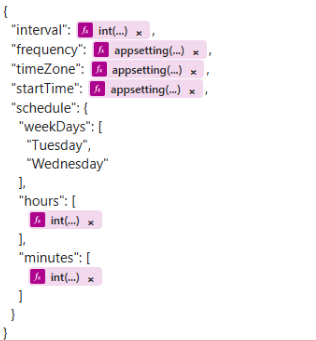
Instead of fixed numbers, the fields are now populated with dynamic parameters. This confirms that the Logic App is correctly fetching the definitions from the environment variables we configured in Step 1.
Expected Behavior
The final goal is to replicate the exact behavior of a manually configured trigger while retaining the flexibility of dependency injection.
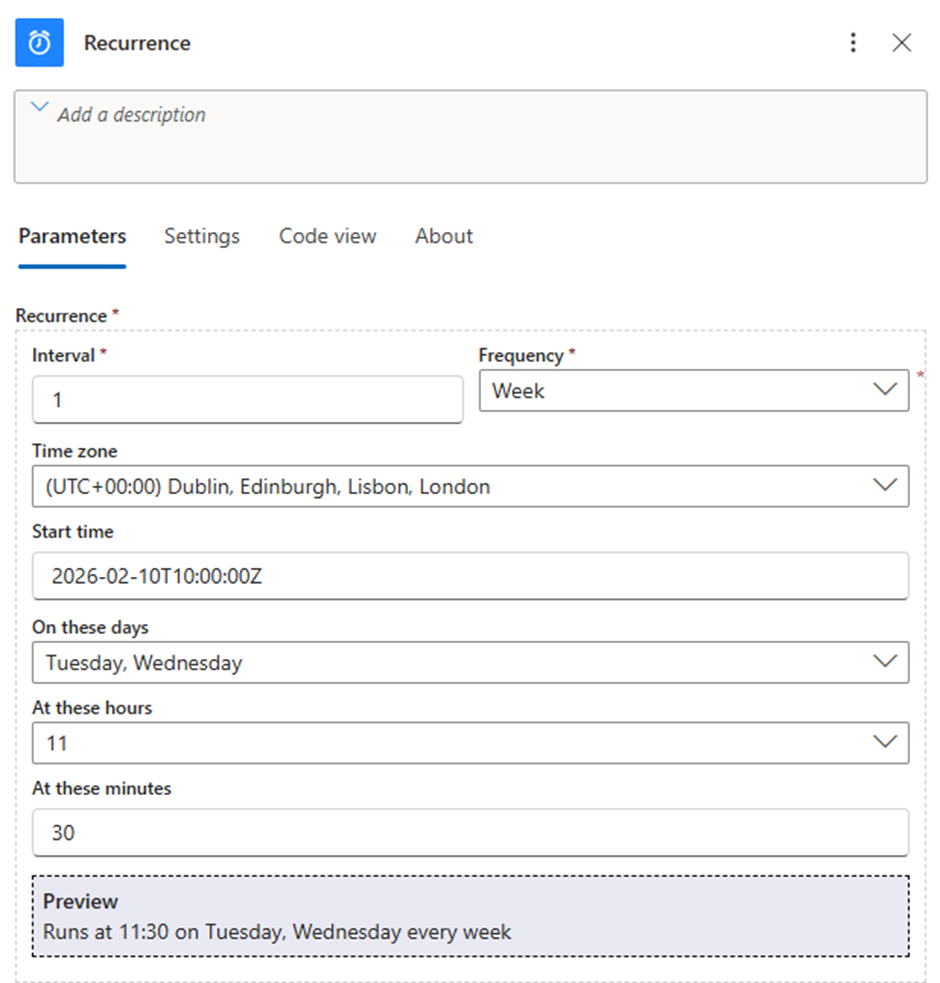
At runtime, the behavior will be exactly like this standard configuration (in this example, Tuesdays and Wednesdays at 11:30). However, we now have the massive advantage that if we want to change it to 14:00, we simply update the RECURRENCE_HOUR variable in the portal, without touching a single line of code.
The Game-Changer
In the end, the Logic App behaves exactly the same as a manually configured trigger: the same schedule, the same reliability, the same results.
- The difference? Total flexibility.
- Need to change the hour? Update an Environment Variable.
- Want to adjust the frequency? No problem.
- Redeploy the Logic App? Not necessary.
Small architectural tweak, massive operational win.
And that’s how we turn a simple schedule into a smart, Friday-worthy upgrade.
Pro Tip: Centralizing these outside the workflow allows your Ops team to make adjustments without needing “Developer” level access to the code view.
To lazy to read? We’ve got you covered! Check out our video version of this content!
Hope you find this helpful! If you enjoyed the content or found it useful and wish to support our efforts to create more, you can contribute towards purchasing a Sauron’s Action Figure for Sandro’s son, yep, not for me!



