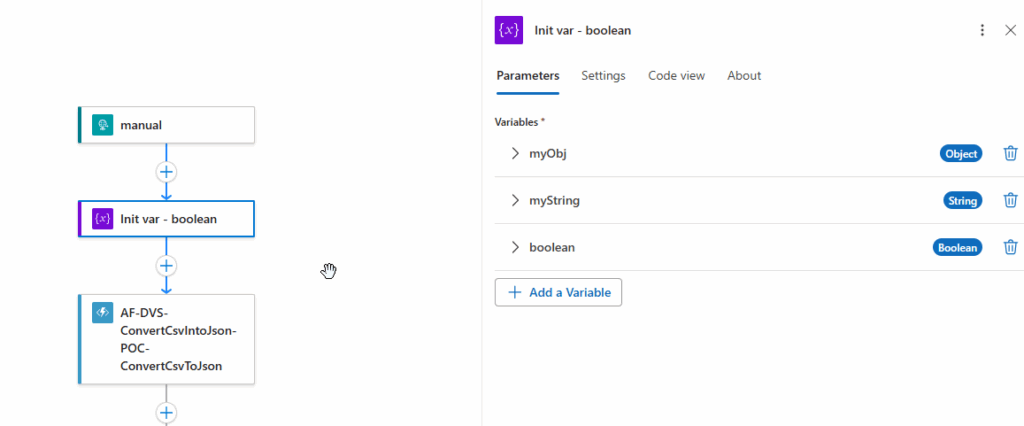
If you’re still carrying that classic Logic Apps “variable wall” (3, 5, 10… consecutive Initialize variable actions), the designer now tries to help you clean it up.
When you open the Logic App designer, it can detect consecutive initializers and prompt you with:
“There are multiple consecutive Initialize Variable actions in this workflow. Would you like to combine them into a single action?”
If you click Yes, the designer consolidates them into a single Initialize variables action (plural) — the same capability that lets you to define multiple variables in a single initializer.
Why it matters
Cleaner workflows (less scrolling, less noise, easier reviews).
Faster edits (one place to manage the “constants/counters/defaults” block).
This feature is available in:
Logic App Consumption Designer
Logic App Standard Designer
Logic App Standard Designer new preview designer
A small but important “gotcha”
There’s a known scenario where combining variables can break runtime evaluation when one variable’s default value references another variable created in the same combined initializer. A bug was reported with a reproducible example and workaround guidance. GitHub
Pro tips (so you don’t fight the designer later)
Remember, there is a limit of 20 variables per “Initialize variables” action in the designer.
The designer is getting smarter — and this preview feature is one of those small UX improvements that can make large workflows feel maintainable again
To lazy to read? We’ve got you covered! Check out our video version of this content!
Hope you find this helpful! If you enjoyed the content or found it useful, and wish to support our efforts to create more, you can contribute to purchasing a Star Wars Lego set for my son!
Author: Sandro Pereira
Sandro Pereira lives in Portugal and works as a consultant at DevScope. In the past years, he has been working on implementing Integration scenarios both on-premises and cloud for various clients, each with different scenarios from a technical point of view, size, and criticality, using Microsoft Azure, Microsoft BizTalk Server and different technologies like AS2, EDI, RosettaNet, SAP, TIBCO etc.
He is a regular blogger, international speaker, and technical reviewer of several BizTalk books all focused on Integration. He is also the author of the book “BizTalk Mapping Patterns & Best Practices”. He has been awarded MVP since 2011 for his contributions to the integration community.
View all posts by Sandro Pereira