


Let’s go to the truly basic of the Friday Fact and address an undeniable fact about the Logic Apps Initialize variables action!
If you’ve ever tried to add “just one more” variable to a Logic App and the Variables ➜ Initialize variables action stopped letting you add rows, you’ve met today’s Friday Fact: the Initialize variables action in Logic Apps enables you to add up to 20 variables per action. It’s a quiet guardrail in the designer that may surprise people mid-build—especially when you’re porting larger workflows or centralizing constants in one place—but in fact, this is a considerable number of variables not easy to reach in day-to-day workflows.

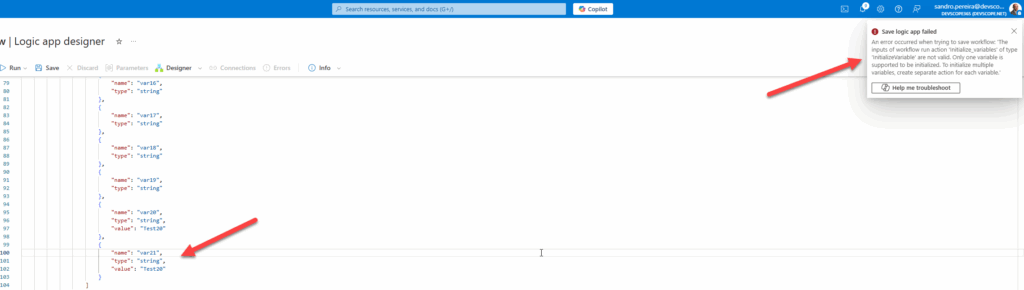
After you reach the 20th variable, the Add a Variable button gets disabled. And if you are thinking this is a limitation of the Logic App designer and that you can work around it in the code view and add more, then you are wrong! If you try to accomplish this, you get the following error:
An error occurred when trying to save workflow: ‘The inputs of workflow run action ‘Initialize_variables’ of type ‘InitializeVariable’ are not valid. Only one variable is supported to be initialized. To initialize multiple variables, create separate action for each variable.’
📝 One-Minute Brief
This Friday Fact highlights a lesser‑known limit in Azure Logic Apps: the Initialize variables action supports a maximum of 20 variables per action. The post explains why the limit exists and shares better design patterns to keep workflows clean and maintainable.
The good news: this is a per-action limit, not a per-workflow limit. You can add a second “Initialize variables” action and keep going (another 20, and so on). But before you create a chain of initializer blocks, consider a few patterns that are cleaner, faster, and easier to maintain.
1) Prefer objects (and arrays) over many variables.
Instead of 15 separate strings, create one object variable (e.g., config) with properties like apiBaseUrl, timeoutSeconds, region, etc. Access with variables('config').apiBaseUrl. This reduces visual noise and keeps related settings together.
If you use an array instead, then we can access the values with @{variables(‘config’)[0]}, @{variables(‘config’)[1]}, and so on.
2) Use “Compose” for immutable values.
If a value never changes, it isn’t a “variable”—it’s a constant. A Compose action is lighter, evaluates once, and avoids accidental mutation. It also works great across parallel branches without concerns about variable locking.
3) Push configuration to parameters.
For Logic Apps Standard, define workflow parameters (app settings + ARM/Bicep values) and reference them in your actions. This keeps environment-specific data out of the definition, simplifying CI/CD. If the values are secrets, pair parameters with Key Vault references.
4) When you really need >20 scalars, split initializers.
There’s no penalty for using multiple “Initialize variables” actions—name them clearly (Init Vars – Config, Init Vars – Counters) and keep each block curated.
Friday Fact Takeaway
The takeaway: yes, the 20-variable cap per initializer action is real—but it’s also a nudge toward better design. Favor objects, parameters, and Compose for constants; reserve scalar variables for truly stateful data. Your workflows will be tidier, safer, and far easier to evolve.
I would like to thank Raúl Díez for alerting us to this restriction.
To lazy to read? We’ve got you covered! Check out our video version of this content!
Hope you find this helpful! If you enjoyed the content or found it useful, and wish to support our efforts to create more, you can contribute to purchasing a Star Wars Lego set for my son!



