


When you are creating a Logic App Integration Account Mapper inside Visual Studio 2019 – note that these maps can be used in Logic App Consumption by using an Integration Account but also in Logic App Standard by copying the XSLT for your Visual Studio Code workspace – one of the capabilities that teh mapper provides is to create inline C# code inside a Scripting Functoid that can be execute to apply transformation rules or executed via msxsl:script inside XSLT.
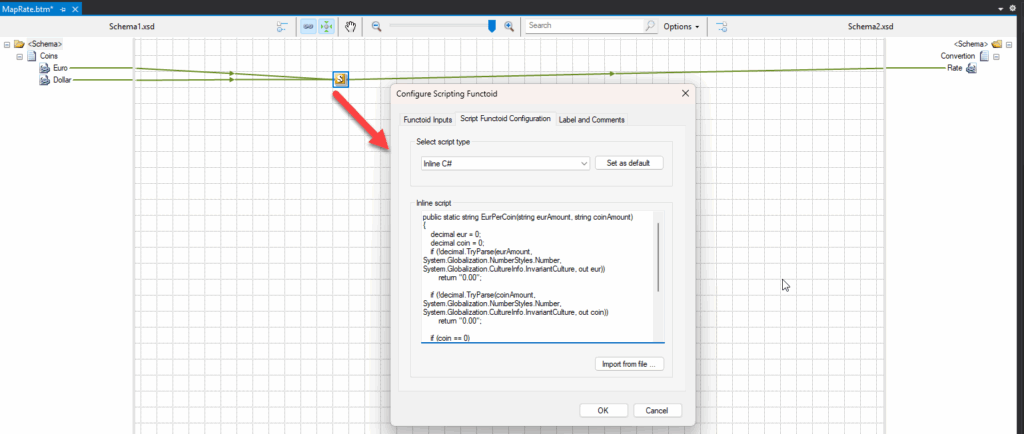
However, the Logic App Integration Account Mapper only supports .NET 2.0 Framework. If your code is written using modern C# features, it will break in the Integration Account map because the runtime is 2.0. If you see errors like “keyword var not recognized” or missing types/methods, you’ve likely used newer features.
📝 One-Minute Brief
Inline C# is an amazing transformation capability but despite the Integration Account maps being a sharp tool—it is build in a old framwork.
Pro tip: Use 2.0-friendly inline C# in your XSLT maps.
For example, if we try to use the following function using var keyword:
public static string EurPerCoin(string eurAmount, string coinAmount)
{
    if (!decimal.TryParse(eurAmount, System.Globalization.NumberStyles.Number, System.Globalization.CultureInfo.InvariantCulture, out var eur))
        return "0.00";

    if (!decimal.TryParse(coinAmount, System.Globalization.NumberStyles.Number, System.Globalization.CultureInfo.InvariantCulture, out var coin))
        return "0.00";

    if (coin == 0)
        return "0.00";

    var rate = eur / coin;
    return Math.Round(rate, 2, MidpointRounding.AwayFromZero).ToString("F2", System.Globalization.CultureInfo.InvariantCulture);
}
This will fail since the var keyword was introduced in C# 3.0, which shipped with .NET Framework 3.5. In .NET 2.0 (C# 2.0), you must explicitly declare the type of every variable.

So in this case, we need to modify our code to be something like this:
public static string EurPerCoin(string eurAmount, string coinAmount)
{
    decimal eur = 0;
    decimal coin = 0;
    if (!decimal.TryParse(eurAmount, System.Globalization.NumberStyles.Number, System.Globalization.CultureInfo.InvariantCulture, out eur))
        return "0.00";

    if (!decimal.TryParse(coinAmount, System.Globalization.NumberStyles.Number, System.Globalization.CultureInfo.InvariantCulture, out coin))
        return "0.00";

    if (coin == 0)
        return "0.00";

    decimal rate = eur / coin;
    return Math.Round(rate, 2, MidpointRounding.AwayFromZero).ToString("F2", System.Globalization.CultureInfo.InvariantCulture);
}
Common gotchas
- Use 2.0-friendly inline C# in your XSLT maps
- Return strings unless you absolutely need numeric types—XSLT integration is smoother with strings.
- No LINQ (
System.Core, lambdas,Select,Where, anonymous types). - No
var(implicit typing) or extension methods (C# 3.0+). - No
dynamic,async/await,Tuple<,>(4.0+) or modern APIs added after 2.0. - No external NuGet references or arbitrary assemblies; you’re limited to the sandboxed set available to the engine.
Friday Fact Takeaway
Inline C# in Integration Account maps is a sharp tool—but an old one. Keep functions tiny, deterministic, and 2.0-compatible. For anything more ambitious, elevate the logic out of the map or move to a mapping stack that supports modern runtimes.
To lazy to read? We’ve got you covered! Check out our video version of this content!
Hope you find this helpful! If you liked the content or found it useful and would like to support me in writing more, consider buying (or helping to buy) a Star Wars Lego set for my son.



