


When working with Azure, it’s common to reorganize resources into different Resource Groups (RGs) for governance, billing, or simply tidying up environments. However, here’s a fact that often surprises developers and administrators: moving a Logic App Consumption to another Resource Group does not automatically update its internal workflow configurations; you must do it manually.
Let’s break this down with an example:
- Suppose you have a main (parent) Logic App Consumption (workflow) that calls a child Logic App Consumption (workflow) in the same Resource Group, for example, RG-SASP-LA-POC.
- Internally, in the main (parent) Logic App Consumption using the Logic App Connector, the call is represented by the workflow ID, which is a fully qualified Azure resource identifier. For example:
- /subscriptions/<subscription-id>/resourceGroups/RG-SASP-LA-POC/providers/Microsoft.Logic/workflows/LA-BP-Tip-Trick-GetSubsIdAndResourceGroup-Workaround
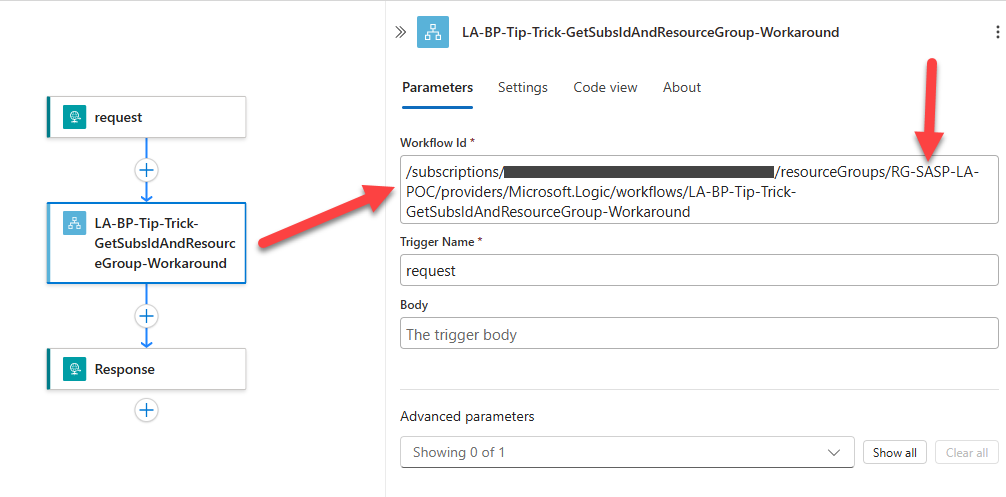
Notice how the resource group name (
RG-SASP-LA-POC) is baked into the definition.📝 One-Minute Brief
Moving a Logic Apps Consumption resource between Azure resource groups can silently break internal workflow references. This Friday Fact explains why references are not updated automatically, how this impacts executions, and what developers should validate after the move.
Now, suppose you move both Logic Apps—the parent and the child—to another resource group, for example, RG‑SASP‑LA‑CONSUMPTION‑POC. Azure makes this process fairly simple. You select the Logic Apps, click Move, and complete the required validations. Once Azure finishes the checks, it moves the Logic Apps to the new resource group.
After the move, the Logic Apps appear correctly under the new resource group in the Azure portal. However, Azure does not update the internal workflow JSON definition. The workflow keeps the original resource group references. Azure also does not ask for confirmation or offer to update these references during the move.
As a result, any absolute resource IDs—such as references to child workflows, API connections, or other Logic Apps—continue pointing to the old resource group. This behavior can easily cause runtime issues if you don’t update those references manually.
Unexpected issues
This can create unexpected issues:
- If you delete the old Resource Group, those hardcoded references will break.
- Your Logic App will start failing at runtime because it’s still trying to reach resources in the “old world.”
- Although visually everything appears fine in the new Resource Group, under the hood, you are still tied to the old configuration.
So what can you do about it?
Best practice
The best practice is:
- Always verify and update workflow definitions after moving Logic Apps between Resource Groups.
- For child workflow calls, consider using relative paths or parameters instead of absolute IDs. For example, reference only the workflow name where possible, and externalize environment-dependent values into parameters or configuration files.
- If you must rely on absolute IDs, you’ll need to manually edit the workflow JSON or redeploy using ARM/Bicep templates or Azure DevOps pipelines with the correct RG values.
In the Azure Portal, to quickly fix, just edit the Logic App and change the resource group in the Workflow ID.

This fact highlights an important principle when working with serverless and cloud-native architectures: what you see in the portal is often an abstraction of the underlying infrastructure. Behind the scenes, the underlying definitions might still contain absolute references that don’t change automatically.
So, next time you think about “tidying up” your Logic Apps by moving them to a new Resource Group, remember: the portal move operation is cosmetic for management, but not transformative for your workflow internals. Plan ahead, test after moving, and keep your configurations flexible.
To lazy to read? We’ve got you covered! Check out our video version of this content!
If you liked the content or found it helpful and would like to support me in writing more, you can consider purchasing (or helping to purchase) a Star Wars Lego set for my son.



