


Welcome again to another Logic Apps Best Practices, Tips, and Tricks. In my previous blog posts, I discussed some of the essential best practices to follow when working with Azure Logic Apps. Check out these Logic App tips and tricks!
Today I will speak about another important Best practice, Tips, and Tricks that you need to consider while designing your business processes (Logic Apps): How to debatching XML messages.

📝 One-Minute Brief
You can debatch XML content in Logic Apps similarly to JSON inputs. However, to achieve that, you need to use a developer trick.
Here you will learn how to accomplish this functionality.
#46 Debatching XML Messages
Previously, we showed how easy it is to debatch or split JSON messages in Logic Apps. We even covered this in a Friday Fact. However, things have evolved, and the approach we used in the past now looks slightly different.
Because Logic Apps are built on APIs, they natively support JSON payloads. As a result, implementing this pattern remains straightforward. However, this leads to an important question: can we still achieve the same behavior using traditional XML‑based integrations?
The answer is yes. You can debatch XML content in Logic Apps in a way similar to JSON inputs. To do so, however, you need to apply a small developer trick. In this post, we’ll walk through that approach step by step using a sample XML structure. For example, consider the following XML content that we want to debatch:
<People>
    <Person>
        <name>Sandro Pereira</name>
    </Person>
    <Person>
        <name>Luis Rigueira</name>
    </Person>
</People>
To accomplish this inside Logic App, let’s start by adding:
- A Request > When a HTTP request is received trigger to your Logic App to handle incoming HTTP requests.

Because, by default, the When a HTTP request is received trigger doesn’t support XML Schemas, there is no way for the designer to know that there is a repeating structure in which you can split the incoming message. For this reason, the Split On option is not available for configuration.

So, to accomplish the same concept using XML Messages, we need to apply the following trick:
- Switch to the Code View of your Logic App. This allows you to directly edit the JSON definition of your Logic App (always be careful when working in the code view).

- In the triggers section of your Logic App definition, add the following line to enable debatching:
"splitOn": "@xpath(xml(triggerBody()), '/*[local-name()=\"People\"]/*[local-name()=\"Person\"]')"
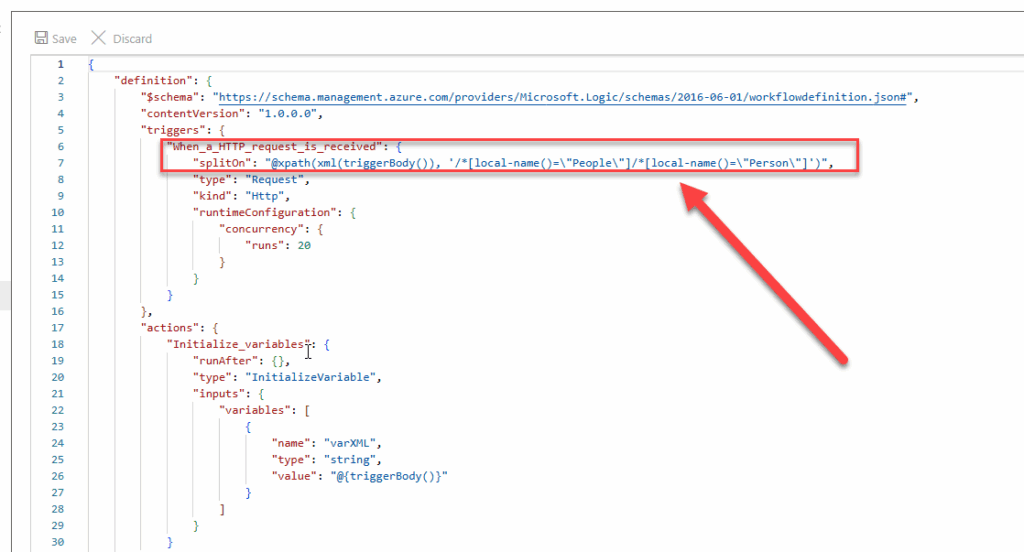
- Explanation of the splitOn Property:
- This line specifies that the splitOn feature is enabled and defines where the split should occur. In this case, it uses the following XPath expression:
- /*[local-name()=\”People\”]/*[local-name()=\”Person\”]
- Breakdown of the XPath
- Root Element: People
- Use /[local-name()=”People”] to target the People element regardless of namespace.
- Child Elements: Person
- Use /[local-name()=”Person”] to target each Person element within People.
- Root Element: People
- This line specifies that the splitOn feature is enabled and defines where the split should occur. In this case, it uses the following XPath expression:
- Finally, get back into the Designer

- Click on the When a HTTP request is received trigger. On the properties panel, you will see a warning:
- Failed to evaluate outputs because splitOn @xpath(xml(triggerBody()), ‘/*[local-name()=”People”]/*[local-name()=”Person”]’) cannot be evaluated. As a result, this operation’s outputs might not be correctly visible in subsequent actions .
- On the Settings panel, unfortunately, you will not be able to see whether the splitOn property is enabled or configured; however, the split XPath expression will be active and performing the intended debatching action.
- As you can see in the run history picture below, the first execution will have Sandro record:
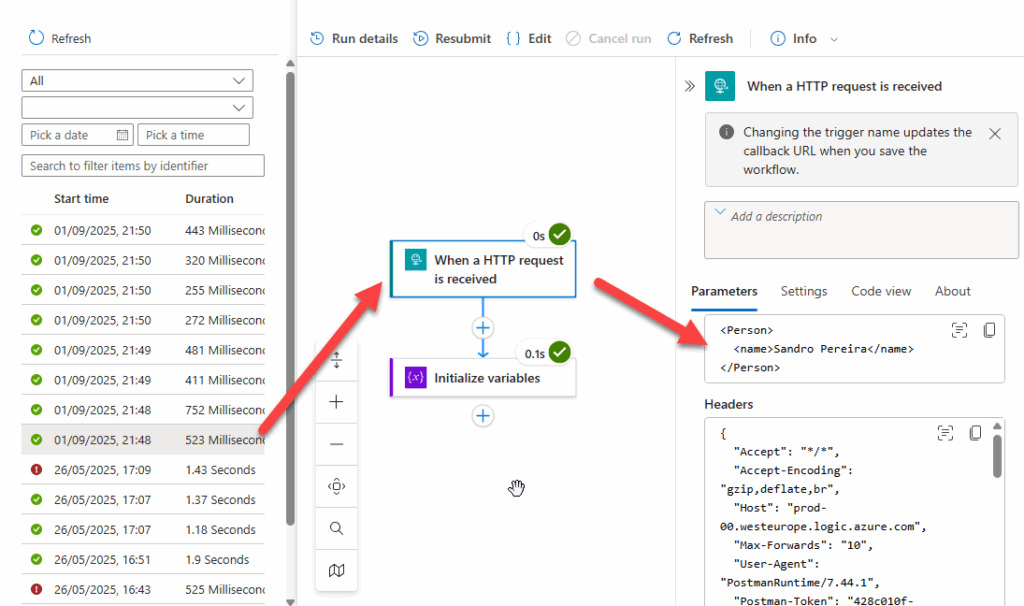
- And the second will have Rigueira’s record:

I confess, it is not perfect; we should have a better user experience. The UI should reflect the splitOn property once it is set up in the code view, because in the past, that was possible:
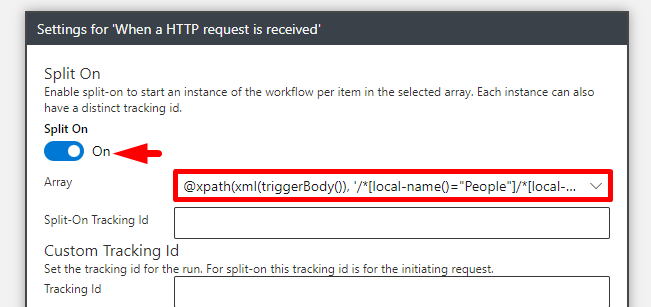
But at least, the functionality works.
Download Handbook
If you want to know more about Logic Apps Best practices, tips, and tricks, you can download my handbook for free: The Ultimate Azure Logic Apps Handbook: 50 Expert Tips & Best Practices.
I hope you find this helpful! If you liked the content or found it useful and want to help me write more, you can consider buying (or helping to buy) my son a Star Wars Lego set.



