


Azure Service Bus is a reliable and scalable cloud messaging service. It enables asynchronous communication between applications and services. One of its key features is Peek Lock, which helps ensure message reliability and processing integrity.
However, this feature also introduces limitations. These limitations appear when deploying Logic Apps, especially Logic Apps Consumption, that use Service Bus triggers with Peek Lock.
Before diving into those limitations, let’s briefly explain what Peek Lock means.
📝 One-Minute Brief
Understand a critical deployment limitation in Logic Apps Consumption where Service Bus triggers using Peek Lock cannot be switched between queue and topic, and learn the simple workaround to redeploy successfully.
The Role of Peek Locks in Message Processing
Peek Locks is a mechanism within Azure Service Bus that provides message retrieval with acknowledgment semantics. When a message is fetched from a queue or topic subscription using Peek Lock mode, it remains invisible to other consumers until explicitly completed or abandoned. This ensures that messages are processed exactly once, even in the event of failures or transient errors.
Now that we know what peek lock means, let’s dive deep into the existing deployment limitation.
Understanding the Deployment Limitations in the development phase
Let’s assume that we had previously created and deployed to Azure a Logic App using the When a message is received in a topic subscription (peek-lock) trigger, and we realized that we have made a mistake and, in fact, we want to use a queue and not a topic.
In Visual Studio, we can easily delete that trigger and add the correct one: When a message is received in a queue (peek-lock). However, when we try to deploy those changes into Azure, the deployment fails with a similar error:
‘When_a_message_is_received_in_a_topic_subscription_(peek-lock)’ of current version of workflow ‘LA-DEMOSB’ has concurrency runtime configuration specified. Trigger concurrency runtime configuration cannot be removed once specified.
In this case, we’re trying to deploy a new version of the logic app from Visual Studio with a queue peek lock, but unfortunately, there’s already a version of this logic app that uses a Topic Subscription with peek lock with the same name.
Solution: The solution to this problem is quite simple.
1º: Delete the current Logic App version from the Azure Portal
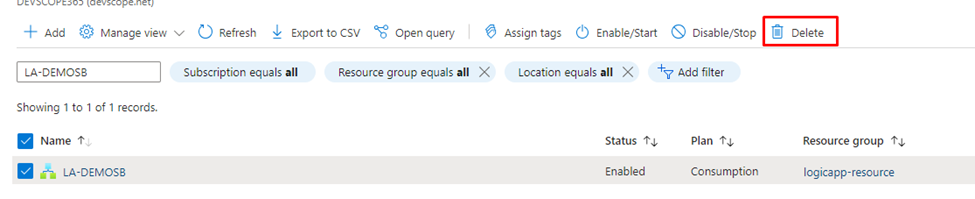
2º: Deploy the Logic App again through Visual Studio.

Note that this problem only occurs with peek locks. It doesn’t happen if we use auto-complete.
To lazy to read? We’ve got you covered! Check out our video version of this content!
Hope you find this helpful! If you enjoyed the content or found it useful and wish to support our efforts to create more, you can contribute towards purchasing a Star Wars Lego for my son!




Good to know, thank you Sandro.