


In the past, I wrote several blog posts about Configuring BizTalk Server Host and Host Instances according to some of the Best Practices:
- PowerShell to Configure BizTalk Server Host, Host Instances and Adapter handlers according to some of the Best Practices
- PowerShell to Configure BizTalk Server Host and Host Instances according to some of the Best Practices.
The reason I ended up creating a new version for BizTalk Server 2016 was that previous scripts only did 90% of the work, and they were intended to be used on “day zero” of your environment, i.e., after you finish installing your environment.
So, I updated my previous script to add more functionalities, mainly:
- Configure the Default Send Handler as the Send Handler for each existing static and Dynamic Send Ports
- Configure Receive Handlers from all the existing Receive locations
With these missing functionalities added to the script, it will configure or reconfigure 100% of your environment. You can use it on “day zero” or in an already up and running environment. Of course, this was optimized to BizTalk Server 2016 (but it can be executed in all previous BizTalk Server versions).
📝 One-Minute Brief
Configure BizTalk Server 2020 hosts, host instances, and adapter handlers using PowerShell scripts based on best practices.
Why a new version dedicated to BizTalk Server 2020?
There are two reasons why I decided to create this new script, specific only to BizTalk Server 2020:
- The previous scripts don’t run properly in BizTalk Server 2020.
- And BizTalk Server 2020 now has support to Group Managed Service Accounts.
The first reason is very simple. The previous scripts will not work, giving you an invalid credential error, even though you are putting the correct credentials, as Gaurav Sood kindly reported to me.
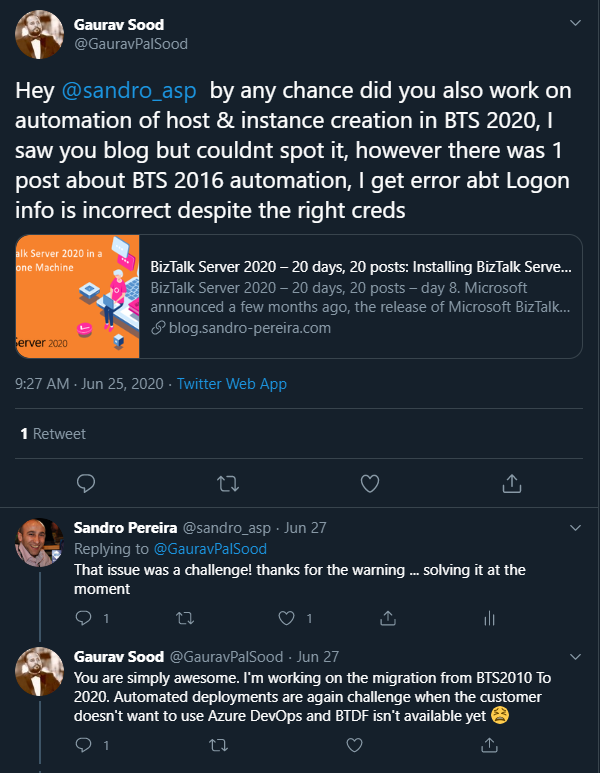
The reason why this error is happening was because one undocumented change that the product group made on the MSBTS_HostInstance WMI Class, and now the method Install has a new mandatory parameter:
- IsGmsaAccount: a boolean that will define whether or not we will use Group Managed Service Accounts.
Now the method parameters will be:
- System.Management.ManagementBaseObject Install(System.String Logon, System.String Password, System.Boolean GrantLogOnAsService, System.Boolean IsGmsaAccount)
- Logon: String containing the logon information used by the host instance.
- Password: String containing the password for the host.
- GrantLogOnAsService: Boolean determining whether the ‘Log On As Service’ privilege should be automatically granted to the specified logon user or not. This flag only has an effect when the HostType property is set to In-process.
- IsGmsaAccount: a boolean that will define whether or not we will use Group Managed Service Accounts:
- If true, the password can be empty.
The second reason is related to the first one. Now BizTalk Server 2020 has support for Group Managed Service Accounts (gMSA), and since I’m changing this script, I also want to add support to this feature.
What is a Host and a Host Instance?
The BizTalk Host is a logical process and security boundary within BizTalk Server that represents a logical set of zero or more run-time processes in which you can deploy BizTalk Server services and artifacts (such as adapter handlers, receive locations, and orchestrations). Each host has a security group assigned to it and may contain multiple host instances, each on an individual machine, that perform the work of the host.
On the other hand, a host instance is the physical instance of a host on a computer running BizTalk Server. Each host instance belongs to exactly one host, and the service account of the host instance belongs to the security group of the host. The security group may be used to grant permissions to physical resources, such as databases, for use by any host instances in the host.
What is an Adapter Handler?
An adapter handler is an instance of a BizTalk host in which the adapter code runs. When you specify a send or receive handler for an adapter, you are specifying which host instance the adapter code will run in the context of. An adapter handler is responsible for executing the adapter and contains properties specific to a given instance.
The default BizTalk Server configuration will only create one in-process host, “BizTalkServerApplication”, that will be associated as a receive and send adapter handler for all of the installed adapters, with the exception of HTTP, SOAP, WCF-BasicHttp, WCF-WSHttp, and WCF-CustomIsolated adapter receive handlers that can only be running in an isolated host.
How can I automate this task?
Windows PowerShell is a Windows command-line shell designed for system administrators and can be used by BizTalk administrators to automate tasks.
This is a simple script that will configure the following components in your environment:
- Create Host and Host Instance according to some of the best practices: two Receive host and host instances (one 32-bit and one 64-bit); two Send host and host instances (one 32-bit and one 64-bit); One Host and Host Instance to process Orchestrations and one Host and Host Instance for tracking.
- Create Receive and Send Handlers for each adapter.
- And finally, associate the correct Receive and Send Handlers to each existing receive and send port present in your environment.
Download
THIS POWERSHELL IS PROVIDED “AS IS”, WITHOUT WARRANTY OF ANY KIND.
The script can be found and downloaded on GitHub:
Hope you find this helpful! If you liked the content or found it useful and would like to support me in writing more, consider buying (or helping to buy) a Star Wars Lego set for my son.




Hi Sandro
When I try use your code (downloaded from GitHub) to create host in BizTalk 2020, I see then following in the log:
Warning Source:ENTSSO EvenId: 10566
You cannot update some of the specified flags for this application. They will be ignored.
Application Name: {f97f8472-7a72-48ee-bf49-27bd2f40c4b9}
Specified Flag Mask: 0x00000008
Can you explaine why?
Thanks for fantastic blog
regards
John
Is the user running this PowerShell a member of the BizTalk Server and SSO Administration group?