

Another day and another blog post about BizTalk Mapper Extensions UtilityPack project migration. Today, we will focus on another set of libraries available for BizTalk Server 2020: CRM Functoids, created a few years ago by Salvatore Pellitteri.
📝 One-Minute Brief
Introduces the CRM Functoids in the BizTalk Mapper Extensions UtilityPack for BizTalk Server 2020, enabling direct mapping to Dynamics CRM data types without relying on inline XSLT or custom scripts.
CRM Functoids
These functoids allow you to Integrate Directly with the Dynamics CRM SOAP API, avoiding the use of an inline XSLT Call template script function.
MSCRM requires that different data types be specified differently. For this reason, we provide a set of functoid, one for each specific data type.
This project includes the following Custom Functoids:
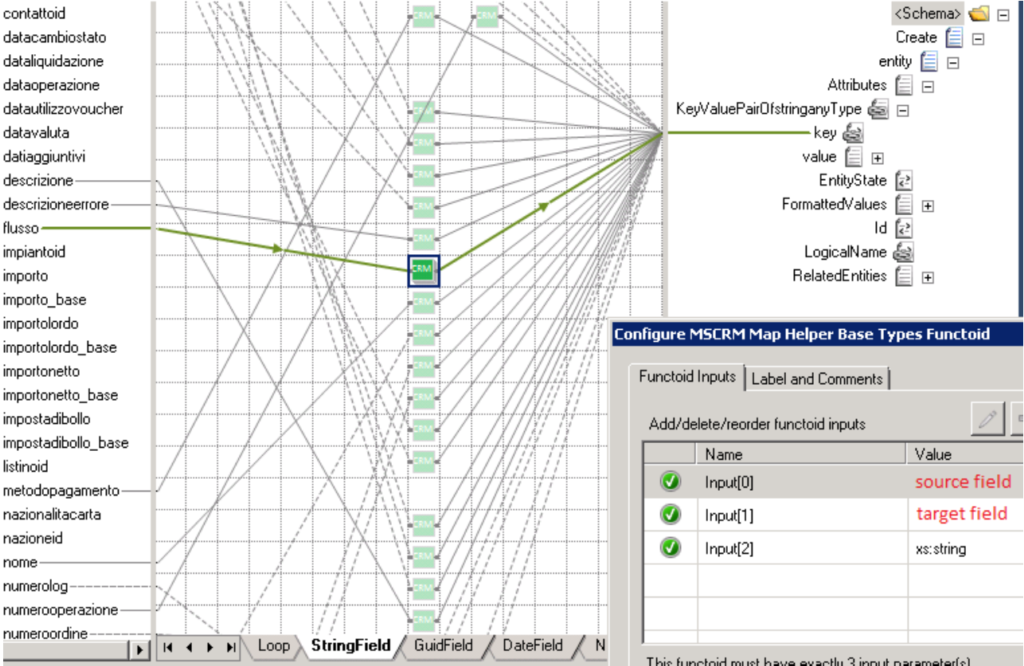
- MSCRM Map Helper Base Types Functoid: Use this functoid when you want to map CRM base data types such as xs:string, xs:int, and so on.
- The functoid takes three mandatory input parameters:
- Source Field: Link from source schema field value.
- Target Field Name: CRM target field name.
- Target Field Type: CRM target field type (Example: “xs:dateTime”).
- The output of this functoid should be linked to:
- ///entity/Attributes/KeyValuePairOfstringanyType/key.
- The functoid takes three mandatory input parameters:
- MSCRM Map Helper GUID Functoid: Use this functoid when you want to map the CRM GUID type.
- The functoid takes two mandatory input parameters:
- Source Field: Link from source schema field value.
- Target Field Name: CRM target field name
- The output of this functoid should be linked to:
- ///entity/Attributes/KeyValuePairOfstringanyType/key
- You may use this functoid in combination with the CRM Lookup functoid, where you first find the entity GUID and then use the result to map to the destination schema.
- The functoid takes two mandatory input parameters:
- MSCRM Map Helper Money Functoid: Use this functoid when you want to map the CRM money type.
- The functoid takes two mandatory input parameters:
- Source Field: Link from source schema field value.
- Target Field Name: CRM target field name.
- The output of this functoid should be linked to:
- ///entity/Attributes/KeyValuePairOfstringanyType/key
- The functoid takes two mandatory input parameters:
- MSCRM Map Helper Option Value Functoid: Use this functoid when you want to map the CRM option value type.
- The functoid takes two mandatory input parameters:
- Source Field: Link from source schema field value.
- Target Field Name: CRM target field name.
- The output of this functoid should be linked to:
- ///entity/Attributes/KeyValuePairOfstringanyType/key
- The functoid takes two mandatory input parameters:
- MSCRM Map Helper References Functoid: Use this functoid when you want to map CRM reference type.
- The functoid takes three mandatory input parameters:
- Source Field: Link from source schema field value.
- Target Field Name: CRM target field name.
- Entity Name: CRM referenced entity.
- The output of this functoid should be linked to:
- ///entity/Attributes/KeyValuePairOfstringanyType/key
- The functoid takes three mandatory input parameters:
How to use it
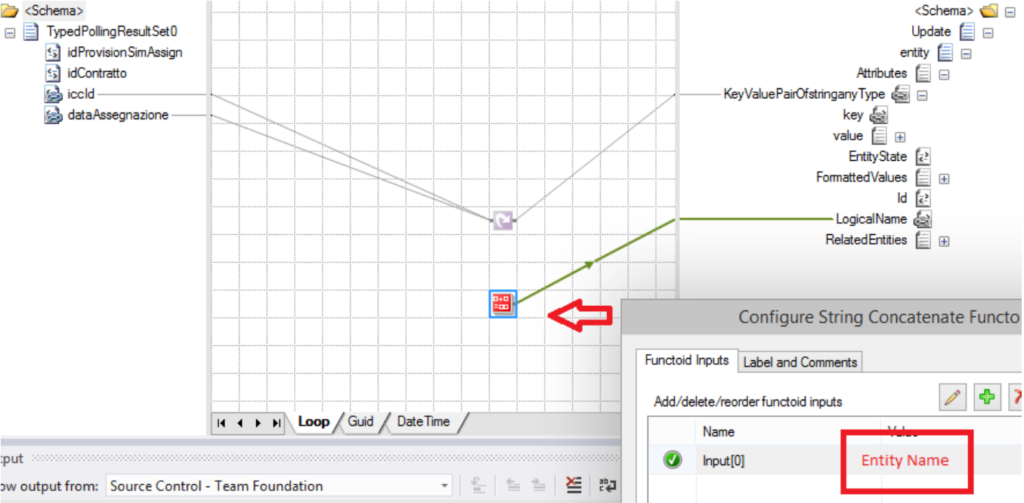
You need to use these functoids in two steps:
- First Step: specify the CRM Entity Name on the LogicalName element.
- Second Step: define the Key values
BizTalk Mapper Extensions Utility Pack
BizTalk Mapper Extensions Utility Pack is a set of libraries that includes several useful functoids to include in a map, extending BizTalk Mapper’s capabilities.

Download
You can download the source code and application binaries from GitHub:
Hope you find this helpful! If you liked the content or found it useful and would like to support me in writing more, consider buying (or helping to buy) a Star Wars Lego set for my son.



