

In October, I did a major rearrange and release of my stencil pack, mainly because Microsoft redesigned many of the icons present in the Azure Portal, but guess what? Microsoft hasn’t stopped it yet. And several of the symbols that have been redesigned already have a new version. So I decided it is time for me to update my stencils again, but instead of spending a lot of time and releasing everything at once, like I did last time, I will do it in small waves.
📝 One-Minute Brief
Announces version 5.1.0 of the Microsoft Integration and Azure Stencils Pack for Visio, introducing updated and newly redesigned icons that help architects create accurate integration and Azure architecture diagrams.
What’s new in this version?
The main goal of this release was to provide the new icons present in the Azure Portal and update existing ones. In this version, the changes and additions are:
- New shapes: New shapes added on MIS Security and Governance, MIS Developer Stencils, and MIS IoT Devices Stencils.
- MIS Security and Governance: Complete update to this category with many unique symbols added and updating many others to their current stencils.
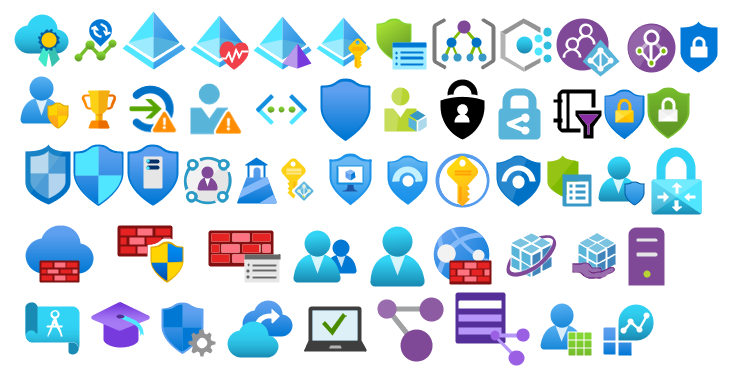
- SVG Files: Add new SVG files and standardize all filenames.
- Special Highlights: Azure Arc and Machines – Azure Arc.

Microsoft Integration, Azure, Power Platform, Office 365, and much more Stencils Pack
Microsoft Integration, Azure, Power Platform, Office 365 and much more Stencils Pack it’s a Visio package that contains fully resizable Visio shapes (symbols/icons) that will help you to visually represent On-premise, Cloud or Hybrid Integration and Enterprise architectures scenarios (BizTalk Server, API Management, Logic Apps, Service Bus, Event Hub…), solutions diagrams and features or systems that use Microsoft Azure and related cloud and on-premises technologies in Visio 2016/2013:
- BizTalk Server
- Microsoft Azure
- Integration
- Integration Service Environments (ISE)
- Logic Apps and Azure App Service in general (API Apps, Web Apps, and Mobile Apps)
- Azure API Management
- Messaging: Event Hubs, Event Grid, Service Bus, …
- Azure IoT and Docker
- AI, Machine Learning, Stream Analytics, Data Factory, Data Pipelines
- SQL Server, DocumentDB, CosmosDB, MySQL, …
- and so on
- Integration
- Microsoft Power Platform
- Microsoft Flow
- PowerApps
- Power BI
- Office 365, SharePoint,…
- DevOps and PowerShell
- Security and Governance
- And much more…
- … and now non-related Microsoft technologies like:
- SAP Stencils

The Microsoft Integration Stencils Pack is composed of 27 files:
- Microsoft Integration Stencils
- MIS Additional or Support Stencils
- MIS AI and Machine Learning Stencils
- MIS Apps and Systems Logo Stencils
- MIS Azure Additional or Support Stencils
- MIS Azure Mono Color
- MIS Azure Old Versions
- MIS Azure Others Stencils
- MIS Azure Stencils
- MIS Buildings Stencils
- MIS Databases and Analytics Stencils
- MIS Deprecated Stencils
- MIS Developer Stencils
- MIS Devices Stencils
- MIS Files Stencils
- MIS Generic Stencils
- MIS Infrastructure Stencils
- MIS Integration Fun
- MIS Integration Patterns Stencils
- MIS IoT Devices Stencils
- MIS Office365
- MIS Power BI Stencils
- MIS PowerApps and Flows Stencils
- MIS SAP Stencils
- MIS Security and Governance
- MIS Servers (HEX) Stencils
- MIS Users and Roles Stencils
That you can use and resize without losing quality, in particular, the new shapes.
Download
You can download the Microsoft Integration, Azure, BAPI, Office 365, and much more Stencils Pack for Visio from GitHub here:

Hope you find this helpful! If you liked the content or found it useful and would like to support me in writing more, consider buying (or helping to buy) a Star Wars Lego set for my son.




Hi Sandro, i’ve downloaded your stencils for visio and this don’t work.
Is like i need to enlarge too much the stencis.
Can you help me?
Thanks
What version of Visio are you using?
Will you publish the v7 stencil *.VSSX files from GitHub as a package on TechNet or elsewhere?
Ie so we don’t have to download the full GitHub code ZIP and pull the VSSX files out of it.
I was not planning to create a zip file only with the VSSX files because is hard to maintain and can easily be obsolete.
TechNet is being retired by Microsoft, so I don’t plan to publish there anymore.
Is there an icon in these stencils for Microsoft Cloud App Security (MCAS) portal? https://portal.cloudappsecurity.com
If not, please would you add one. Thanks
Any plans for adding virtual wan hubs?