

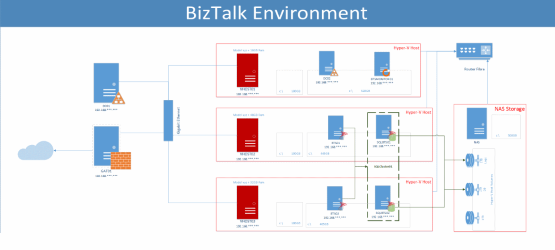
Some time ago, I do not remember when or where, I was asked to provide some examples of diagrams that I use in my documentation, or some diagram representations in which I use the Visio Stencils for BizTalk Server
I know that no one likes to create documentation; it is boring, it can be a challenging task, but documentation is an important part of every BizTalk Integration project, or for infrastructure operations management and administration. They will help you in many critical situations and will reduce the time needed to carry out different procedures, like finding where the machines are hosted, how many machines your environment has, what the actors (systems, protocols) are in a given solution, and so on. You can have at least three types of documentation when it comes to BizTalk:
- Infrastructure Overview
- Solution Overview
- Technical Overview
Or as Steef-Jan mentioned in one of these posts:
- BizTalk Environment (Design) document
- Functional Design of BizTalk Solution
- Technical (Design) of BizTalk Solution
📝 One-Minute Brief
Documenting BizTalk projects is often seen as a tedious chore, but it’s vital for infrastructure management and troubleshooting. This post explores how the Visio Stencil for BizTalk Server simplifies this task. By using these custom, modern flat shapes, architects can easily create Infrastructure Overviews (logical and physical diagrams) and Solution Overviews (protocol and actor flows). The post provides several downloadable samples to help developers and admins standardize their technical documentation with minimal effort.
Visio is great for creating multiple kinds of diagrams, unfortunately, the set of stencils and shapes, which out-of-the-box come with Visio probably is not sufficient to cover the kinds of diagrams we need with our BizTalk/Integration projects or they are not easy to use and read. Visio 2013 Stencil for BizTalk Server and Visio 2010 Stencil for BizTalk Server can easily help you create documentation for the first two: BizTalk Environment (Design) document and Functional Design of BizTalk Solution. They are a collection of 73 modern flat Visio 2013 shapes that will help you represent BizTalk Server physical architectures, Integration architectures (Cloud or Hybrid scenarios), or solutions diagrams in Visio 2013 and 2010.
Infrastructure Overview Samples
This logical diagram describes the overview of your BizTalk environments, where you can specify the Infrastructure of your production, UAT, testing, or developer environments.
Here are some samples of:
- Complex logical diagram of your Infrastructure

- Basic logical diagram of your Infrastructure

- Or, for example, a diagram representing a logical diagram of your BizTalk Group and Host Infrastructure

Solution Overview Samples
This logical diagram depicts a view of the solution. It will describe how the solution will work, who the actors are, what type of protocols they are, and so on.
Here are some samples of solution diagrams:
- Complex logical diagrams


- Or a basic logical diagram

This documentation should be available to all stakeholders within your organization: the developer, operations, and administration teams.
Contrary to what many might think, some kind of documentation is pretty straightforward and can be realized with minimal effort, butit has enormous importance in the organization when you need to make changes inside your solution or infrastructure.
Download
You can download BizTalk Infrastructure and Solution Overview Samples from GitHub here:
Hope you find this helpful! If you liked the content or found it useful and would like to support me in writing more, consider buying (or helping to buy) a Star Wars Lego set for my son.




Hi Sandro,
When I saw the title of the post I thought “great, the answer for my biggest question” but It wasn’t exactly what I was expecting. Actually this post is very useful – THANKS, however I have another documentation issue I was never able never find a positive answer and maybe you can point me to the right direction: Is there a way to document complex maps from the map tool, grouping stuff (on the same page), commenting structures and so on?
Thanks
Guilherme
The only tool that I’m remember to make some king of map documentation is: BizTalk Map Documenter available in CodePlex: http://biztalkmapdoc.codeplex.com/
Or BizTalk Map Converter (http://biztalkmapconverter.codeplex.com/) that converts maps to a csv file