


Imagine this scenario: your Logic App is running smoothly, processing requests, handling integrations, and everything seems fine. Until the end of the month, when the Azure bill arrives, and it’s higher than expected.
You check the runs, and nothing looks wrong. No failures, no obvious issues. Just successful executions. So, where is the cost coming from?
The reality is simple: you might be paying for things you don’t actually need.
In Logic Apps (especially Consumption), you are billed per execution and per action. That means every trigger, every condition, every loop iteration – it all adds up.
Even small inefficiencies, when multiplied by thousands of executions, can significantly increase your costs.
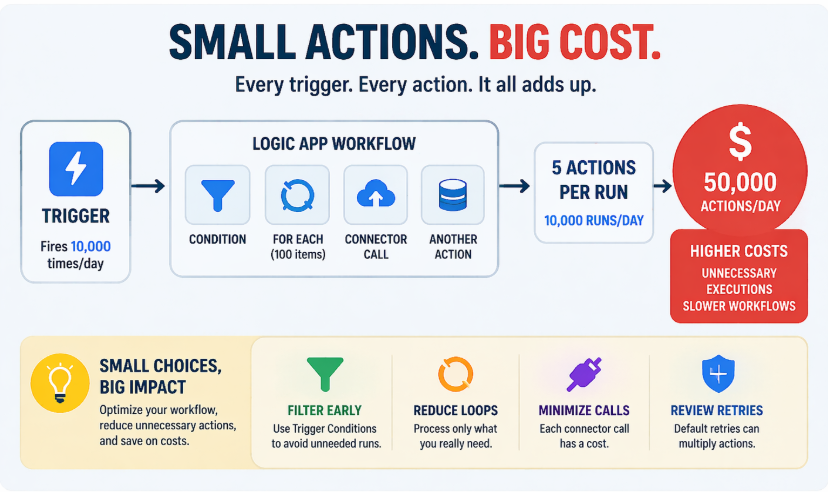
Still, you need to consider that the cost per action is quite low, and there are many free actions per day. Nevertheless, every euro/dollar we can save is a euro/dollar we can invest to modernize our integration landscape.
📝 One-Minute Brief
Logic Apps Consumption costs can grow silently due to unnecessary executions, loops, and connector calls. This post explains the most common hidden cost drivers and shows how small design optimizations can significantly reduce monthly Azure bills without changing functionality.
A Closer Look
Here are some of the most common hidden cost drivers:
1. Unnecessary executions
If your trigger fires too often and you filter data later using Conditions, you are already paying for runs that do nothing.
Imagine a Logic App that processes emails but only cares about messages from your boss.
- 1,000 emails arrive per day.
- Only 10 are relevant.
In many cases, when a Condition filter is applied inside the workflow trigger, it can avoid the Logic App from running unnecessarily 990 times, focusing only on the 10 executions that actually matter.
That means:
- 1,000 triggers executed.
- 1,000 conditions evaluated.
- 10 runs of your workflow.
- You save 990 runs that were doing absolutely nothing.
👉Note that you are paying for all of them. This is a significant savings improvement.
2. Loops doing more work than needed
Using a For Each over large datasets can multiply the number of actions executed.
- 1 run.
- 100 items.
- 3 actions inside the loop.
👉 That’s 300 billable actions.
Try to minimize the number of actions you use inside Loops; in some cases, use expressions to replace certain actions. Minimize the unnecessary loop iterations.
3. Overusing connectors
Each connector call is a paid action.
Calling an API multiple times instead of batching or filtering data first can quickly increase costs.
Imagine a Logic App that retrieves customer data from an API and processes orders:
- You receive 100 orders.
- For each order, you call an external API to get customer details.
That means:
- 100 orders.
- 100 API calls (connector executions).
Now imagine that many of those orders belong to the same customer.
👉 You are calling the same API multiple times for the same data.
A more efficient approach would be:
- Cache or store the customer data.
- Or group requests before calling the API.
- Trying to nest some logic in the same action.
👉 Fewer calls = fewer actions = lower cost
Of course, sometimes this is out of our control, but you get the point.
A Smarter Approach
Optimizing costs in Logic Apps doesn’t require big changes – just smarter design decisions.
Here are a few quick wins:
- Filter early (by using Trigger Conditions).
- Reduce unnecessary loops.
- Minimize connector calls.
- Review retry policies.
- Avoid processing irrelevant data.
- Use expressions instead of actions whenever possible.
Think of it this way: The cheapest action is the one that never runs.
Proof that it matters. Let’s take a simple example:
- 10,000 trigger executions per day
- Each run has 5 unnecessary actions
👉 That’s 50,000 extra actions per day
Now multiply that by a month… Small inefficiencies quickly become real money.
Key Takeaways
Logic Apps Consumption pricing is simple – but also unforgiving. Every action counts.
If your workflows are not optimized, you may be paying for executions that bring no value.
The good news? Most of these costs come from small design choices that are easy to fix.
A few optimizations can make your Logic Apps not only faster and cleaner, but significantly cheaper.
Hope you find this helpful! If you enjoyed the content or found it useful and wish to support our efforts to create more, you can contribute towards purchasing a Sauron’s Action Figure for Sandro’s son, yep, not for me!


