


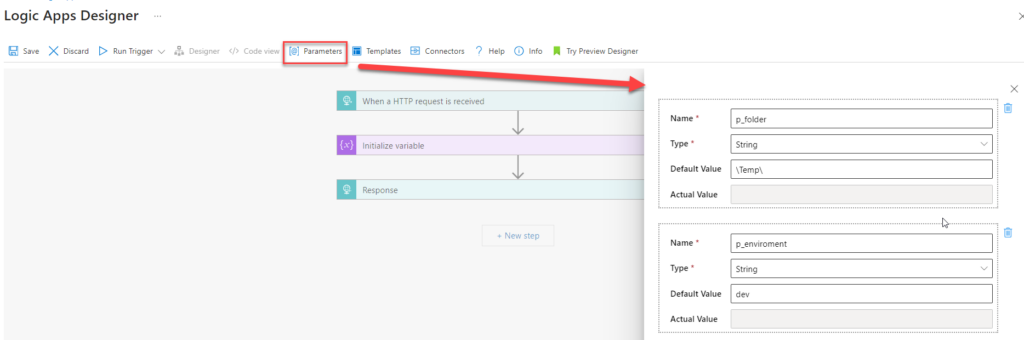
In Azure Logic Apps, you can abstract values that change across development, test, and production environments by defining parameters. These parameters store reusable values that you can reference throughout a workflow.
As a result, parameters make configurations more flexible and easier to maintain. They also let you update values without modifying the workflow logic itself.
📝 One-Minute Brief
Logic App components usually come with strict naming limits—but parameters are the exception. This Friday (Funny) Fact highlights that Logic App parameter names have no size limit, unlike workflows, actions, or triggers. While amusing, this quirk also reveals an important detail about how parameters behave differently from other Logic App components.
Parameters can store many data types, such as strings, secure strings, booleans, arrays, or any reusable value within a Logic App. You can also change these values across development, test, and production environments.
In addition, you can define parameters at deployment time by using CI/CD pipelines, which keeps configuration consistent and easy to manage across environments.
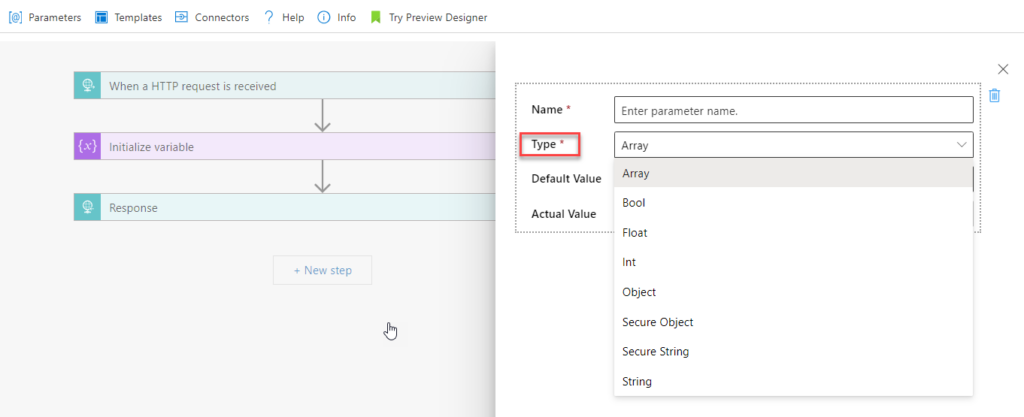
By using parameters, you can update values in a single place without editing multiple actions or triggers throughout the Logic App.
In practice, you define parameters directly in the Logic App definition and then reference them in expressions or actions as needed. When the Logic App runs or is deployed, it evaluates these parameters and applies their values accordingly. As a result, this approach simplifies deployments across environments and makes workflows more dynamic and easier to configure.
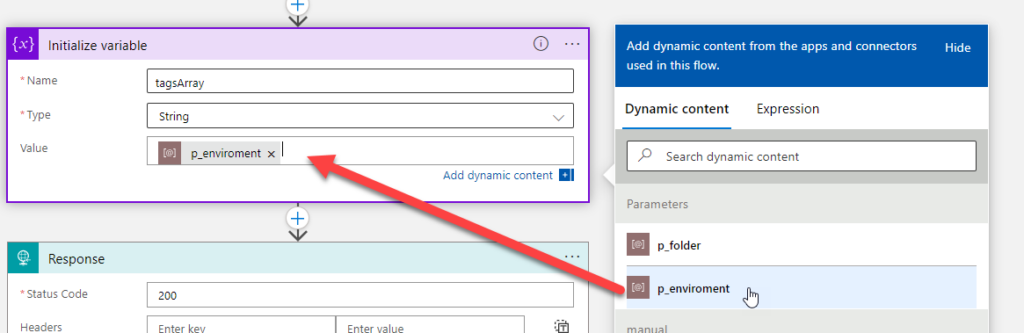
The funny fact about parameters is that they are probably the only Logic App “component” that doesn’t have a size limit regarding the name. For example:
- The Logic App Consumption name has a maximum length of 80 characters.
- Logic App Standard Workflow name has a maximum limit of 43 characters.
- A trigger or action name has a maximum limit of 80 characters.
- and so on.
But the Logic App parameter name is unlimited! To prove that and for fun, I have created a parameter with this name:
p_material_availability_changed_range_hours_assaasasasasasasasasassaassaaaaaaaaaaaaaaaaaaaaaaaaaaaaaaaaaaaaaaaaaaaaaaaaaaaaaaaaaaaaaaaaaaaaaaaaaaaaaaaaaaaaaaaaaaaasaaaaaaaaaaaaaaaaaaaaaaaaaaaaaaaaaassaasassaasasaaaaaaaaaaaaaaaaaaaaaaaaaaaaaaaaaaaaaaaassasasasasasaassasa_assaasasasasasasasasassaassaaaaaaaaaaaaaaaaaaaaaaaaaaaaaaaaaaaaaaaaaaaaaaaaaaaaaaaaaaaaaaaaaaaaaaaaaaaaaaaaaaaaaaaaaaaasaaaaaaaaaaaaaaaaaaaaaaaaaaaaaaaaaassaasassaasasaaaaaaaaaaaaaaaaaaaaaaaaaaaaaaaaaaaaaaaassasasasasasaassasa_assaasasasasasasasasassaassaaaaaaaaaaaaaaaaaaaaaaaaaaaaaaaaaaaaaaaaaaaaaaaaaaaaaaaaaaaaaaaaaaaaaaaaaaaaaaaaaaaaaaaaaaaasaaaaaaaaaaaaaaaaaaaaaaaaaaaaaaaaaassaasassaasasaaaaaaaaaaaaaaaaaaaaaaaaaaaaaaaaaaaaaaaassasasasasasaassasa_assaasasasasasasasasassaassaaaaaaaaaaaaaaaaaaaaaaaaaaaaaaaaaaaaaaaaaaaaaaaaaaaaaaaaaaaaaaaaaaaaaaaaaaaaaaaaaaaaaaaaaaaasaaaaaaaaaaaaaaaaaaaaaaaaaaaaaaaaaassaasassaasasaaaaaaaaaaaaaaaaaaaaaaaaaaaaaaaaaaaaaaaassasasasasasaassasa_assaasasasasasasasasassaassaaaaaaaaaaaaaaaaaaaaaaaaaaaaaaaaaaaaaaaaaaaaaaaaaaaaaaaaaaaaaaaaaaaaaaaaaaaaaaaaaaaaaaaaaaaasaaaaaaaaaaaaaaaaaaaaaaaaaaaaaaaaaassaasassaasasaaaaaaaaaaaaaaaaaaaaaaaaaaaaaaaaaaaaaaaassasasasasasaassasa
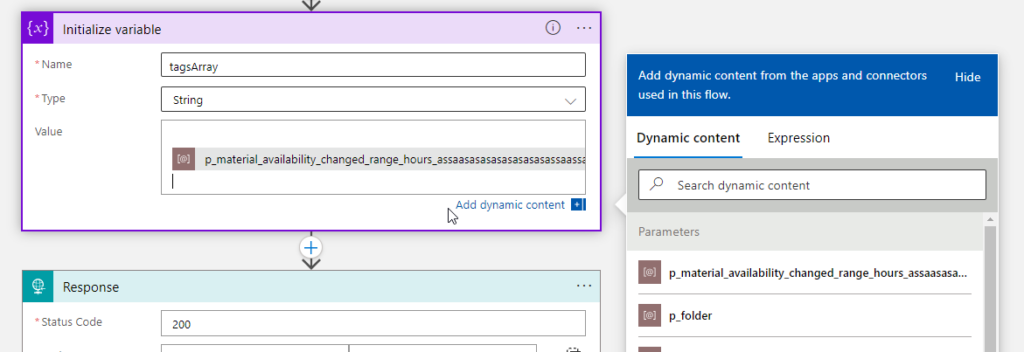
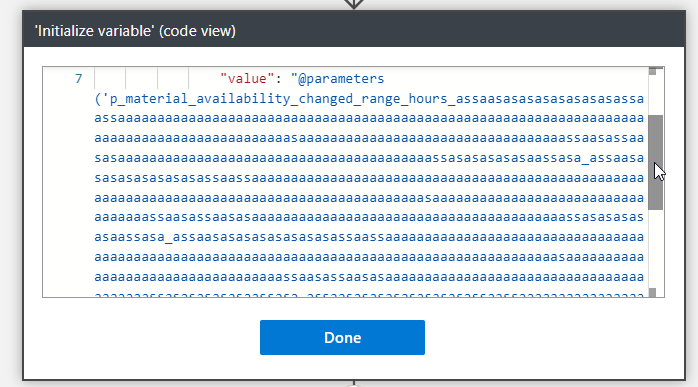
To be honest, I think this is crazy! They should fix this and set up a limit, because giving that much power to developers (and I’m a developer, too) is insane; we can do some nasty stuff!
To lazy to read? We’ve got you covered! Check out our video version of this content!
Hope you find this helpful! If you enjoyed the content or found it useful and wish to support our efforts to create more, you can contribute towards purchasing a Star Wars Lego for my son!



