


After working with BizTalk Server Logic App Adapter for a while, I saw some ” strange ” behaviors in some configurations – maybe strange is not the best work. They are not issues, but definitely, they could have a better user experience.
All of them are related to the Logic App Adapter Azure Authentication (Sign-in to Azure) that you can find on the Endpoint Address Configuration Logic App Details Page
📝 One-Minute Brief
Configuring the BizTalk Server Logic App Adapter can expose usability quirks in the Azure sign‑in experience. This article explains why the “No user is logged in” message appears after reopening the BizTalk Administration Console and why this behavior, although confusing, does not affect runtime execution.
No user is logged in
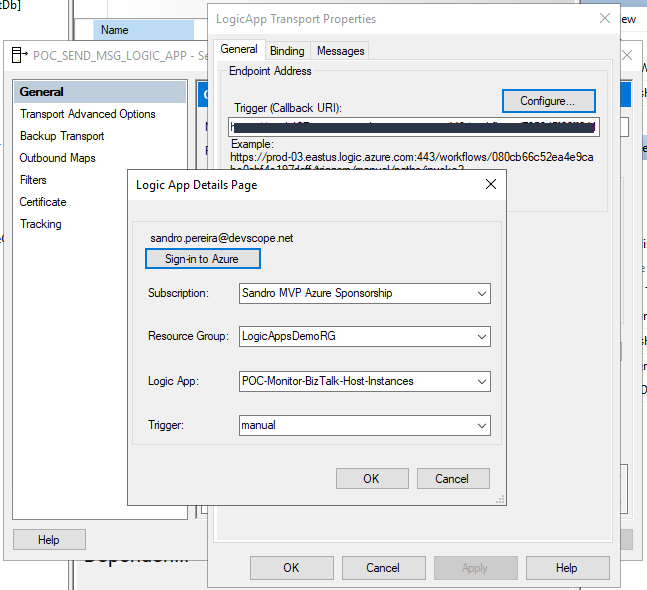
Once you configure the Logic App port, in this case, a send port, you need to sign in to Azure. This will pop up a window where you need to enter your account and password (Multi-factor Microsoft Authenticator). After that, you will see an identical configuration to what is shown in the picture below:
- Account.
- Subscription.
- Resource Group.
- Logic App.
- And Trigger.
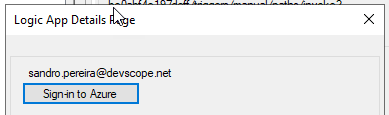
If you then finish the configuration of the port, everything will be ok, and if you return later to the configurations on that same send port, you will still be able to see that the account that I used to authenticate was my personal account:
However, if you close the BizTalk Server Administration Console, once you open it again and access the configuration of that send port, you will still be able to see the following information:
- Subscription
- Resource Group
- Logic App
- and Trigger
But you will no longer be able to identify which account was used to authenticate on Azure.
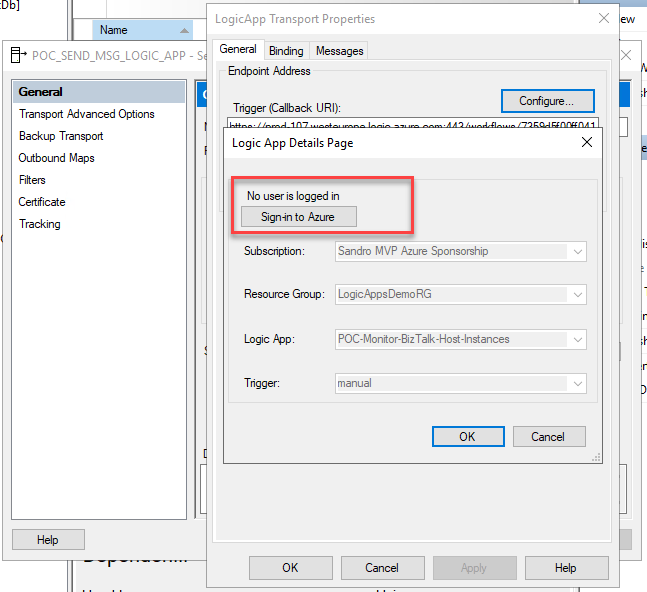
Although the lack of this information is not critical, I think it would be helpful for those who manage the platform to have this information available.
Hope you find this helpful! If you liked the content or found it useful and would like to support me in writing more, consider buying (or helping to buy) a Star Wars Lego set for my son.



