

I haven’t followed all the comments or GitHub issues about the BizTalk Scheduled Task Adapter as closely as I would have liked. However, this wasn’t due to a lack of interest. Instead, I had limited free time and focused on other projects and contributions.
A few days ago, I released a new version of the adapter with additional improvements and full optimization for BizTalk Server 2020. At the same time, I set up a new environment where I needed to install and validate the adapter.
Because of that, I took the opportunity to review existing feedback in detail. More importantly, I focused on addressing all reported issues and unexpected behaviors once and for all, including the following:
- The Timespan schedule could trigger unlimited messages.
- Tasks did not always trigger when the start time was set in the past.
- Stopping receive locations or restarting host instances caused time drift from the original schedule.
📝 One-Minute Brief
BizTalk Scheduled Task Adapter 7.0.2 is now available for BizTalk Server 2020, addressing reported scheduling issues and improving reliability when using Timespan schedules. This release introduces better time handling, fixes unexpected message triggering, and enhances overall scheduling stability.
What is new?
New schedule capabilities:
- Capability to set the DateTime you want to use on the Timespan schedule type: DateTime.Now or DateTime.UtcNow.
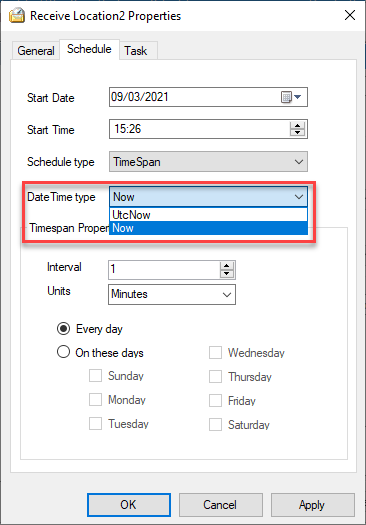
- By adding the option to choose between DateTime.Now and DateTime.UtcNow, the adapter now prevents the issue where Timespan schedules trigger unlimited messages when servers run in different time zones than UTC.
- In addition, the adapter now always triggers messages at 00 seconds and preserves the original scheduled time. I also improved the GetNextActivationTime method to correct all previously reported unexpected behaviors, which were originally treated as features by design.
BizTalk Scheduled Task Adapter
The BizTalk Scheduled Task Adapter works as an in‑process receive adapter. It executes predefined tasks on a daily, weekly, or monthly schedule. You configure the adapter entirely inside BizTalk, and BizTalk stores all settings in the SSODB. As a result, you can easily export and import configurations using binding files.
Moreover, the scheduling capabilities closely match those of the Windows Scheduled Task Service.
The adapter includes four built‑in tasks:
- XmlStringStreamProvider – generates a BizTalk message from a configured XML string.
- FileStreamProvider – generates a BizTalk message from the contents of a file.
- HttpDownload – generates a BizTalk message from data downloaded from a website.
- SQLStreamProvider – generates a BizTalk message from the contents of a SQL Query (similar to the old SQL adapter) – Since version 3.0.
In addition, developers can create custom tasks. Any .NET class that implements the required interface can run on a schedule.
Finally, a big thank you to Pedro Almeida, my team member, who completed most of the work and finalized this release.
Download
You can download this “new” version of the adapter in BizTalk Scheduled Task Adapter from GitHub:
Please feel free to use the adapter, and if you find any problems or bugs, please open an issue on the adapter GitHub site: https://github.com/sandroasp/BizTalk-Scheduled-Task-Adapter and help evolve this community adapter. You can also suggest new features, and I’m open to new ideas.

Hope you find this helpful! If you liked the content or found it useful and would like to support me in writing more, consider buying (or helping to buy) a Star Wars Lego set for my son.




Thank you for the update! We are using BR2016, and the update labeling in GitHub for BT2016 is inconsistent.
Drilling down in Releases, the 2016 version is labeler “BizTalk Scheduled Task Adapter v6.0 for BTS2016.zip V7.0 for BTS2016”
It shows updated a few days ago.
Does the 2016 version contain the same updates as the 2020 version?
I removed (as best as I could) v6.x and installed v7.x, and I do not see the UTC choice in the v7.0.0.0 for 2016.
Hi Jim,
I fix the labels on GitHub. The 2016 version doesn’t have the same updates as the 2020 version. I will try to publish these change to 2016 this week
is there a reason that the source isn’t available on GitHub for others to contribute and / or fork to add customizations?
Hi Sandro,
I notice with Schedule Adapter, we don’t have an option to paste the XML template message into XmlStringStreamProvider. Do you think I am missing some steps
Hi Sandro,
I see 2 messages are getting triggered when we select timespan option . tested with interval of 2 minutes and see 2 messages creating.
Anything we can do in the configuration to avoid this?
Hi Sandro,
I am testing 7.0.2 adapter in BizTalk server 2020.
Thanks,
Laxmi
Hello Sandro!
I’m trying to install it in a Win Server 2016 64 bits system, and I’m getting the error message “This app can’t run on your PC. To find a version for your PC, check with the software publisher”.
Any suggestion?, Thanks
Hello Sandro,
I’m using Schedule Task Adapter on Biztalk 2020. It works fine with multi instances. But when I use it with a single instance. It trigger just one when I started host instance and never again.
Is there anything that I missed or any specific configuration?
Thanks
Hi Sandro,
Is it possible to use the schedule adapter to create the following schedule?
Run Daily, Every minute from 4 p.m. to 5 p.m.
Basically, I can’t figure out how to use the Schedule adaptor to establish a service window.
Hi Sandro,
I would like to inquire about the support for running the adapter on multiple instances of the same Host in version 7.0.2 (BTS 2020). I noticed that in the previous version for BTS 2016, this capability was not available, as discussed in the comments of the following blog post.
https://blog.sandro-pereira.com/2015/02/19/biztalk-scheduled-task-adapter-is-now-officially-available-for-biztalk-server-2013-r2/.
At that time, receive location synchronization via a database table was not implemented.
Can you please confirm if this limitation has been addressed in the latest version?
Thanks
For Custom tasks to be configured in Schedule task adapter, it’s mentioned
“Custom tasks can be created. Any .NET class that implements the appropriate interface can be scheduled.”.
What are the interfaces required to be implemented ?
The “Calendar.Schedules.dll” shipped with release 7.0.2 (latest) is trying to reference an old version of Microsoft.BizTalk.Scheduler (Version=3.0.1.0, which is compatible with Biztalk 2013 and not BizTalk 2020). Will a new version be released that fixes this issue. Errors are thrown from the “Import-Bindings” powershell extension when importing bindings with the schedule adapter included.